Starting next month, Google will update the Destination requirements policy requiring that ad experiences on destinations to conform to the Coalition for Better Ads Better Ads Standards.
What this means. This means that any ads that don’t conform to the new standards will be disapproved. Advertisers will be notified of disapprovals in the Ad Experience Report.
What Google says. Google made the announcement in an email, indicating that affected accounts may see their ads disapproved and to make adjustments by October. They did not give an exact date.
Advertisers can review destination requirements here.
Why we care. Advertisers who are unsure if their destinations meet the Better Ads Standards should review their accounts and make the necessary changes asap to avoid having ads disapproved.
Bill Slawski recently passed away but his hosting company will continue to ensure his website lives on after the site went offline when the hosting payments were not being processed anymore.
SEO by the Sea. Bill Slawski has published thousands of articles on his SEO by the Sea website, some dating back as far as 2005. The site is known as the most authoritative resource on patents on how search engines work in the space. In fact, he has written countless articles breaking down complex search patents for search marketers and SEOs to understand. The site is referenced by other SEO resources for many many years and will continue to be referenced in the future.
For many in our industry, Slawski was probably best-known for researching, analyzing, interpreting and writing about Google and search-related patents and algorithms at SEO by the Sea. He started the SEO by the Sea blog in June 2005. On SEO by the Sea, Slawski covered it all – from the classics (PageRank, TrustRank, information retrieval) to today (machine learning, the Knowledge Graph, entities).
SEO by the Sea went offline. Earlier this month, his website went offline due to payment not being processed. Of course, with Bill’s passing, he was not able to make payment and the site automatically went offline. After the site went offline, the hosting company heard from the SEO community and that hosting company decided to reactive the site.
SiteGround, the hosting company, wrote on Twitter “We agree that the blog holds significant value for the SEO community, which is why we have reactivated the service. The site should be accessible shortly.”
About Bill Slawski. Slawski did SEO before Google existed. Heck, he did SEO before SEO was even called SEO. He started when all of this online stuff was simply known as internet marketing and web promotion, in 1996. He provided consulting services to help make websites easier to find online, help make them easier to use, and increase conversions and revenue for clients. Throughout his career, Slawski worked on all types of sites – nonprofits, Fortune 500, educational institutions, e-commerce, professional services, consumer goods, B2B and more. Prior to his search marketing career, Slawski earned a Juris Doctor degree and was a legal and technical administrator at the highest level court in Delaware for 14 years. Slawski lived in Carlsbad, California.
Why we care. This treasure trove of information about how search engines and SEO work will remain live, despite Bill’s passing. It is wonderful to report that Bill and his knowledge will continue to live on through his website, SEO by the Sea.
What are top content bids. Top content bids allow advertisers to set bid adjustments for content that was measured by Google to be popular, have a greater number of impressions per day, and get a higher level of traffic and viewer engagement.
Get the daily newsletter search marketers rely on.
What Google says. Nothing. Google hasn’t officially announced the change outside of removing the info from their documentation. We reached out to Google for comment.
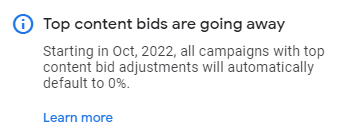
In the bid adjustments help doc, the section for top content claims that the feature is no longer available. In their accounts, advertisers may see the notification that starting in October, all top content bid adjustments will default back to 0%.
Why we care. Advertisers who use top content bid adjustments may still be able to use them until October but should start planning for them to disappear. This could be another attempt by Google to automate and control ad campaigns, or they could be sunsetting a feature that never worked as well as intended. Either way, if you use bid adjustments in your account, monitor them closely for changes.
Microsoft just announced five new ad products and updates available to advertisers immediately.
Pinterest Import
Performance Max beta
Multimedia Ads support in Editor
Cruise, Tours and Activities ads
Subdomains in Dynamic Search Ads (DSAs)
Pinterest Imports. Microsoft’s Import tools allow advertisers to import campaigns from Google and Facebook into Microsoft, for easier setup and quicker launch. Now, advertisers can import campaigns from Pinterest as well. Changes to bids, budgets, and other campaign settings are available.
Audiences will not be imported, so Microsoft advises that advertisers should use the Audience network Planner to identify target audiences before campaigns are launched.
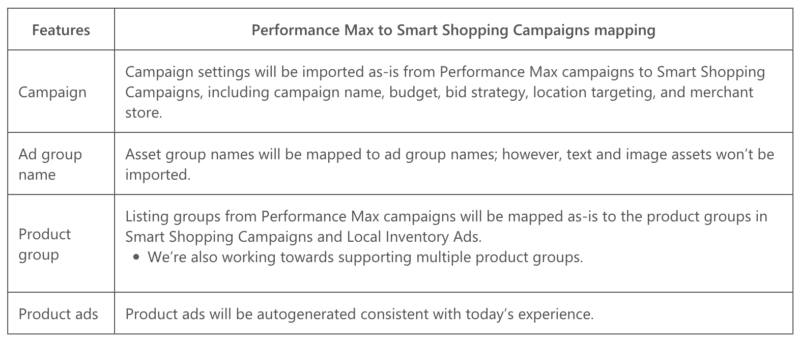
Performance Max beta. Google Performance Max campaigns can be imported as Smart Shopping Campaigns and Local Inventory Ads in Microsoft. The feature is intended to simplify duplicating your campaigns across platforms when using Google Performance Max campaigns.
This feature is currently in beta, but advertisers who are interested can reach out to their account reps to sign up. The chart below is how each feature would be mapped into Microsoft.
Support for Multimedia Ads in Editor. Support for managing Multimedia Ads for search campaigns in the Ads Editor is now available in all markets.
Multimedia Ads is a responsive search ad format that allows the use of large images placed on the mainline and right rail ad positions.
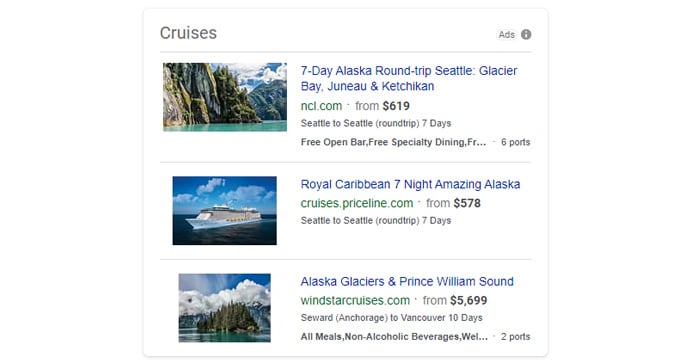
Cruise, Tours and Activities ads.Cruise, Tours and Activities ads are now available to all eligible advertisers. Previously, both ad formats were only available to advertisers in the US and UK.
Subdomains in DSAs. Subdomains for DSAs are now available in all eligible markets. Now, advertisers can use subdomains in addition to top-level domains in their campaigns. The list of eligible markets where subdomains are available is here.
Get the daily newsletter search marketers rely on.
Read the announcement. You can read the full announcement from Microsoft here.
RSA reminder. Microsoft extended RSA migration to February 2023.
Why we care. Import tools give Microsoft Ads users a greater ability to duplicate, modify, and manage their ad campaigns faster and easier from other platforms. Advertisers who also manage Pinterest, Smart Shopping, LSAs, or travel accounts should test the new products if they are eligible.
Email shows no signs of slowing down. With an average ROI of $42 for every invested dollar, it’s still a star among marketing channels. If you don’t feel the same way, it may be time to look at why email isn’t working for your business. Often, the reason is poor email deliverability.
What is email deliverability?
Email deliverability refers to the number of emails that reached an inbox successfully. You’ll also encounter the term inbox placement to describe this same concept.
Make sure you don’t confuse your email deliverability with your email delivery rate. The latter is the number of emails that were delivered to a mailbox. However, it refers to both inbox and spam.
Your email deliverability focuses solely on the emails that landed in your customers’ inboxes. It matters more since most people don’t check their spam folders.
Many things influence this metric, but at the top of the list is the content you send and who you send it to. Let’s look at some quick ways to improve your email deliverability, so you can convert more.
Verify your email list regularly
Data decay is a real phenomenon, and the pandemic made it even worse. More than 22% of your email list degrades every year. Since March 2020, millions of people have either quit their jobs or been let go. Your B2B data may have churned at an even higher speed.
Successful email marketers stay on top of their email hygiene and validate their databases regularly. Bounces have a tremendous impact on email deliverability. Internet service providers (ISPs) take note of indiscriminate senders – they’re usually spammers who belong in the junk folder.
Keeping a fresh, valid email list is easier than you may think. There are two ways you can use an email validation service to check your leads:
Upload your existing email list onto an email verification platform. ZeroBounce will validate 100,000 contacts in about 45 minutes, then notify you of the results. Download them, and you’ll see how many email addresses were outdated and how many are still in use.
Connect an email verification API to any lead collection form. Working silently in the background, the API will reject poor-quality addresses and allow only real, valid ones to get on your email list.
ZeroBounce spots and removes 30 types of email addresses that are risky to your email deliverability. What’s more, you can validate 100 contacts for free every month.
Send content people expect from you when they expect it
When they think about ways to improve their inbox placement, many marketers don’t pay much attention to content. But the content you send has a critical influence on how your subscribers – and ISPs – perceive you.
Your overall email engagement sends ISPs a signal regarding the relevance of your content. Are people opening and clicking through your emails? ISPs will want to serve your audience more of that, so you’re more likely to land in the inbox. The contrary applies, too: if your audience is passive and your emails aren’t getting much traction, you might end up in spam.
So, how do you build healthy engagement that helps your email deliverability? Send your subscribers the content they signed up for, and deliver it as expected.
For instance, if your company promised weekly marketing tips, make sure you send out just that every week. This doesn’t mean you can never talk about anything else but strive to tie any topic back to your industry. The more you stick to your niche, the more brand awareness and trust you build in that space.
Test the email deliverability of every campaign
There’s nothing you can do to pull your emails out of spam once they land there. However, you can address email deliverability issues and prevent them from happening.
An inbox placement tester will allow you to find out if your email will land in the inbox – before you send it. If certain elements of your email cause it to go to spam, you get a chance to edit them ahead of time.
Here are some of the things that can cause an email to go to spam:
A lack of balance between text and images. Such content can be blocked by spam filters, so make sure to include enough text in your campaigns.
Link shorteners can also trigger spam filters. Relying on them to retrieve performance data is detrimental to your email deliverability.
Inconsistent sending behavior. If your email goes to spam during the test, it could be that it’s been too long since you’ve reached out to your list. Warm up your IP before you send a mass email.
Assuming your email list is clean, and your content is on brand, testing your deliverability ensures you have the highest chance of reaching your audience.
Explore ZeroBounce to learn more about landing in the inbox. The platform gives you access to an entire suite of email deliverability tools – all working together to help you get more eyeballs on your emails.
When it comes to local SEO, there’s a lot of noise.
From the latest industry buzz talk to the nuances of a specific website, a strategy to-do list can quickly become flooded with tasks that don’t consider the big picture.
However, none of these tasks matter if you ignore competitors.
A competitive analysis for local SEO can uncover:
Who is ranking at the top.
Why they achieved this ranking.
Where they’ve chosen to target their strategy.
What level of effort they’ve put into ranking.
When you might be able to outrank them.
If you understand the effort and approach used by those who rank well locally, then you can thrive in even the most competitive search environments.
Determining your local competitors
Competitors in local SEO require a different approach than competitors in national markets.
In a national SEO campaign, competitors are usually targeting hundreds or thousands of keywords. At the local level, most competitors typically target something in the range of 20-100 keywords.
Local SEO typically has fewer keywords because it is defined by its physical community.
Local SEO is designed to support a network of small businesses, franchises and physical goods and services. Unlike national SEO, there is no SaaS or cloud-based architecture or leading national ecommerce website.
Local dealers, practitioners and businesses offer a service or item that customers will receive in their community. Products and services from these businesses are limited to the parameters of their local population. If a local business offers garage door repair, demand is limited to the number of people who need garage door repair in that community.
Because local SEO is limited to a physical community, discovering competitors is straightforward. Identify 5-10 core keywords and see who ranks first.
However, competitive analysis for local SEO quickly becomes complicated when there is more than one location for the business. Each location poses unique challenges.
Although local competitive analysis considers a smaller portion of keywords, the complexities of local search impact these keywords.
3 steps to conducting a competitive analysis for local SEO
A competitive analysis for local SEO considers keyword search visibility in the context of three local ranking factors:
Compare proximity.
Assess Google Business Profile (GBP) optimization.
Analyze on-page content.
1. Compare proximity
Are you located farther from the city center than your top competitors? Does this information about your location even matter? After all, it’s not like you can move locations for the sake of SEO.
Understanding your location within the context of your competitor’s location is important because proximity might answer why they rank #1.
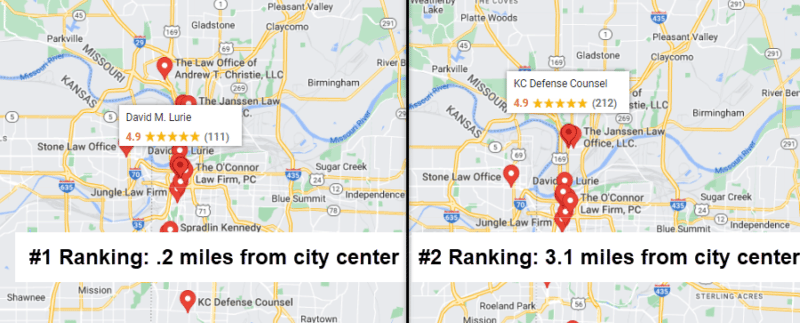
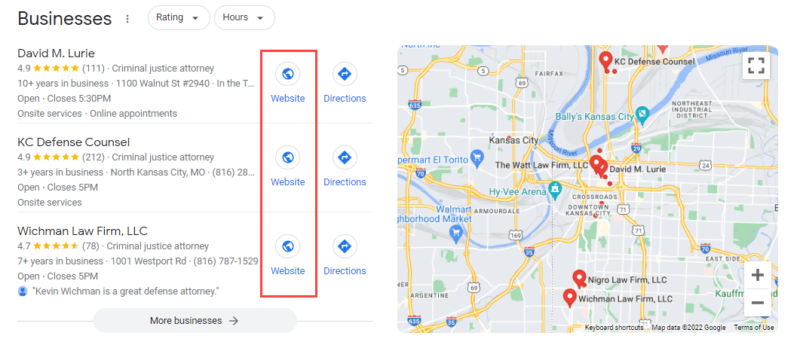
In the image below, a search for “kansas city defense attorney,” a highly desirable keyword for defense attorneys in Kansas City, the #1 ranking is held by a law firm that is located .2 miles from the city center of Kansas City. The #2 ranking business is located 3.1 miles from the city center.
A quick search for your top keyword can indicate whether proximity will impact your campaign. Review the distance between verified location and city center for the #1 ranking GBP (a.k.a., your competitor) in the Local Pack. Then, compare your competitor’s distance to the distance between your verified location and the city center.
If you’re a Service Area Business (SAB), then your competitors are also likely SABs, which means you won’t be able to check the distance between their address and the city center. In these scenarios, you should still note the distance between your verified location and the city center.
If your website struggles to achieve local ranking growth in the future, proximity could be limiting progress. Sometimes your verified address will be too far from the target location to rank, which means you may need to change your target location.
During a competitive analysis for local SEO, a quick check of competitor proximity is sufficient to understand how much distance matters in your specific marketplace. However, you may determine from this initial check that a deeper understanding of your proximity would help frame your strategy.
If a more comprehensive analysis of proximity would help, consider completing a full proximity audit as a next step. For example, you might consider a full proximity audit if you look at distance, GBP, and on-page strategy but still can’t determine why a competitor ranks well. The proximity audit is a deeper analysis of all the factors that impact proximity-based rankings in a specific marketplace.
2. Assess GBP optimization
In local SEO, Google Business Profile is the star of the show. Everyone is vying for that #1-3 position in the Local Pack. Competitors typically pay the most attention to GBP with their local SEO strategy because this profile appears directly at the top of search results.
Assess the following ranking factors across your competitors’ GBP listings and compare your own profile:
Name
Primary category
Other categories
Reviews
The name, primary category and reviews are directly visible on the profile, but viewing a business’ additional GBP categories will require a tool like GMB Everywhere. Those are the key ranking factors on Google Business Profile, but it’s also important to look at how much competitors have invested in additional GBP features:
Description
Photos
Questions and answers
Products
Services
Posts
If competitors are ranking solely due to reviews and proximity, then a few adjustments to your GBP categories might improve your Local Pack rankings. But if a #1 ranking competitor has fleshed out their profile with every detail and they are posting every week, then it will likely require substantial effort to outrank them.
Ultimately, a Google Business Profile is intended to update users with as much information about the business as possible. Rankings are great, but keeping customers informed about your business is a solid practice across all communication channels.
3. Analyze on-page content
On-page SEO is an important ranking signal for the Local Pack. So, what does that #1 ranking competitor’s website look like? Click the Website button featured directly in the Local Pack to get started.
While analyzing competitor websites, you’ll typically see two types of sites linked from GBP:
Homepage for a single location business.
Location page for multi-location business.
Content on a homepage is often structured differently than content on a location page:
Homepage
Location Page
Service pages in nav
All services listed on the page
High-level business information
Location-specific information
High volume of backlinks
Typically fewer backlinks
Original content
Content might be duplicate between locations
Review your competitor’s homepage or location page to determine how much effort is needed with your website. How much has your competitor invested into their website and/or their location page?
Here are some questions to review for either a homepage or a location page linked from GBP.
Homepage questions:
Are there a lot of service pages in the navigation?
Does the website appear modern/mobile-friendly?
Does the website feature awards, testimonials, or customer reviews?
Does the website use optimized title tags?
Does the homepage feature video, Q&A, or other standalone content?
Location page questions:
Does the location page discuss local services?
Is the content original to that location page?
Is there a CTA that users can easily view and interact with?
Does the location page use optimized title tags?
How does the rest of the website link to this location page?
Does the page include content from local providers (video, bios, etc)?
These questions are by no means exhaustive, but they’re a good starting point and can help you understand the level of investment and strategy behind a competitor’s website.
Compiling the information and looking at the big picture
You’ve gathered information about a competitor’s proximity, GBP and website. Now, it’s time to analyze this information and ideate your local SEO strategy.
Here’s an example of what we could learn about a #1 ranking competitor for “houston dentist.”
#1 Ranking Competitor
Our Location
.5 miles from city center
2 miles from city center
812 reviews on GBP
435 reviews on GBP
Primary category: Dentist
Primary category: Cosmetic dentist
Posts weekly on GBP
Posts occasionally on GBP
GBP links to homepage
GBP links to location page
Homepage includes video content
No video content on location page
15 service pages
Location page mentions 2 services
In the above example of competitive analysis for local SEO, we can see that our business needs several improvements to compete for that #1 ranking, from updating the GBP category to considering video content.
The best local SEO strategy is unique to its marketplace
That marketplace includes competitors who have invested a varying amount of content optimization, linking, and even physical real estate. While there will always be an SEO to-do list, a competitor analysis can help determine which tasks will make the biggest impact.
Google is updating the privacy threshold for the Search Query report in Universal Analytics, and the Google Ads query, First user Google Ads query, and Session Google Ads query dimensions for the explorations in Google Analytics 4.
What is the privacy threshold. Google announced new privacy thresholds last year, ensuring user anonymity by only reporting on terms that have seen sufficient search volume across all Google searches. They also committed to giving advertisers more data.
What this means. The new thresholds should make what advertisers are seeing in their Google Ads accounts more consistent with what they see in GA4. But Google says that “Due to differences in data models, with this update, search query terms reporting in Universal Analytics will be more limited than Google Ads reports.”
Learn more. You can read the announcement from Google here.
Why we care. The Search Query report has always been a source of data to help advertisers ensure they’re bidding on the right keywords. But if the new standards of privacy thresholds continue to only show keywords with significant search volume, it may no longer be a useful tool.