As many of us are already aware of, Google Analytics 4 (GA4) is not an analytics update. It’s an entirely new Analytics product altogether. And along with implementing a new Analytics product comes the inevitable learning curve of not only figuring out how to set it up, but also familiarizing yourself with the new UI, finding and pulling reports, and analyzing the most important data.
Though Universal Analytics (UA) isn’t being sunsetted until July 2023, advertisers should still get ahead of the curve and set up GA4 as soon as possible. The sooner you bite the bullet and switch to GA4, the better you’ll be set up for the future and the sooner you can begin actioning on relevant customer insights.
By following along with advice from Russel Ketchum, Google’s Director of Analytics, and Steve Ganem, Group Product Manager at Google Analytics, implementing GA4 correctly, while time-consuming, can be broken down into a few steps.
Account Structure
Businesses should start by structuring their GA4 properties and accounts to meet their business needs.
“Getting familiar with the key concepts of account, property and data streams will help inform the structure that’s right for the business. It is essential that customers take their time with this piece to make sure their whole organization gets the most out of the product” Ganem says.
Setup Assistant
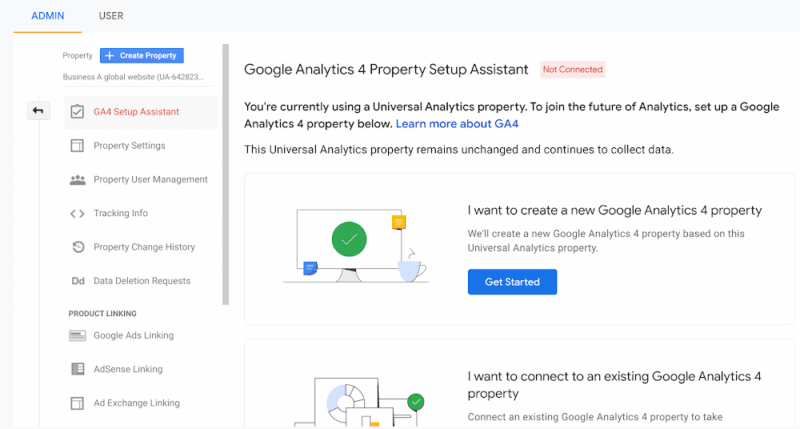
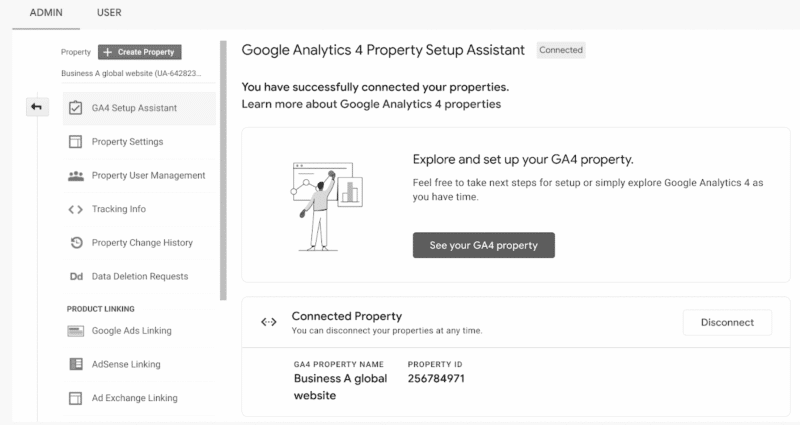
Next, businesses should engage with the Setup Assistant, through which they can save time setting up a GA4 property to measure a site or app that already uses Universal Analytics with the setup assistant.
“Marketers looking for a guided set up experience in Google Analytics 4 should use the setup assistant. This includes tools to automate some required steps and help you track progress. For example, these tools let you select the goals you want to import to GA4, copy the Google Ads links currently used, and add the users who have access to your current property.” – Ganem
Analytics Tag
Businesses and advertisers should add the Google tag to their sites to start collecting data. We encourage businesses to explore how they can use the Google tag to begin viewing data in their GA4 properties. It’s important to note that if businesses were using the global site tag, they are now using the Google tag and nothing further needs to be done.
“Structured data collection is the foundation of a measurement strategy which enables businesses to understand the effectiveness of their campaigns and marketing efforts. With Google tag, we’ve made it even easier to implement this critical piece of the puzzle.” – Ganem
Link to Google Ads
Importing Google Ads links from their existing Universal Analytics into the new GA4 property is critical to begin seeing Google Ads data in your GA4 reports. Once that’s complete, businesses should take action in their Google Ads account to start using GA4 data in their campaigns.
“Insights are only as good as the actions a business or advertiser can take from them. That’s why Google Analytics 4 allows insights to be quickly applied to campaigns with the Google Ads integration” – Ganem
Custom Events
Custom events allow businesses to complete their measurement by mapping Universal Analytics custom events to GA4.
“Google Analytics 4 was built on an entirely new and more robust event-based data model. In Universal Analytics, Page Views and Sessions were so important because that’s really all there was. In Google Analytics 4 these are just two of the dozens of events that can be automatically collected – and that doesn’t even consider the near countless number of events that customers can instrument for themselves. Meaning that how a user interacts with a site can be measured natively – measuring things like purchases, scrolls, button clicks, external links, form submissions, video plays, etc. Additionally, these are not measured as an afterthought of a page view or as an inference made about what “must be happening” in a long session. This event model, coupled with a more intelligent handling of users throughout the product, are some of the key ways we’re equipping our customers to succeed in the world ahead.” – Ketchum
Track custom events in GA4
Goals & Conversions
To get a better understanding of how websites and apps are performing, businesses should Import Universal Analytics goals into GA4.
“Most website and apps are designed with the objective of getting users to perform some important action. For some, that can be creating a new account, for others it might be making a purchase or just submitting an interest form. Whatever action you want customers to take on your website or app should be represented as a Conversion event in GA4. Doing so unlocks key marketing features, such as the ability to understand which campaigns are delivering the best results for your business.” – Ganem
Here’s a great video showing you how to migrate events & goals from UA to GA4
Bidding
To enhance bid optimization, validate and bid on GA4 conversions in Google Ads.
“The conversion events a business collects from their website or app can actually improve the performance of their ad campaigns. By linking to Google Ads and importing your conversions, it can provide important feedback to their campaigns, which automatically improves their performance when automated bidding is enabled.” – Ganem
Audiences
To get the most from GA4, advertisers and marketers need to build relevant audiences in Google Analytics 4 and activate them wherever they are most useful. Learn about predictive audiences available in GA4.
“GA4’s Audience Builder is the most powerful audience system we have ever built in Google Analytics, because it lets businesses express almost any criteria they can think of in a simple and intuitive user interface. The audiences they define are pre-populated based on the last 30 days of data, and evaluated on an ongoing basis, and they can be used for a variety of purposes including generating reporting insights, online advertising, and sending more meaningful push notifications.” – Ganem
Create audiences based on purchasers, subscribers, and more
Ecommerce
For businesses selling products online, they should set up ecommerce in GA4 properties to ensure they are using names and parameters that will provide the most useful ecommerce reporting.
“By simply following our recommended ecommerce data collection best practices, businesses will get rich out-of-the-box insights on shopping cart activity, and can benefit from powerful ML-based features such as Purchase Probability and Predicted Revenue.” – Ganem
Users
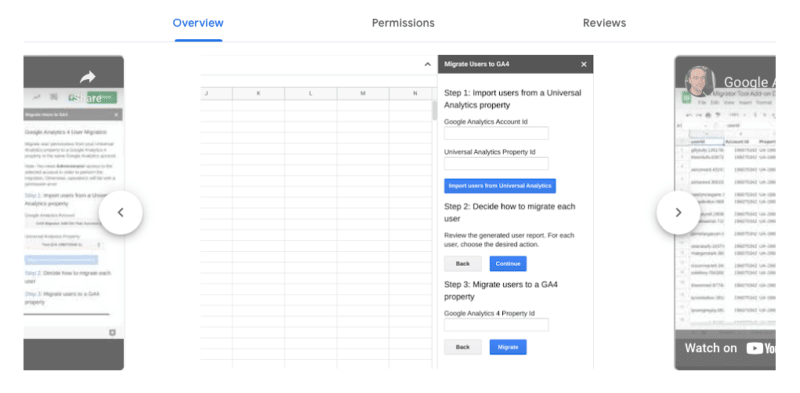
Finally, copy Universal Analytics property users to GA4 property manually or through the automated tool.
“For many businesses, it’s important to tightly control access to sensitive financial information. That’s why we added settings in GA4 to allow customers to control access to cost and revenue data on a user-by-user basis.” – Ganem
Reports & analysis
Now that GA4 is set up, it’s time to start getting familiar with the navigation, standard reporting available, and learn how to customize reporting in brand new ways based on what’s important to the business.
“While we’ve given customers a rich default reporting experience in GA4, we designed the product to be entirely customizable so that businesses of all shapes and sizes can tailor it to their specific needs. They can use our report builder to create reports that visualize virtually any combination of dimensions and metrics available in the product, and even assign filters to them so that teams in different regions or different business units can get the most insights with a minimal amount of effort.” – Ganem
For businesses looking for more ways to get a better understanding of GA4 and some of the key concepts mentioned above, the GA4 Academy and Skillshop is a helpful resource.
“When it comes to the migration, long periods of overlapping data and an extended state in a dual UA / GA4 state will set customers up for success. It will allow them to not only compare data moving forward, but also to get comfortable with the new platform and understand its differences. This is why we’re continuing to stress the importance of getting started as soon as possible.” – Ketchum
In a statement to Search Engine Land, Ketchum says “We acknowledge that change is hard and that making the move takes effort and time, but to create a platform that will be both resilient against the evolving privacy landscape and help customers measure effectively while respecting users’ privacy, more than an update was needed. GA4 is the analytics solution of the future for a reason – it was built that way. We hope these steps and tips will help to ease the process and help businesses understand the most essential pieces of getting started with GA4.”
Google search is a powerful tool in and of itself. You can use it to find anything, but did you know that you can use it to get specific results as well?
If you are looking to enhance your search engine marketing efforts, you need to know about advanced Google search operators. With the right search operator, your Google searches will be more efficient and accurate than ever before.
In this guide, we will reveal everything about the main advanced Google search operators so that you can get a better understanding of how to use them to your advantage.
What are Google search operators?
Google search operators are special commands and characters that extend the capabilities of standard text searches.
To use a search operator, simply enter it directly into the Google search box (in the same manner you would if you were doing a text search).
Make your results much more specific
Advanced Google search operators will deliver much more specific results. Let’s say you search “SEO” on Google right now. You will get more than 730 million results!
However, if you use the allintitle operator, which is one of the advanced Google search operators we’re going to tell you about below, you can reduce this to just 14.6 million results, as you will only be presented with results that have “SEO” specifically in the page title.
Use advanced Google search operators to take your business to the next level
With search operators, you can:
Find content and backlink opportunities.
Find SEO issues, such as glaring indexation errors.
Find research and statistics to improve your content.
Efficiently gauge how competitive certain long-tail keywords are.
Search operator rules to follow
There are two important ‘rules’ to follow when refining web searches:
If punctuation is not part of the search operator, Google will usually ignore it.
Avoid spaces between your symbol or word command and your search term. For example, site:movingtrafficmedia.com will work, however, site: movingtrafficmedia.com will not work.
The best advanced Google search operators
It is so much easier to search for things online once you know about Google search operators. Once you have mastered these commands, you will wonder how you previously managed without them.
1. site:
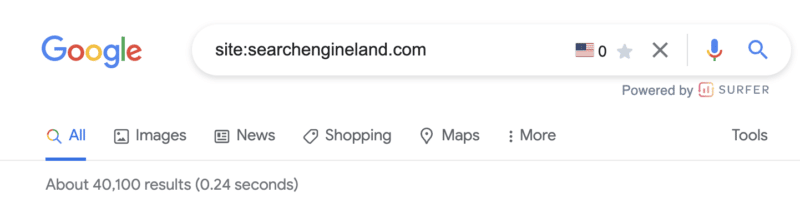
As you might have guessed, this operator allows you to search for content that’s hosted on a certain domain.
If you want to search through specific websites like Wikipedia or YouTube, but not other sites, site:youtube.com or site:wikipedia.org is what you need.
site: command use case
There are many use cases for this particular command. Perhaps the most common is to determine the number of pages Google has indexed for a particular domain.
2. cache:
Simply put, the cache: operator makes it possible for you to locate the most recent cached version of a specific web page.
cache: command use case
If you’ve recently made a content update or design change, this command will show you if and when Google crawled the new changes.
3. related:
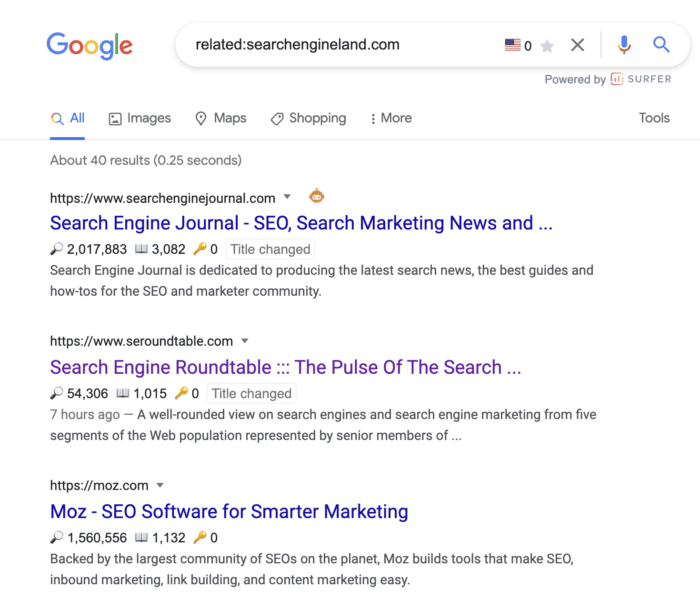
You can use this search operator to find websites that are related to the site in question. This is only effective for large domains, such as nytimes.com or searchengineland.com as illustrated in the image above.
related: command use case
Use the related: command for an illuminating look into how Google categorizes your site and the competition.
This is incredibly valuable for competitive analysis when trying to understand who your digital competitors are – which may be wildly different from your offline competitors.
4. inanchor:
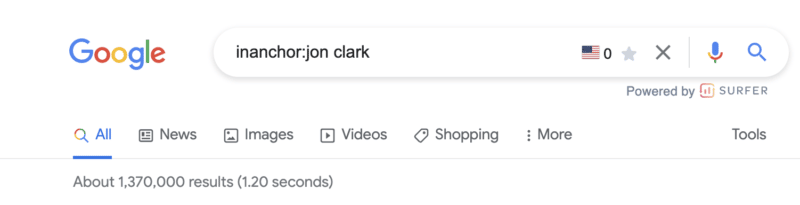
This advanced Google search operator is used when you want to locate pages containing inbound links that have the anchor text specified.
In the example above, the 1,370,000 results returned will display any pages with anchor text that includes the word “jon” or the word “clark.”
Note: You cannot expect accurate global results, as data is only sampled.
inanchor: command use case
This command is helpful when evaluating link building opportunities or competitive link audits.
5. allinanchor:
This operator builds on the inanchor: command from above but makes sense when you want to conduct research for pages that include all of the words in the inbound anchor text.
For example, you can see the returned results for pages with anchor text that includes both “jon” and “clark” have decreased to 991,000.
6. inurl:
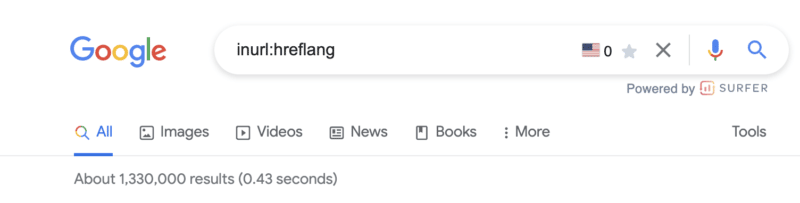
If you wish to find a page on a website that includes a specific word (or words) in the URL itself, then the inurl: is the Google search operator to use.
inurl: command use case
This search command is extremely helpful for:
Diagnosing indexing issues (inurl:tag to identify indexed blog tag pages).
Content inspiration across topics you are researching.
This advanced Google search operator will further refine the inurl: command by returning only results that include all of the defined words in the URL.
8. intitle:
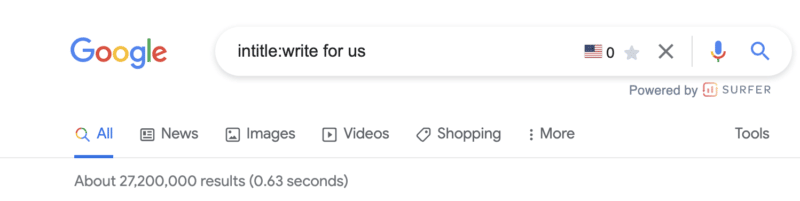
This operator allows you to locate results that are more targeted for certain search words or phrases. In the image above, more than 27,200,000 results are returned that include at least one of the terms in the page title.
intitle: command use case
This is a great search function for locating guest posting opportunities and checking levels of competitiveness for keywords based on the number of results returned for a word.
9. allintitle:
Similar to the above variables, the allintitle: command further refines returned results to include all the words in the page’s title.
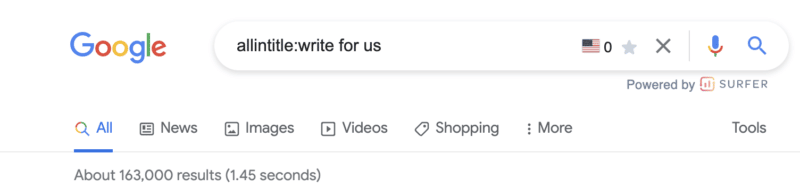
For example, the results that include all of the words “write for us” have been further refined from 27,200,000 to 163,000.
10. intext:
Looking for a specific word or phrase somewhere in the content? The intext: operator enables you to locate terms that show up in any part of a website page, from the page title to page’s content.
intext: command use case
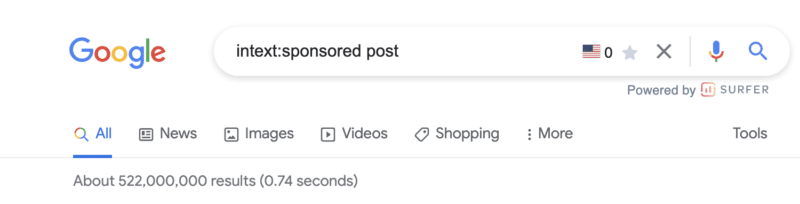
Personally, I use this command most often to find link building opportunities. In the example screenshot above, there are more than 522,000,000 pages with the terms “sponsored” or “post.“
The next advanced search operators will help us further refine these results.
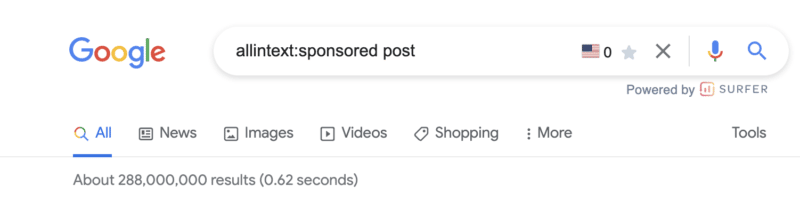
11. allintext:
This operator helps you to refine your search to only pages that include all of the terms you are searching for in the text of the page.
Modifying the operator from intext: to allintext: removes almost 200,000,000 results.
Note: This operator does not account for the proximity of the words on the page, only that they appear on the page. Said another way, the words may not be in a phrase or close to each other in a sentence.
Get the daily newsletter search marketers rely on.
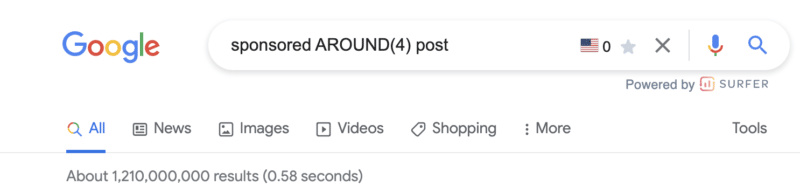
The around(X) command will account for word proximity by limiting your results to pages that feature the searched words within ‘X’ words of one another. The maximum gap or distance between words is denoted by whatever number is included within the parentheses.
around(x): command use case
While this is one command I rarely use, it can be helpful when looking for quotes, sentences, or references that you don’t remember.
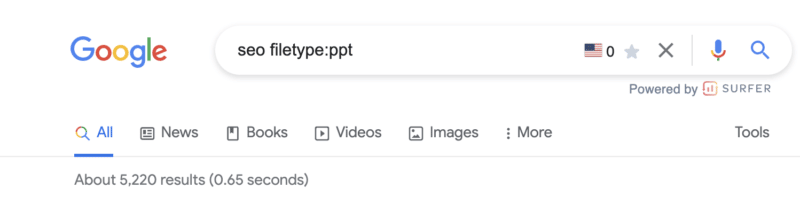
12. filetype:
When you use the filetype: search operator in conjunction with a keyword will limit returned results to certain file types that include the keyword. These file types include:
SWF
PDF
PS
DWF
KML, KMZ
GPX
HWP
HTML
XLS, XLSX
PPT, PPTX
DOC, DOCX
ODP
ODS
ODT
RTF
SVG
TEXT
TXT,
BAS
C, CC, CPP, CXX, H, HPP
CS
JAVA
PL
PY
WML, WAP
XML
Note: Using the ext: will return the same results.
filetype: command use case
I love this search operator.
First, for content writers, this is an extremely powerful site command to improve "information gain" – something that should be discussed more in light of the helpful content update.
Hat tip to Steve Toth’s SEONotebook email newsletter for this awesome tip. He laid out this use case via the following:
Information gain scores state how much more information one source may bring to a person who has seen other sources on the same topic. Pages with higher information gain scores may be ranked higher than pages with lower information gain scores.
Here's what Google's patent has to say about it:
"…when a set of documents is identified that share a topic, many of the documents may include similar information."
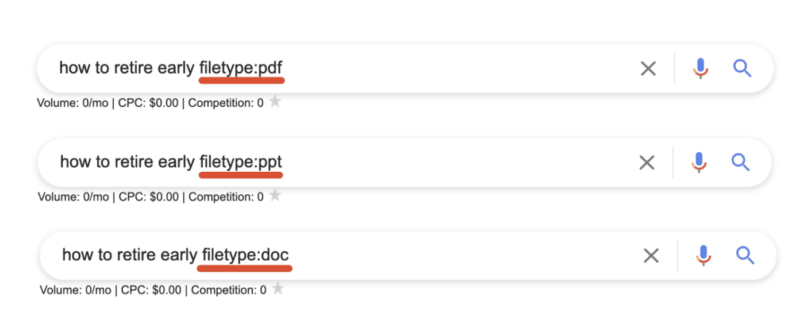
So let's say there are 10 pages on Page 1 that all tell "how to retire early," and all 10 articles on page one basically share the same tips. This presents a problem for Google since users wouldn't want to read 10 blogs about the same thing. Google goes on to say:
"Implementations described herein relate to determining an information gain score for one or more documents of potential interest to the user and presenting information from one or more of those documents that are selected based on their respective information gain scores."
Here are three ways we can source information and insights beyond the same Page 1 results everyone else is looking at to create their content:
By sourcing information that is buried within PDFs, Powerpoints, and Word docs we're able to unearth new information that the rest of Page 1 isn't talking about!
Open the results and look for topics or ideas missing from the article.
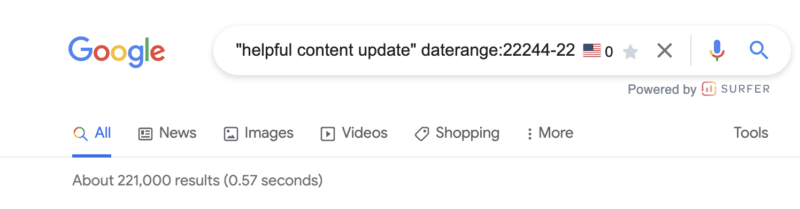
13. daterange:[XXXXX-XXXXX]
You may be feeling a little bit perplexed by the example in the screenshot above.
The daterange: advanced search operator does display search results within a set number of dates that you specify. However, it utilizes the Julian date format which requires the year followed by the number of days since the beginning of the year.
To ensure you do not make any mistakes, I would advise using an online converter so you can be sure you will get the date format right.
daterange: command use case
This can be useful to determine the volume of content published for a certain topic during a specific period. For example, in the screenshot above, there were 221,000 pieces of content published on the helpful content update from September 1, 2022 - September 21, 2022.
14. OR
This is one of the search operators you have probably used a few times without fully knowing what it does.
If you want to combine searches, simply add the capitalized OR between your search terms (keyword1 OR keyword2). Google will surface results that satisfy either the first search term OR the second.
Quick tip: If your caps lock is broken, the pipe (|) operator will provide identical results.
OR: command use case
This is probably most useful when doing research in which you need information on more than one item but not necessarily looking for results that include references to both.
15. "keyword"
When you utilize quotes during a Google search, you are basically limiting the search result to that exact match phrase.
Google will return every webpage that has the specific phrase in its body copy, title, or description.
"keyword" command use case
In addition to refining the results returned for a query, the " " search modifier is one of the most efficient ways of locating instances whereby your content has been duplicated.
You can copy as much as an entire paragraph from your online content, paste it with quotation marks, and find out whether or not someone has pinched your work.
Of course, there are other ways you can find out if someone else has stolen your work, such as Copyscape. Nevertheless, this is certainly one of the quickest ways of getting to the root of the problem.
16. -keyword
The minus (-) sign is a simple tool you can use if you want to exclude a certain search term/topic from your results.
In the above example, the results returned will be related to SEO but not PPC.
Pro tip: This command is not limited to a single exclusion. Layer on additional exclusions to filter down to the most specific results.
-keyword command use case
This is beneficial if you are searching for something that has more than one meaning, and you want to exclude the other meaning.
You can also utilize it if you want to get rid of some branded search results.
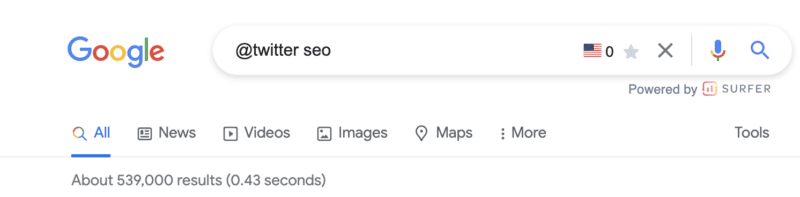
17. @
Looking for a specific result from social media? Adding the @ modifier to the front of your query will return social media-specific results.
This is most useful when searching for the official channels of a company or organization.
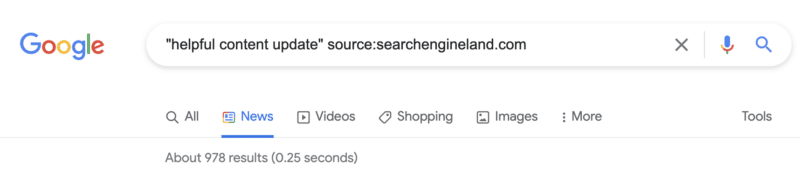
18. source:
The source: command enables you to search specific sources for a given topic in Google News.
source: command use case
While it is limited to Google News, if you are looking for article sources or potential link partners who have written about a similar topic, this command can certainly come in handy.
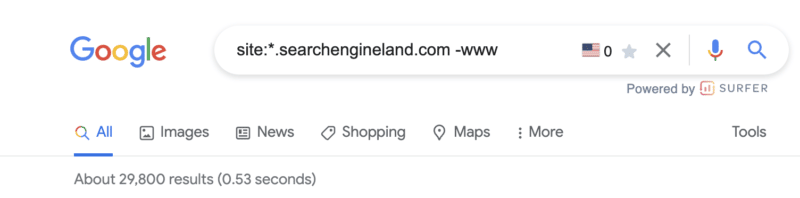
18. *
Should you wish to get more matches, you can utilize the asterisk (*) wildcard operator.
If the wildcard is put in between terms, you will end up with all of the variations of the phrase. This makes it helpful in terms of finding phrases and quotes.
* command use case
Similar to the example above, this can be very useful in technical audits or maintenance of your own domain. However, it requires the combination of a handful of commands (more on that below).
Simply add the * wildcard operator in front of the site: command and exclude any -www results.
Combining multiple search operators: Use cases
One of the best things about using Google search operators is that they can be combined for specific use cases.
The sky is the limit when it comes to this, as you can easily combine any of the advanced Google search operators we have mentioned above.
This means you can efficiently locate official documentation, an original image, or the source of a quote for pretty much anything.
Find backlink opportunities
It seems link building opportunities (or uncovering how your competitors are acquiring links) is a super common use case for Google search refinements.
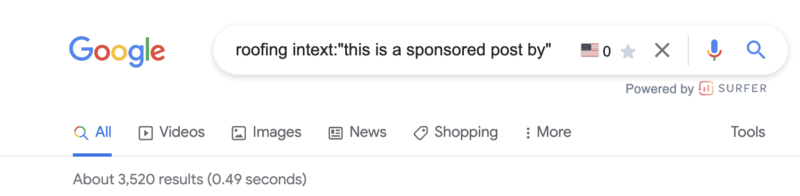
In the example above, if you have a roofing company, you now have 3,500+ potential targets that you know accept sponsored content.
There are a handful of command combinations that will provide similar results:
[topic] sponsored AROUND(3) post
[topic] intitle:"sponsored post"
[topic] intext:"sponsored by"
[topic] intext:"sponsored post"
Not looking for sponsored posts? Not to worry. Give these Google search operators a try:
[topic] "write for us"
[topic] intitle:"write for us"
[topic] inurl:"write-for-us"
[topic] inurl:"write-for-us" intitle:"write for us"
Still not finding a list of solid outreach targets? Plug in some of these variations:
"guest contribution"
"guest post"
"write for me"
"become a contributor"
"guest post guidelines"
Find infographic submission opportunities
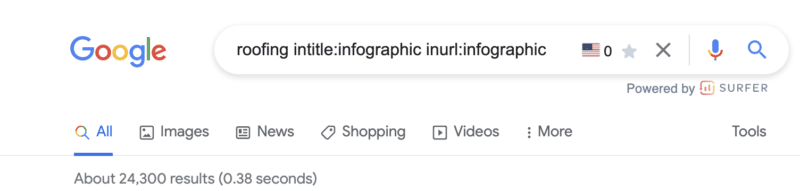
Infographics can be excellent visual assets to create for your website. However, their creation is only half of the task. You then need to make sure they are effectively distributed.
If you use this advanced Google search operator, you may be able to locate websites that could be interested in featuring the infographic you have made.
Find social profiles for outreach
So, using the search operators above, you’ve built a solid list of outreach targets.
What if their contact details aren’t listed on the site?
If you want to reach out to a certain person on social media, this is the best operator to use. It is also highly effective if you are trying to find the contact details of someone in general.
Discover indexation issues
We talked about discovering subdomains that may have been inadvertently indexed using the site: and wildcard (*) command above.
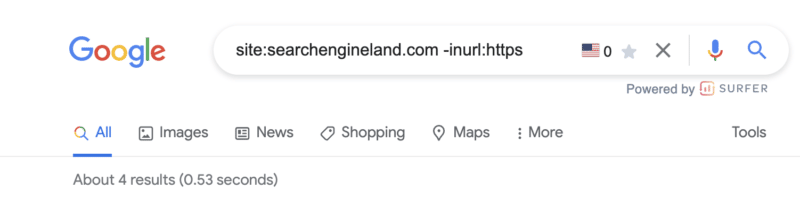
Similar to the screenshot above, another useful tactic is to utilize the site:, exclusion (-) and inurl: commands to discover non-secure URLs that may be floating around Google’s index.
For those working on sites with a blog, I also find the combination of site: and inurl: commands infinitely valuable in diagnosing common indexing issues with tag pages.
Just drop the following command string into Google to see for yourself: site:yoursite.com inurl:tag.
Join social conversations
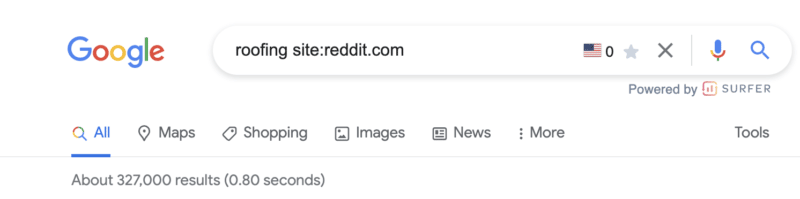
This is a great advanced Google Search operator to use if you want to locate relevant forum and community discussion topics.
Q&A websites, like Quora, as well as online communities, subreddits, and relevant forums, are ideal for content promotion.
You can easily locate questions being asked in your niche and relevant discussions. Joining in is a great way of building your online presence.
Some of the best options to consider here include:
I utilize search commands to discover internal linking opportunities seemingly every day.
The concepts are simple.
Prevent duplicated topics. Before you get started, the below command will show you if and how many similar pages have already been published.
[topic] site:yoursite.com
If you see a headline that is similar, it may be worth revisiting that older post or looking for an alternative topic.
Find existing references. While you’re building your content, adding internal links (where it makes sense) is a smart SEO strategy. Using the below command, search the general topics being covered and add internal links to those existing pages.
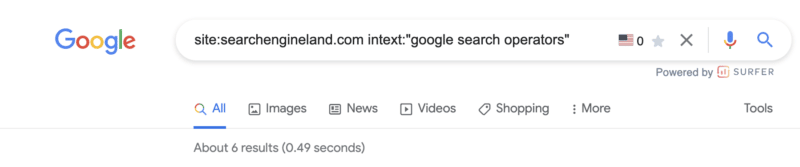
site:yoursite.com intext:topic
In the example above, I see six potential internal links to add to this post.
Add internal links to your new post. Once your post is published, adding internal links from older content to your new post will aid in indexation and transfer some existing authority.
This is a bit of a sneaky one but, if nothing else, it is useful to make sure you don’t have any private information stored in a Google doc floating around the interwebs.
Google docs (documents, spreadsheets, presentations, etc) all live off of docs.google.com.
Using the site:docs.google.com command, we can then filter down indexed Google Docs in unlimited ways.
E-commerce is expected to grow by 15.5% this year, to $236 billion. In the US, online sales might finally eclipse brick-and-mortar, making e-commerce the most significant way to drive Q4 revenue. This means that now more than ever, savvy brands need actionable ways to boost Q4 performance and attribution across key e-commerce channels – from SEO and email to paid search, social, Amazon and SMS.
Moreover, in order to be effective across each of these, brands need a coordinated, cross-channel approach to move shoppers quickly from awareness to consideration to purchase through a variety of digital touchpoints. They also need visibility into the effectiveness of each of these touchpoints to determine which ones deliver the most value at each stage of the shopper journey.
Join Exclusive Concepts – a Premier Google Partner, BigCommerce Elite Partner, Meta Business Partner and Microsoft Elite Partner – for this live event on Wednesday, October 5th. Presenters will walk through the 2022 E-commerce Guide, where attendees will learn how to:
Test cross-channel messaging across various audience segments
Plan your budget for each channel to maximize ROAS
Measure how your website ads impact Amazon sales
Adapt to policy and platform changes that affect channel performance – from very recent Google updates affecting SEO rankings to changes in Amazon Ads and everything in between
Master our number one strategy for each vital e-commerce channel
Save your spot and walk away with 12 easy tactics you can use NOW to boost Q4 sales.
Google’s helpful content update has finished rolling out, and while it didn’t create the impact many anticipated, it’s certainly turned our attention to reviewing and improving content.
What we have determined is that Google is making more steps toward serving content written for people, by people. With this in mind, optimizing content for both people and search engines should be possible.
Here are my top tips for enhancing your content for better search results and happy readers.
1. Review the readability
Assessing readability is one of my biggest tips for optimizing online content.
Online, we read and take in information differently than in print. Short, simple sentences are easier for us to digest.
In the U.K., guidelines encourage us to pitch our writing to something a 9-year-old could understand. The U.K.’s Office for National Statistics recommends writing in a way that’s easy to understand for all users.
Putting this into practice is harder than it sounds and is often overlooked.
Search engines love “readable” content too. They use natural language processing (NLP) to process language based on linguistic rules to understand the relationships between words.
The intended meaning can easily be lost if these relationships are too complex.
For example, this sentence has a readability score of 11 (OK) on the Hemingway Editor:
And Google’s NLP tool identifies “sales funnel” and “target audience” as the most salient entities. But this passage is intended to focus on ecommerce PPC management.
I’ll simplify it to get a readability score of 7 (Good) and run the updated version through Google’s NLP tool:
Not only is this easier to follow, but it’s also more relevant to the topic intended.
2. Keep language simple, precise and concise
Following on from readability, it’s best to keep your language as accurate and succinct as possible.
Remove any unnecessary or complex words.
Do your best to write things in their simplest form while maintaining pace and rhythm to keep things interesting.
This will help readers to follow your content and help search engines to process it.
3. Use synonyms and close variants
Repeating the same terms or phrases isn’t a good idea. It creates content that’s laborious to read, and it can appear untrustworthy to a discerning audience.
Optimize your content by upgrading recurrent words to their equivalent alternatives. This will make a much more interesting and engaging reading experience.
It will also provide search engines with more contextual information and avoid the temptation to overuse certain keywords that could result in poor search performance.
The use of synonyms solidifies the topics you’re writing about by providing lots of different points of reference. It can give you wider ranking opportunities, too.
For example, Search Engine Land’s guide “What is PPC?” ranks for a whole host of different synonyms and close variants of PPC, like paid search, search engine marketing, paid search marketing, paid search advertising, pay-per-click search, and more.
Data from Sistrix
4. Research and include related entities
Every piece of content is a collection of entities, and both search engines and people understand the relationships between many entities.
People have learned over time, for example, that Buckingham Palace is a royal residence located in London, England:
So it is connected to entities like London (location), the late Queen Elizabeth II (person), and certain events, to name just a few.
While some entity relationships like these are well-defined and apparent, others are more subtle. This is why it’s important to research entity associations and consider the connections you’re making within your content.
Making the right associations helps build the bigger picture and give context to your topic. This is useful for your readers and search engines. If you wrote about Buckingham Palace but failed to mention the Royal Family, your content would be lacking.
But entity relationships help to clarify meaning, too. If you’re writing content about the historical figure Anne Hathaway, related entities like William Shakespeare and Stratford Upon Avon provide context. A piece of content about Anne Hathaway, the modern-day movie star, would likely connect entities like films, acting, Academy Awards and New York City.
So, when you include an array of relevant entities within your content, it improves the overall piece. It helps to give search engines wider reference points to improve their confidence in what you’re talking about, and it shows your readers that you have thoroughly researched a topic and provided them with a valuable resource.
5. Structure your content
Make sure your content follows a logical, ordered structure. This makes it easier for readers to digest and for search engines to interpret.
For example, this Ideal Home article about how to load a dishwasher is structured simply and effectively. It covers general tips on getting the best results, followed by considering the top and bottom racks.
Other, competing articles cover a muddle of tips. While useful, their structure isn’t as logical and easy to follow.
6. Use headings
An effective heading structure is vital for people and search engines alike.
Clear, descriptive headings help busy readers scan your text more quickly or jump to the areas they’re interested in.
Correctly structured headings are also essential in accessibility. They are used by assistive technology, so good headings allow users of screen readers to navigate effectively and understand your content as intended.
Just like people, search engines love headings, too.
Clear H1, H2 and lower level headings help search engines to understand what your page is about, what each paragraph covers, which topics are important and how they relate to each other.
Mordy Oberstein recently reported some really interesting findings about how improving ambiguous headings actually helped more of his content to get indexed.
I don’t know if it’s me or if it’s something happening more often these days in general, but I’ve seen more & more of my pages on the SEO Rant site being crawled but not indexed.
So I made some changes. Lo & behold the pages are now indexed
This really demonstrates how important clear, informative headings are to content success.
7. Use formatting correctly
The way you format content helps to convey the meaning behind it.
For example, a numbered list might be a step-by-step process or a ranking system. Bullet points usually indicate a list of items with equal importance. Bold or italic text helps items stand out and gives them emphasis.
You’re reading this article now, and I promised you 25 tips. So I labeled these 1-25 to reinforce the message in the title.
The right formatting will help people to read your content in the way you have intended. It will also make it easier to scan and process. But it helps search engines too, as they also recognize these formats and their common meanings.
For example, some formatting will suggest a classification like an address. Other items like tables imply certain relationships. Charts can show averages and ranges.
If I’m interested in the weather in London throughout the year (perhaps I’m planning a trip there) charts and tables convey this information more effectively than text:
Screenshot from Holiday Weather
So the formatting here helps to support the message. It creates a better resource for people and search engines by configuring elements most effectively.
Get the daily newsletter search marketers rely on.
If you're producing long-form content, adding a contents section with jump links to each main section can be a helpful optimization.
This will help readers move between sections easily, accessing the information they need. It improves user experience and makes your content more digestible.
From an SEO perspective, these unique internal links help clarify the focus of certain passages, which can boost the passage-based ranking of long-form articles.
"Very specific searches can be the hardest to get right, since sometimes the single sentence that answers your question might be buried deep in a web page. We've recently made a breakthrough in ranking and are now able to better understand the relevancy of specific passages. By understanding passages in addition to the relevancy of the overall page, we can find that needle-in-a-haystack information you're looking for."
So search engines are able to identify useful passages and match them with queries, but it certainly doesn't hurt to point them in the right direction with a clear contents section.
9. Choose usefulness over word count
When you're writing or optimizing content, aim to cover what is useful to your users rather than hitting a word count.
Most people can see right through content that's written to hit a word count. And search engines can, too. The content becomes empty and lacks meaning.
"Are you writing to a particular word count because you've heard or read that Google has a preferred word count? (No, we don't)."
So clearly, they have their eye on this, too.
If you focus on providing enough depth to satisfy your target audience, they will genuinely find it useful. You'll avoid empty words and information that's there just for the sake of it.
10. Do your search term research
Great content should always be based on research. Often, we think we know what our target audience wants, but as content producers, we might have a skewed perspective.
This is where search query data comes in. It's a treasure trove of information about what people are actually looking for. While it's important to use this carefully, it shouldn't be disregarded.
Awareness of how people search for the topics we're writing about is essential for content optimization. Readers will find that your content is more aligned with what they searched for to discover your content, and search engines will serve your content in the right context.
Here's an example of a piece of content in a very specialist niche that was optimized based on search data and republished on a new URL:
Data from Sistrix
Visibility has increased considerably, and Google Analytics shows a lower exit rate and bounce rate for the new page in comparison to the previous version. This optimized content is clearly more effective for discovery via search and readers alike.
11. Identify an appropriate scope
Consider where your content starts and ends. Should it be combined with other resources to make a better and more useful asset? Or should it be broken down into bitesize chunks?
When you're optimizing content, it's better for both people and search engines if you consider the scope. Something very short might be considered thin content from a search perspective and lacking in detail for your readers.
On the flip side, an extremely long resource might be easier to digest in parts or sections that interlink. Breaking it down could create a series of more focused pieces of content that perform better in search because they're more defined.
For example, Search Engine Land's guide to SEO covers high-level information and includes links to more in-depth chapters about sub-topics. Trying to cover everything about what SEO is in one resource would be too broad a scope.
12. Give direct answers to questions
If you ask a question in your content, provide a direct answer. Don't equivocate or waffle.
Use the expected units or classifications in your answer. Think about the answer you'd like to see!
For example, this passage directly answers a question simply and effectively:
(Disclosure: GeoSLAM is a current client of mine.)
And this one gives a straightforward answer using the expected temperature measures of Celsius and Fahrenheit:
Most people are using search engines to find fast answers to their questions. They don't want to read a debate. They want to access something definitive and unambiguous.
13. Use images to improve understanding
People are visual learners by nature, so consider updating or increasing your images to optimize your content.
Great visuals improve your search performance too. They can boost click-through rate, appear in image search and increase your real estate in SERPs.
The key is to make sure your imagery is really adding value to your content.
Does it help to illustrate something difficult to understand?
Does it make a key point more memorable or emotive?
If so, it's likely to be enriching your message.
For example, this technical piece about LiDAR technology aids understanding with simple diagrams:
14. Add videos to improve the experience
In 2020, over 3 billion internet users were consuming online video content. This is expected to reach 3.5 billion by next year based on Statista's figures. So, where videos are suitable for supporting or enhancing your content, they're well worth considering as part of your optimization plan.
Many people prefer watching rather than reading, so video content improves their overall experience.
You'll only get real search benefits if you produce original video content yourself. If your budget doesn't stretch this far, embedding useful video content from other producers is still an option.
Overall, creating a better content resource is the aim, which could result in secondary benefits like more shares and backlinks.
15. Assess internal links
When you're optimizing content, make sure you consider internal links.
Does your content link to other useful internal resources? And do other internal pages link to it?
Improving internal linking enhances the experience for readers as it allows them to find out more about a topic of interest. It's also critical for search engines, helping with content discovery, importance and topical relationships.
Earlier this year, Google's John Mueller explained:
"It's something where internal linking is super critical for SEO. I think it's one of the biggest things that you can do on a website to kind of guide Google and guide visitors to the pages that you think are important. And what you think is important is totally up to you. You can decide to make things important where you earn the most money or you can make things important where you're the strongest competitor or maybe you're the weakest competitor. With internal linking you can really kind of focus things on those directions and those parts of your site."
16. Update external links
Adding external links to your content is a great way to enrich and optimize.
It might seem counterintuitive at first. Why should you send your readers to another website?
But there are multiple benefits if you consider this approach thoughtfully.
People will find your content more trustworthy and useful if you back up claims, statistics or quotes with an authoritative external source. They also add value by giving your audience a fast route to access further information.
But these need regular checking to make sure you're still sending your readers to the most relevant source.
Clear, relevant sourcing also demonstrates expertise in your field, something that search engines value. They provide context that helps solidify the relationship between your content on a certain topic and other expert or authority sites that also cover it.
17. Give examples
A great tip for enhancing your content is to provide real examples. Are there areas that could be explained better by showing how something works rather than trying to explain it in words?
You'll notice I've provided lots of examples throughout this article to help you to follow my thinking. They reinforce my points by showing you a representation of the advice in action, making it easier to apply to your own content.
Showing a representation of your idea in action adds credibility, and makes it more useful and engaging.
18. Ask the experts
If you've produced thought pieces or content that answer a qualitative question, you might be able to upgrade it by asking some experts in the field.
Combining expert quotes that are clearly referenced will enhance E-A-T signals for search engines by demonstrating that you have qualified subject matter experts involved. Readers will get the benefit of a more balanced argument, as well as the recognition of industry expertise.
You might even benefit from attracting eternal backlinks or social activity from the experts involved.
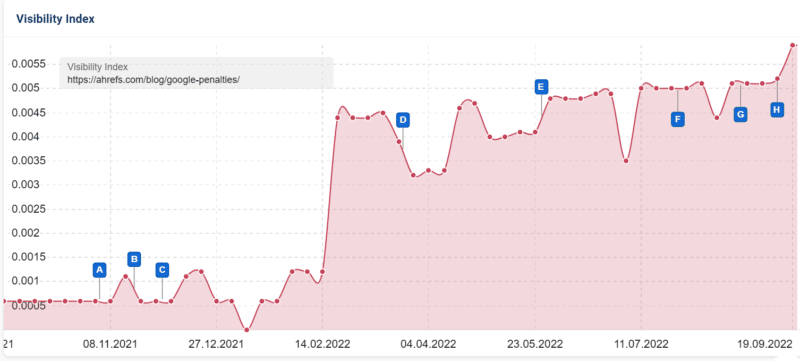
This post on Google penalties from Ahrefs is a great example of reaching out to qualified experts to add value:
It's gained backlinks from 212 linking domains and just look at the recent uptick in visibility after September's core update (marker H).
Data from Sistrix
19. Find a new angle
Add value to your content by making sure you approach a given topic differently. If you're just rewriting something that has been covered many times before, you're unlikely to deliver anything insightful or meaningful.
Google's helpful content guidelines state that you should avoid "mainly summarizing what others have to say without adding much value."
So if you have some older content to optimize, perhaps you could approach it from a different perspective or gain some additional insight into the topic.
You might do original research, test something out or ask an expert in the field for additional commentary as mentioned above.
20. Include data
When reviewing your content, consider whether you have made claims that could be backed up with data. Providing hard facts builds trust and shows readers that you have really researched your topic.
From a search perspective, adding relevant data might also provide external linking opportunities. You can reference useful data published on authority sites in your niche.
If you are including your own unique data, there's a strong chance that others writing on a topic will link to your resource to back up their own claims in the future.
For example, this study that benchmarks over 2,000 digital PR pieces gained several relevant backlinks from industry websites in a short time due to the unique, useful and interesting data provided.
21. Keep it up to date
Content optimization never ends, and it's essential to keep your assets current. By carrying out a regular review, you can avoid people accessing outdated content that could provide obsolete advice.
Search engines use freshness as a ranking factor, so they value content that's well maintained and kept up to date. Studies by Botify have confirmed this, although it's a complex issue.
One ecommerce site I worked on was experiencing a downturn in traffic for a key page, and through analysis, I noticed that "prices start from" was mentioned in the copy, but the minimum price had changed. After correcting the price, performance returned to its previous levels.
22. Keep it relevant
Make sure the topic of your content is highly relevant to your area of expertise.
People reading content that's detached from your main topic area may find this confusing, unhelpful or might fail to trust it.
Search engines are working toward a better user experience, so they mirror this. I've carried out many content audits over recent months on different types of websites.
Assessing a site's content as a whole usually reveals a lot, but one of the predominant findings has usually been that relevant content performs much better than unrelated content.
There are several reasons for this. In most cases, the content is likely to be better quality if subject matter experts create it. But the relationships between pages matter, too.
Content clustering displays a breadth of knowledge about a topic that interlinks, which can help you build up topical authority over time. I covered this in more detail in my recent article on how to use relationships in SEO.
23. Take your time
Considering the implications of content optimization on search and users alike takes time.
The time taken to write a blog post is just over 4 hours on average, and that has increased by 67% since 2014, a large-scale study by Orbit Media shows.
This just goes to show that the quality, level of detail and expertise involved are only increasing. Older content may require extra time to optimize and bring up to current standards.
If you want to do a thorough job, allow yourself the time you need to develop your content and strengthen it.
24. Analyze the results
If you're optimizing content, use results to guide you. Data will provide valuable information about what's working in search and how people engage with your content. You should analyze both.
This page, which was improved using data from Google Search Console and Google Analytics, has performed much better after optimization. Total impressions have increased by 359%, and clicks have increased by 433%.
Data from Google Search Console
Google Analytics shows that the average time on page has increased, indicating that the content refresh is not only bringing in more traffic but is engaging readers.
25. Check and check again
Spell check, grammar check and fact check.
Maybe you missed something the first time and have published content with inaccuracies. Any errors will erode trust with your readers. They could also hamper your search performance.
I find it really valuable to have a proofing process in place within my team. It's much easier to spot someone else's errors and review content from a pragmatic perspective if you haven't written it yourself.
Balance humanity and SEO
It's never been more important to get the right balance between enhancing content for search engines and people.
An ideal mix is a user-first approach with a good grounding in SEO.
Neither should be ignored when you're optimizing content.
Search engines are crucial for driving an audience to your content, but you don't want your readers to be disappointed when they get there.
Keep both in mind, and search engines and your readers can work hand in hand to deliver exceptional results.











 (@MordyOberstein)