Thursday, 2 November 2023

How to optimize your product feeds with ChatGPT and FeedGen

Feed management in PPC, especially within platforms like Google Ads and Microsoft Ads, is crucial for organizing and updating product or service data. It serves as the foundation of Shopping Ads, ensuring that viewers are presented with relevant results and accurate information. 

With AI tools like ChatGPT and Google’s FeedGen, you can enhance your product or service data to deliver more relevant and accurate information to your audience. 

This article will explore the core principles of product feed optimization and the capabilities of AI-driven tools, including the benefits and limitations compared to traditional feed management tools.

What is product feed optimization?

At its core, product feed optimization in PPC is about creating keyword-rich titles and descriptions that:

  • Match search queries.
  • Show information.
  • Categorize products properly.
  • Add additional information like color, size, etc. 

In more advanced optimizations, you also consider optimizing images, adjusting prices, using performance labels and conducting A/B tests. 

While the best practices can vary depending on the product category, a common approach for creating effective product titles is with the following structure:

Apparel

  • Brand + Gender + Product Type + Attributes (color, size, material)

Consumable

  • Brand + Product Type + Attributes (weight, count)

Hard goods

  • Brand + Product + Attributes (size, weight, quantity)

Electronics

  • Brand + Attribute + Product Type

Books

  • Title + Type + Format (hardcover, ebook) + Author

To effectively optimize product titles for online retail, here are some best practices: 

  • Adopt a customer-centric approach.
    • Think from the perspective of your target audience and understand their shopping behavior.
    • Include key attributes in titles (i.e., color, size, material, and specifications) as customers often use them to refine their searches. 
  • Adhere to platform-specific guidelines, especially Google’s strict rules regarding using capitals and exclamation marks. 
  • Use data from Google Ads search terms reports, Google Trends, and tools like Semrush or Ahrefs to identify high-performing queries and relevant keywords. 
  • Tailor your titles based on the product vertical, considering how customers in that industry typically search. 
  • Include brand names in titles if they are well-recognized and relevant, but exclude lesser-known brands that might not resonate with shoppers.

Optimizing a product feed with ChatGPT

To begin with AI-based feed optimization, starti with ChatGPT. 

You can input your feed and optimize the title and description, gradually adding more information. 

This approach provides a foundational understanding of feed optimization’s capabilities and allows you to focus on significant improvements.

An example optimization with ChatGPT and Google Sheets

You can use popular plugins like ChatGPT in Google Sheets and Docs, or you can use App Scripts to let the ChatGPT API work on that sheet.

A sample query could be: 

  • “Write a Google Shopping optimized product title with a maximum of 150 characters using the [title], [description], [category], [color], [size] and [gender].” 

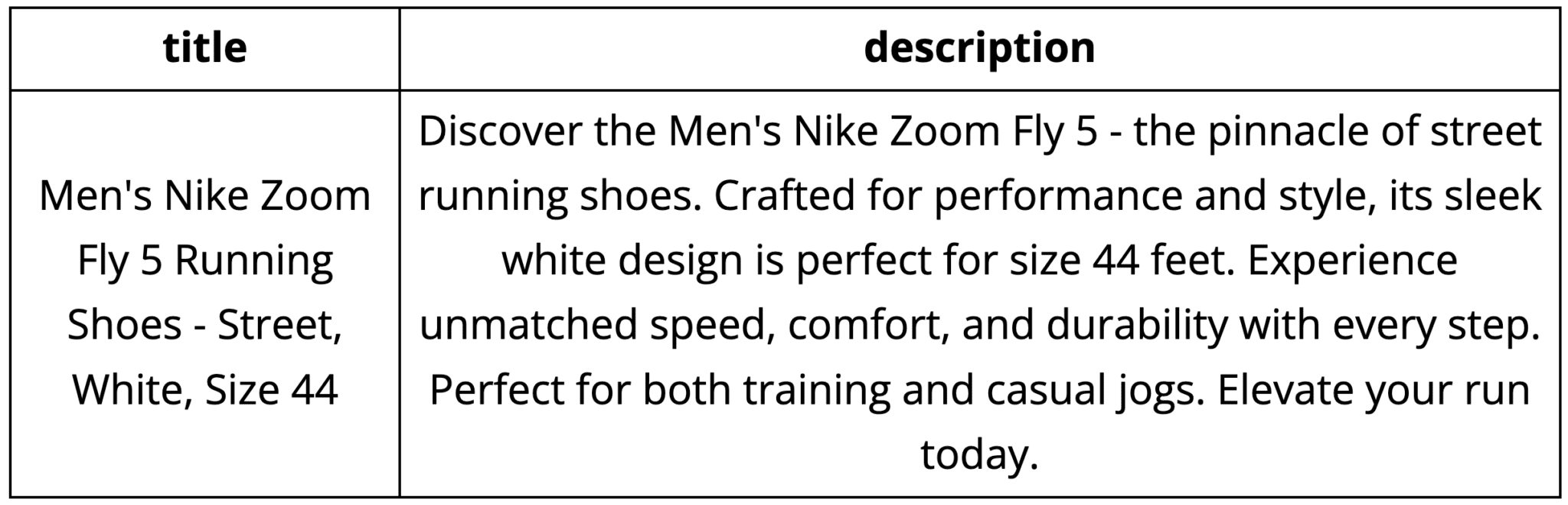
The input feed:

sample input feed for nike zoom fly 5

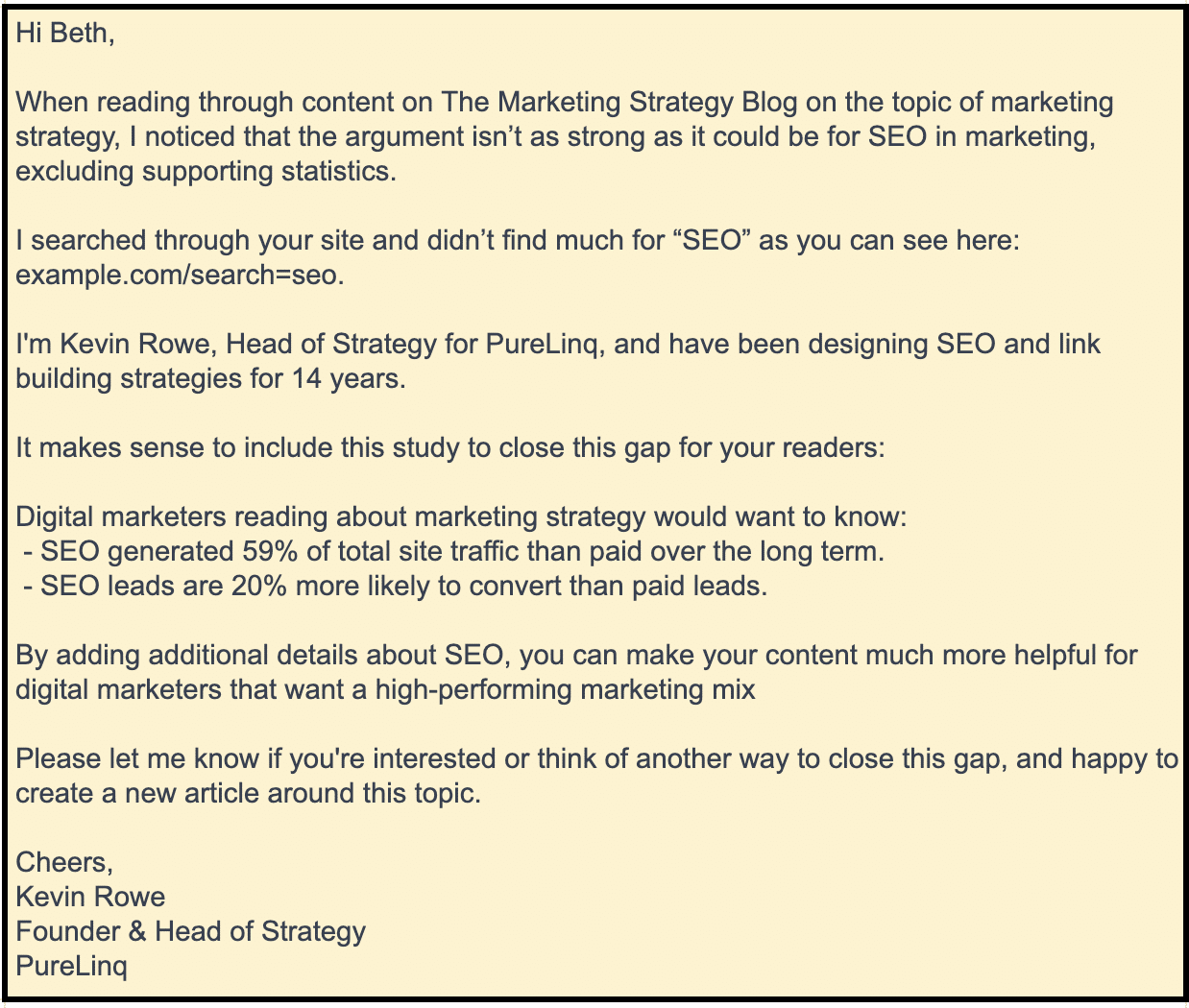
The result:

results for nike zoom fly 5

While this is not an all-time peak performance of product feed optimization, it’s an improvement of the input feed and a good base to work with.

Setting up ChatGPT + Google Sheet is easily done in 15-30 minutes, including a Plugin or AppScripts setup on this basic level.

A more advanced approach can include special input fields to prompts, Google Shopping guidelines and optimization best practices that ChatGPT can use. 

ChatGPT is a cost-effective way to begin feed optimization for quick title and description improvements. However, if you need a more polished and advanced solution, consider FeedGen.


Get the daily newsletter search marketers rely on.

Processing…Please wait.


Optimizing a product feed with Google FeedGen

Powered by Google Cloud's advanced large language models, FeedGen is an open-source tool designed to: 

  • Enhance product titles.
  • Craft detailed descriptions.
  • Supplement missing attributes in product feeds. 

Its main purpose is to aid merchants and advertisers in detecting and rectifying quality shortcomings in their feeds using generative AI presented in an accessible and adjustable manner. 

By leveraging Google Cloud Platform's Vertex AI API, FeedGen offers both zero-shot and few-shot inference capabilities. 

The few-shot prompting feature, in particular, allows users to incorporate the best samples from their Shopping feed, thus tailoring the model's output for consistency and elevated quality.

This can be further refined by adjusting the foundational models with proprietary data.
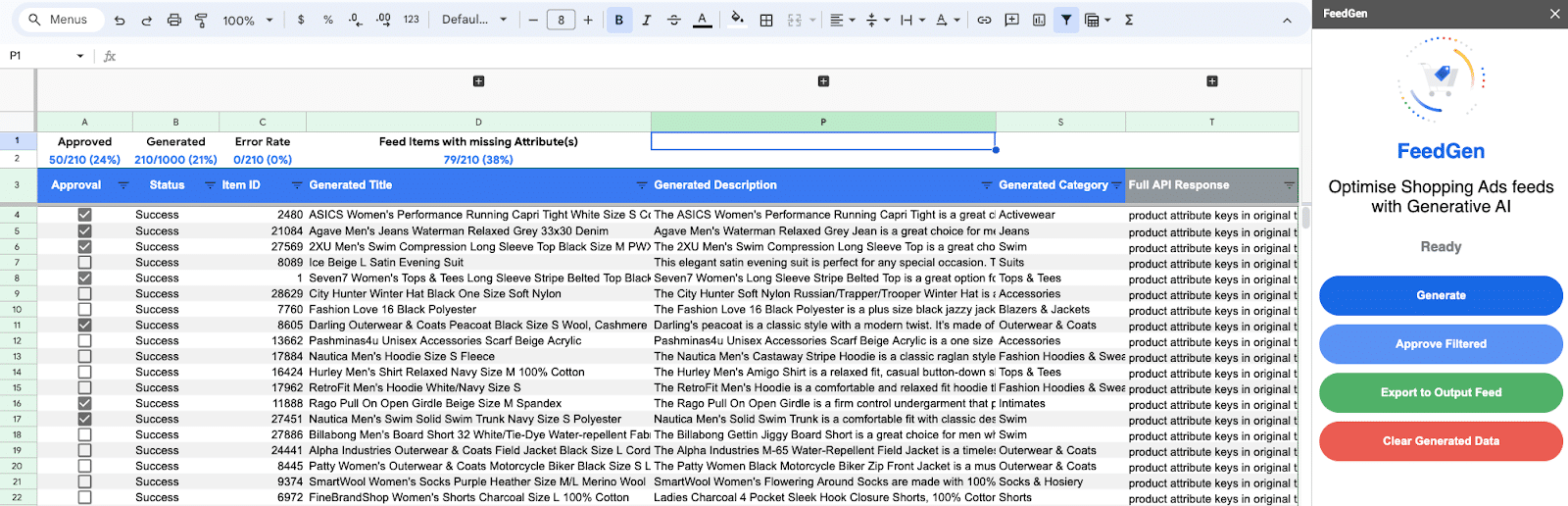
FeedGen tool for optimizing Shopping ads feeds

FeedGen presents many advantages, notably its proficiency in swiftly refining product titles and descriptions in large volumes. 

It's especially beneficial when depending on third-party data and ensures the integrity of titles and descriptions by avoiding fabricated additions. 

Furthermore, users can effortlessly select their preferred titles and descriptions and transform them into a supplemental feed, ready for integration into their Google Merchant Center.

However, using FeedGen can be challenging as it requires the creation of a Google Cloud Project, Vertex API activation, and a solid understanding of Vertex AI for machine learning operations.

The outcome's quality is contingent upon the quality of your prompts, requiring expertise in defining the optimal prompting examples. Setting up examples for each product category can be time-consuming, and meticulously reviewing all products remains imperative to ensure top-notch quality. 

Currently, only English is supported, although there's a potential for expansion into other languages through discussions with Google representatives.

Dig deeper: Top 5 data feed errors that can sabotage your ecommerce campaigns

What to expect when working with FeedGen

Marketers use AI for feed optimization to find scalable and valuable solutions. FeedGen fits this need, working well for both small and large feeds. It fills in missing data and produces detailed descriptions. Its setup can be complex, but its potential is vast.

I've tested FeedGen and found it reliable. Agencies might even use it for multiple clients. Setup takes under an hour, but choosing the right prompts can take longer, depending on the industry and desired outcomes.

Monitoring FeedGen is essential. I've seen errors, ranging from wrong descriptions to titles losing key details. It's important to ensure good input, as poor data gives poor results. FeedGen isn't perfect. 

FeedGen has a rating system for products, from -1 to +1, to help review. Still, I recommend checking each product manually. As for costs, FeedGen is affordable. Bigger feeds might cost more, but smaller feeds should stay around or below $100.

From my experience, you can get up to 80% of properly optimized products after finding your ideal prompts and settings, however until I got to 80% it took me a few tries.

That said, if you manually optimize a larger feed or try to cover it based on static optimization rules, the results would take significantly longer or be worse. From this perspective, FeedGen is already a game-changer on scaling feed optimization.

How does FeedGen compare to feed management tools? 

Marketers often use tools like ProductsUp, Channable, DataFeedWatch and more to optimize product feeds. 

With the rise of AI tools like FeedGen, it's natural to ask: can FeedGen replace these popular tools? 

The straight answer is no

While FeedGen is great for enhancing product details, it doesn't handle the structural tasks that traditional tools do, such as: 

  • Linking data.
  • Setting up rules for information mapping.
  • Working more high-level optimization of titles and descriptions. 

The ideal workflow might be to:

  • Use FeedGen to enrich your product feed with details.
  • Then, rely on a conventional feed management tool to get everything organized and ready for marketing platforms.

Dig deeper: How to set up feed rules in Google Merchant Center and ensure quality product data

ChatGPT and FeedGen: Your gateway to well-optimized product feeds 

AI-driven tools like ChatGPT and FeedGen can significantly boost your product feed optimization efforts, offering scalability and improved data quality. 

These tools are valuable additions to your PPC toolkit, but it's important to recognize their specific strengths and limitations. 

Consider how they can work alongside traditional feed management tools to achieve the best results for your advertising campaigns.

The post How to optimize your product feeds with ChatGPT and FeedGen appeared first on Search Engine Land.


via Search Engine Land https://ift.tt/Wz0iMG1

Hosting third-party content: What Google says vs. the reality

Ever since media publishers moved online, SEOs have been working to help rent out space on their sites in order to gain quicker traction. 

This is not a new concept and has been done and abused over the past few decades, so much so that it has earned the name “parasite SEO.”

What is parasite SEO?

Parasite SEO is when a third party publishes content on a larger website in order to leverage its authority and gain quicker traction. This practice often happens to large media publishers and news outlets. 

So why would large media publishers and news outlets let this happen? Well, it all comes down to money. 

The third party does all the work, and all the website has to do is host the content. Easy revenue share opportunity! These third parties often do affiliate marketing or general high-interest content that earns either affiliate or ad revenue. 

Google’s warning

Google updated its helpful content documentation in September 2023 with the following:

“If you host third-party content on your main site or in your subdomains, understand that such content may be included in site-wide signals we generate, such as the helpfulness of content… we recommend that it should be blocked from being indexed by Google.”

For third parties and media publishers currently in partnerships, this was a scary announcement to see. However, what made it worse was when Gary Illyes posted this on LinkedIn:

So, does this mean that all third-party content is inherently bad?


Get the daily newsletter search marketers rely on.

Processing…Please wait.


What Google says vs. the reality

To be clear, hosting third-party content is not against Google’s guidelines.

It’s easy to take what Google says at face value and roll with that. But their algorithm is so much more nuanced than they could ever really explain. 

So let’s break down a few things in the official statement:

‘Included in site-wide signals’

  • “If you host third-party content on your main site or subdomains, understand that such content may be included in site-wide signals we generate, such as the helpfulness of content.”

What this means

If you rent out sections of your site, any content the third party produces will be lumped with your main site’s content.

The reality

Google using site-wide signals isn’t a new thing. What’s important to note is that Google uses a mix of page-specific and site-wide signals simultaneously. All ranking factors may be weighed differently at any given moment depending on the search intent. 

A bigger reality is that larger news and media publishers have some of the largest sites on the web due to their lengthy history. This means that even without third-party content, they will be affected by the helpful content update due to poor content already existing on the site. 

As someone who actively publishes content on third-party sites, this makes me much more selective with the media publishers I choose to partner with. I don’t want to invest my team’s time and effort into a site we’ll struggle to rank on.

‘...host third-party content on your main site or in your subdomains…’

What this means

It’s common for media and news sites to carve out completely siloed sections of their site for third parties. This can be a subfolder or a subdomain. What happens is these sites allow third parties to have free reign over these sections, but they receive no internal links from the core site. 

The reality

This is actually a negative signal for Google, telling them almost explicitly that this content is renting space and the publisher doesn’t want to affiliate themselves with the content other than sharing the root domain and branding. 

This practice really doesn’t help the third party that much and is a practice that needs to go. If you’re in this situation, talk with your publisher about finding ways to add internal links to your content naturally.

‘...typically without any oversight…’

This comes from Illyes’s LinkedIn post about the change in documentation. The full quote is:

  • “We've heard (and also noticed) that some sites "rent out" their subdomains or sometimes even subdirectories to third-parties, typically without any oversight over the content that's hosted on those new, generally low quality micro-sites that have nothing to do with the parent site.”

What this means

Based on the sites I’ve analyzed, news publishers often fall victim to this. They form partnerships with agencies and give them free rein over a microsite. 

It’s often unlinked from the parent site and is typically focused on general affiliate marketing, while the main site is focused on news.

The reality

Google is actually pretty spot-on here. The content I’ve seen doesn’t follow any E-E-A-T guidelines. It disobeys my number one rule of content, “Does it sound like ChatGPT wrote it?”

Typically, the authors on these posts just say the name of the marketing agency and the content is very generalized without providing any meaningful value or usefulness. 

‘...we recommend that it should be blocked from being indexed by Google.’

The full quote is: 

  • “For this reason, if that content is largely independent of the main site's purpose or produced without close supervision or the involvement of the primary site, we recommend that it should be blocked from being indexed by Google."

What this means

Google is recommending to these publishers that they place a noindex tag on all third-party content that is not closely supervised. 

The reality

I’m really torn on this comment. If I was the lead SEO at a publisher and discovered all of this low-quality content, I wouldn’t just noindex it, I'd likely remove it. 

However, there are so many business contracts and relationships at play that this is likely not feasible. This is often revenue-generating content that is there for a reason. 

If you’re currently in a situation like this, the logical next step is to do a mass overhaul of your content and create an E-E-A-T rubric for your third party to follow. 

Who’s Google talking about?

As I've mentioned before, Google is mostly targeting local news sites and larger media publishers who have active third-party content on their sites. 

Here are a few telltale signs of sites that the next implementation of the helpful content update will hit. 

The content is completely siloed

This means that the site has no internal links coming from the parent site and the content is not relevant to the main site.

The content sounds like AI wrote it

This is my number one criterion for judging content quality. When you read it, does it have a voice, or does it sound like a robot wrote it to be generalized? 

Your content should have a point of view, otherwise, it might as well be instructions on a shampoo bottle. 

There’s no authorship

It’s worth noting that Google’s algorithm doesn’t actually use authors as a ranking factor. This was confirmed at Pubcon in 2023 by Illyes and documented by Mark Traphagen.

However, Google can recognize authors through internal links.

Contradictory? Well, kind of. It means that Google can recognize authors but doesn’t actively use it as a ranking signal.

What this means for us is that Google may end up using this as a ranking signal in the future.

So, if “Acme Marketing” authors your content, you may want to invest in some meaningful experts in the field.

Hosting third-party content: How to do it correctly

I’d like to reiterate that there’s nothing inherently bad about hosting third-party content and it’s not against Google’s guidelines. 

There are ways to do it correctly where you actually provide value to users. Here are my top tips to do it correctly. 

Stay on-brand 

Your content must stay on-brand with the parent theme. So, if you’re partnering with a media publisher that focuses on home decor, make sure any content you’re producing fits within that niche. 

This, unfortunately, makes it difficult for news sites, but you might be able to creatively find a way to produce meaningful content for news sites.

Get qualified experts

Especially when it comes to YMYL content, getting qualified subject matter experts is vital to maintaining E-E-A-T. You’d be surprised how many experts would love to review or even write content for you if it means they get featured somewhere notable. 

Make sure to create meaningful author bio pages to demonstrate why users should trust them.

Find and create natural internal linking opportunities

If your content is staying on-brand with the parent site, then you should have no problem finding natural internal linking opportunities.

If none exists, work with your team to create meaningful content that may naturally link to your third-party content.

Work closely with the parent company

It’s critical to work closely with your parent company to ensure your content is on-brand with the rest of the site.

Because the helpful content update is a site-wide signal, all content on the site must be consistent in tone and messaging. 

Making third-party content work for you

Never take announcements from Google at face value. Take time to think about what Google is saying and decide what nuances may play into it. 

Nothing is final. If the algorithm worked exactly like Google said it does, we wouldn’t have so many algo updates. It’s an evolving process. 

So, pick up on the signs of where Google is heading and always focus on creating the best experience for your users.

The post Hosting third-party content: What Google says vs. the reality appeared first on Search Engine Land.


via Search Engine Land https://ift.tt/6kJFShs

Wednesday, 1 November 2023

Attend Engage Boston on Nov. 14-15 by Acquia

Join Acquia for our next stop on our Digital Freedom Tour in Boston.

Join a packed two-day agenda full of thought-provoking keynote speakers, breakout sessions led by industry experts and practitioners and workshops.

You can expect today’s most impressive digital leaders to share their expertise, insights and secrets to creating customer experiences that truly make a difference. Don’t miss this chance to join leading digital innovators—along with your peers to gather, learn and share together.

Register today with a special discount code just for you! Use MARTECHEARLY to join us for this event you don’t want to miss.

The post Attend Engage Boston on Nov. 14-15 appeared first on Search Engine Land.


via Search Engine Land https://ift.tt/i5AdmcF

How to create linkable assets with ChatGPT

Many of us have come to terms with the idea that generative artificial intelligence (genAI) doesn’t autonomously execute some digital PR, SEO or content marketing activities.

Tools like ChatGPT can currently augment our workflow to improve the quality and speed of creating powerful tools for users that creators want to share and link to because it has a unique value for their audience.

Depending on the level of complexity, a task can be augmented, automated, or autonomously performed by machine learning, artificial intelligence (genAI included), or robotic process automation (RPA).

ChatGPT is a tool to augment certain big digital marketing and SEO tasks. 

This article will explore how digital marketers or SEOs can use generative AI to create assets like useful tools and widgets that content creators want to share because of the value it creates for their audience.

Insights from the article:

  • A linkable asset is a well-positioned asset owned by the company that can be either people, processes or technology.
  • Linkable assets planning starts with a hyper-specific audience segment.
  • Although the capabilities of generative AI are limited, digital marketers can create Google Sheets/Excel templates and then turn those templates into widgets with ChatGPT coding.
How to create linkable assets with ChatGPT

What is a linkable asset?

A linkable content asset is content that communicates the unique value proposition (UVP) of a company’s owned assets. The company’s assets are people, processes or technology that the company owns.

These assets attract shares and links due to their distinctive value proposition, designed to resonate with content creators, journalists, and audiences. The primary goal is to create a compelling story around the asset that encourages sharing and linking.

Linkable assets have a story to tell, which can take the form of helpful infographics, interactive tools, blog articles, interviews, or just case studies.

For example, this BrightLocal study about the weight of online reviews in consumer decision-making received over 2,563 links, according to Ahrefs.

The study is the asset, but Miles Anderson tells the asset’s story in his byline. Anderson and BrightLocal have built a strong brand expectation for good studies.

BrightLocal study

Here’s the Ahrefs “Best by links” report that shows a massive link profile for that specific URL.

BrightLocal article - Ahrefs “Best by links” report

Tip: Truly professional journalists and creators will want to cite the source of the study. So, when people share a study, they will link back to the source on your website if the study is meaningful. Anderson is a master of this.

Linkable assets earn links because they resonate with the audience’s needs and desires. Connecting your company’s assets to those needs requires a customer-first approach to planning the assets.

Linkable asset planning

Linkable assets provide significant value for a reader. However, not every outlet or creator will see value or understand how the content connects to their audience.

This problem requires creativity. So, I like to use a creative framework that starts with identifying what assets you have, makes a connection between the asset and the customer, and then ends with creative enablement of the assets.

An enablement framework for marketing linkable assets is:

  • Ambassador: Learn the ideal customer(s) pain, gains, and workflows.
  • Find assets: Identify the company’s owned assets that solve pains for your customers.
  • Position assets: Find a story explaining how the asset impacts the customer’s goals or needs.
  • Create assets: Use a design-thinking method to enable the story to be told by internal and external trusted sources. 

The story is ready to be told with the assets identified, but now you need to create a content asset.

Tip: Before you start planning the asset, set the overall team or project objectives using the OKR methods.


Get the daily newsletter search marketers rely on.

Processing…Please wait.


Creating a linkable asset with ChatGPT

Generative AI has its limitations, but I've been able to create useful tools and templates to solve foundational pain points using ChatGPT. 

Be an ambassador 

Have ChatgGPT act like a product manager and explain the customer journey, pains, and needs.

For my example below, I found that digital marketers are using email templates that don't work because they are overused.

However, creating each email from scratch is too time-consuming to fit into their other tasks.

Find assets 

I have an email template I like to use for my enterprise outreach that avoids the overused templates.

The template is unique from all the other email outreach templates because it focuses on the content creator's needs for bulletproof facts and evidence to support claims based on content analysis. Most templates don't do this.

Position asset 

Many digital marketers trying link building need to improve performance because they use outreach templates that don't demonstrate expertise or allow for customization for a site analysis.

This template is for digital marketers who have expertise but need help to tell that story.

Tip: When creating an asset, find a blue ocean link building strategy instead of a red ocean strategy. These strategies don’t follow the market trends in content marketing but create a new one.

Create asset 

Using ChatGPT, I turned my email template into a Google Sheet template builder.

With this template, a digital marketer can analyze the gap and explain how their expertise aligns with the site's gaps.

The asset saves time analyzing sites and writing custom emails so the digital marketer can spend time on higher-level marketing tasks.

To create the Google sheet template builder, I: 

  • Uploaded the output template (my base email template).
  • Asked ChatGPT to reverse-engineer it to identify all the dynamic fields.
  • Created the equation to combine each input field into an output field for the final email.
CONCATENATE function - Example

This screenshot shows a template that I had ChatGPT create.

ChatGPT created template

And here's the output of the sheet:

ChatGPT created template

Create simple widgets

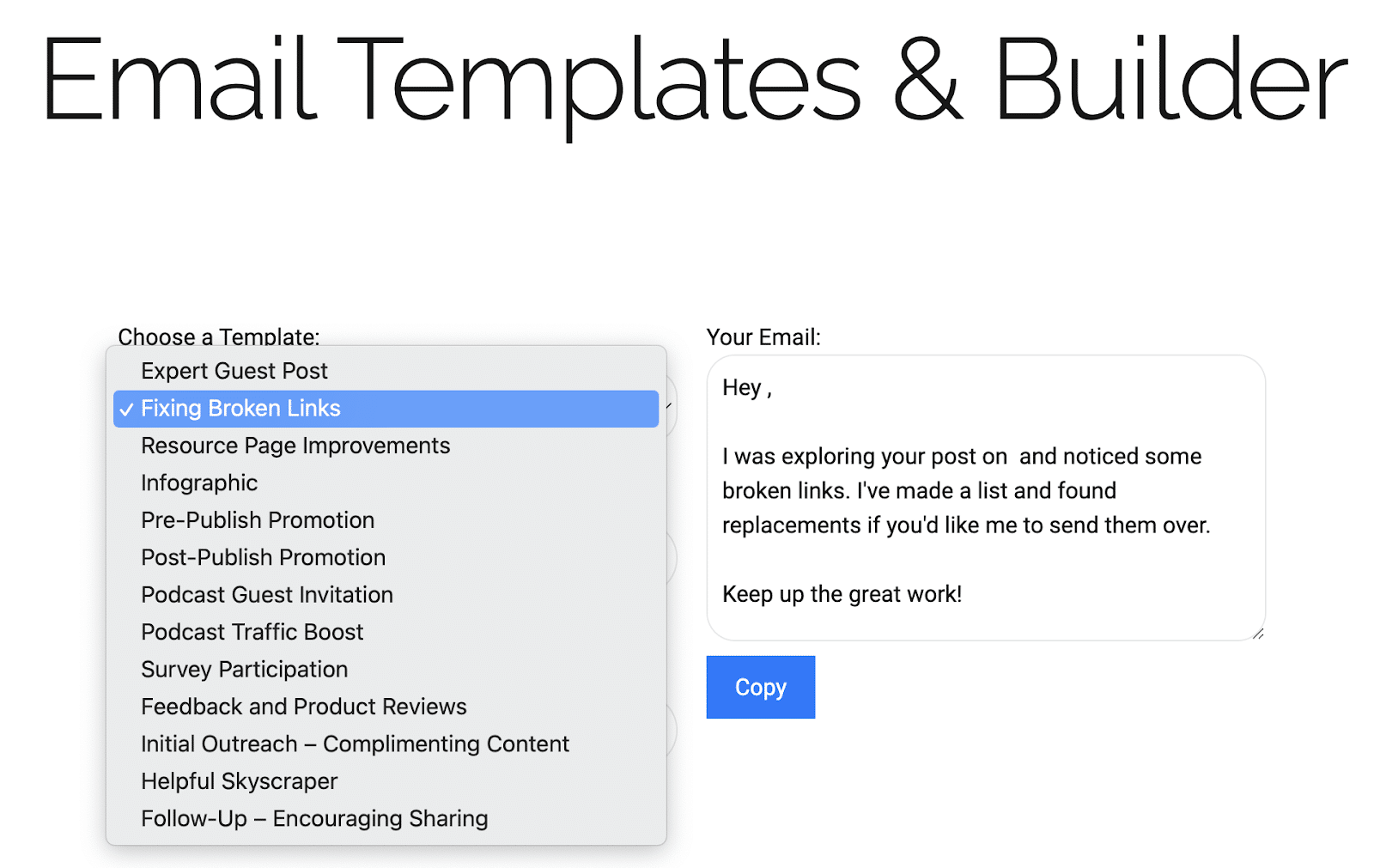
I took it further and created a small widget so the team could select from various templates based on the email campaign type.

I prompted ChatGPT to create a widget from inline HTML and CSS from this template.

Create simple widgets

Tip: After creating the asset, you must market it to the audience. As I point out in "Modern link building starter guide," make sure the goal of your asset marketing is to create audience action and not just get a link. Links are a consequence of excellent asset marketing rather than the goal.

Create more value for your audience by using ChatGPT for more advanced analysis. Here are 5 SEO use cases for ChatGPT's Advanced Data Analysis plugin by John McAlpin that can be combined with the template and widgets creation process above.

Take the leap

AI won't replace all aspects of PR, SEO, or content marketing, but it can enhance our processes, making tasks more efficient and valuable for the audience.

Through examples and insights, unique and valuable content can be created with the assistance of AI, paving the way for a more automated and optimized future in the industry.

Whether augmenting, automating, or acting autonomously, tools like ChatGPT can offer significant value in the digital space.

The post How to create linkable assets with ChatGPT appeared first on Search Engine Land.


via Search Engine Land https://ift.tt/c4ZytH6

Search, social and retail: The future of digital brand experiences

In today’s expansive yet interconnected digital marketing landscape, creating a successful online presence requires a deep understanding of various marketing channels. 

While SEO and PPC are well-known strategies for enhancing online visibility, it’s essential to explore emerging and overlooked opportunities like retail media and social media, including social search. 

This article tackles the synergies between these channels and how brands can offer a more engaging content experience to their audience with a holistic approach.

Retail and social: Why should you care?

Retail media, a thriving high-margin channel, targets consumers during purchase decisions, online and offline, offering brands opportunities to influence decisions at the point of sale.

Social media marketing, with its organic and paid facets, enables brands to build communities, engage audiences, and explore social commerce, particularly with the rise of “TikTok Shop.”

As a strong proponent of “search everywhere,” it’s essential to recognize social search.

It amplifies social platforms by intertwining social interactions with search functions, allowing users to search and discover brand and user-generated content.

As search marketers, the onus is on us to: 

  • Delve deeper into these emerging marketing channels.
  • Learn their mechanics.
  • Explore how they can be integrated with our search marketing strategies. 

Our goal must be to create a holistic digital marketing ecosystem that drives traffic, fosters engagement, influences purchasing decisions and elevates the brand experience.

The role of search, social and retail in your marketing mix

Before we dive deeper, let’s align our understanding of each channel’s roles and responsibilities.

Channel: Search marketing

Core focus

  • Driving organic traffic
  • Grow online visibility
  • Develop awareness and consideration

Tactics

  • Digital PR activations and link building exercises
  • On-site content creation and optimization
  • Technical SEO implementation

Metrics

  • Organic traffic growth
  • Conversion rates / click-through rates
  • Rankings and visibility metrics

Channel: Social marketing

Core focus

  • Build and nurture community
  • Engage with audiences
  • Enhance brand personality
  • Develop awareness

Tactics

  • Content creation
  • Trend capitalization
  • Influencer activation
  • Strategic partnerships

Metrics

  • Follower/community growth 
  • Engagement rates
  • Shareability 
  • Sentiment

Channel: Retail media

Core focus

  • Influence purchase decisions near point of purchase
  • Targeted advert space capitalization
  • Improve shopper experiences

Tactics

  • Product listing ads
  • Sponsored product placement
  • In-store advertising 
  • Webstore advertising

Metrics

  • Reach and impressions
  • Return on ad spend
  • Acquisition costs
  • Conversion rates

Thinking more holistically

The consumer journey showcases the intertwined nature of search, social and retail media.

As consumers navigate search engines, social platforms and retail sites, their interactions with brands become complex and multifaceted. It’s time to harness the convergence of these channels for a holistic brand experience. 

Cross-channel integration starts with acknowledging that each channel – search, social or retail media – has unique potential and distinct roles in the consumer journey, as previously described.

  • Search marketing lays the groundwork for initial brand discovery and engagement, but it’s just the beginning. 
  • Social marketing fosters community, nurtures relationships, and can lead to further searches, creating a multi-touchpoint, non-linear journey. 
  • Retail media capitalizes on purchase intent, influencing buying decisions when consumers are ready to convert.

The interdependence of these channels is evident in a unified marketing strategy:

  • Data insights from search marketing shape social content, which drives traffic to retail platforms.
  • Social engagement informs product listings and ads on retail media. 
  • User-generated content boosts organic search rankings, creating a feedback loop for an enhanced strategy.

Gatekeeping our insights is a surefire way to shoot our strategy in the foot.

We’re at a stage now where knowledge truly is potential power, and we must be leveraging, sharing and collaborating on that insight to grow.


Get the daily newsletter search marketers rely on.

Processing…Please wait.


Creating seamless brand experience: Key considerations

There are challenges that marketers will face around this discussion.

Data privacy concerns are at the forefront, with stringent regulatory frameworks guiding the collection and utilization of consumer data.

We must learn how to navigate these regulatory waters while striving to provide a personalized and cohesive brand experience.

Additionally, overcoming siloed marketing operations to foster a collaborative and integrated marketing environment is imperative.

A holistic approach toward attribution is required to measure ROI accurately across channels, enabling marketers to optimize their strategies for better outcomes.

The journey toward a converged digital marketing strategy combines strategic thinking, technological innovation, and a deep understanding of consumer behavior across channels. 

It involves breaking silos, fostering collaboration and crafting a compelling narrative that engages consumers. 

For search marketers, integrating social and retail media into search strategies is key to creating robust digital brand experiences.

The rise of social search and 'search everywhere' content

Social search and creator-led SEO are growing as consumers use social media for connection and discovery. 

"Search everywhere" envisions a future where content is discoverable on traditional search engines and social platforms, offering a unified search experience.

We must optimize content for social search to enhance brand discoverability across digital touchpoints.

Evolution of retail media platforms

Retail media platforms are evolving to offer more than just advertising space.

They are morphing into comprehensive marketing platforms offering rich data analytics, personalized advertising and immersive shopping experiences. 

Here, it's all about SEOs looking for opportunities to enrich the consumer's journey from discovery to purchase.

Search-integrated influencer marketing and the creator economy

Influencer marketing is a potent bridge between search, social and retail media marketing.

By collaborating with influencers, brands can harness the power of authentic social proof, content that effectively displays E-E-A-T,  while driving traffic and conversions on retail platforms.

Integrating influencer marketing with SEO can boost organic search rankings through quality backlinks and user-generated content generated around conversations, trends or missions.

Tips for implementing a truly holistic digital strategy

Embrace technological advancements

  • Embrace AI, AR and VR for engaging marketing. 
  • Partner with social and retail media platforms for integrated brand experiences beyond SEO.

Continuous learning and adaptation for SEOs

  • SEOs should keep learning and adapting to stay updated with emerging trends and consumer behaviors.
  • Engage with communities, participate in forums, and attend industry conferences for a broader understanding of activation approaches.

 Establishing metrics and KPIs for Success

  • Establish robust metrics and KPIs to measure success across search, social and retail media channels.
  • Consider using "share of search" as a metric that spans both search and social search.
  • Utilize data analytics to gain insights, measure ROI, and optimize strategies for better outcomes.
  • Embrace a culture of data-driven decision-making for successful integrated marketing.
  • Consistently test, learn and test again to refine your strategies.

What's next: The convergence of search, social and retail media

Embracing the convergence of search, social, and retail media is essential for SEOs. It enhances brand engagement and the consumer experience.

It’s time to explore beyond traditional search marketing, dive into social and retail media, and foster collaboration. 

By doing so, we amplify our brand's digital image and pioneer an integrated, user-centric digital marketing narrative. 

Our journey forward involves continuous learning, adaptation, and embracing new marketing paradigms to stay competitive with evolving digital-native consumers.

The post Search, social and retail: The future of digital brand experiences appeared first on Search Engine Land.


via Search Engine Land https://ift.tt/81Pbf3X

How to manage and optimize local listings for SEO

Optimizing local listings for SEO is essential for businesses looking to turn online interest into real-world visits and sales.

Up to 87% of consumers relied on Google to evaluate local businesses in 2022. Neglecting your business’s local online presence can give your competitors an edge and lead to missed sales opportunities.

Here is an overview of SEO best practices for managing and optimizing local listings for SEO.

Local listings: What are they and why do they matter?

The core component of your business’s local SEO strategy will be its local listings. 

Local listings refer to the online profiles that provide essential business details, such as name, address, phone number, hours of operation, etc., typically displayed on directory websites and search engine results. 

These listings are crucial for businesses aiming to capture local searches, ensuring that potential customers find accurate and consistent information and helping search engines like Google populate results with accurate business-related data. 

A Google Business Profile (GBP) will almost always be the most important local listing for any business, given the site’s prominence and integration across Alphabet’s products like Search and Maps. Creating a customized GBP is free and relatively easy. 

A verified Google Business Profile helps ensure your business will appear in Google Map Pack or Google Local Pack search results. 

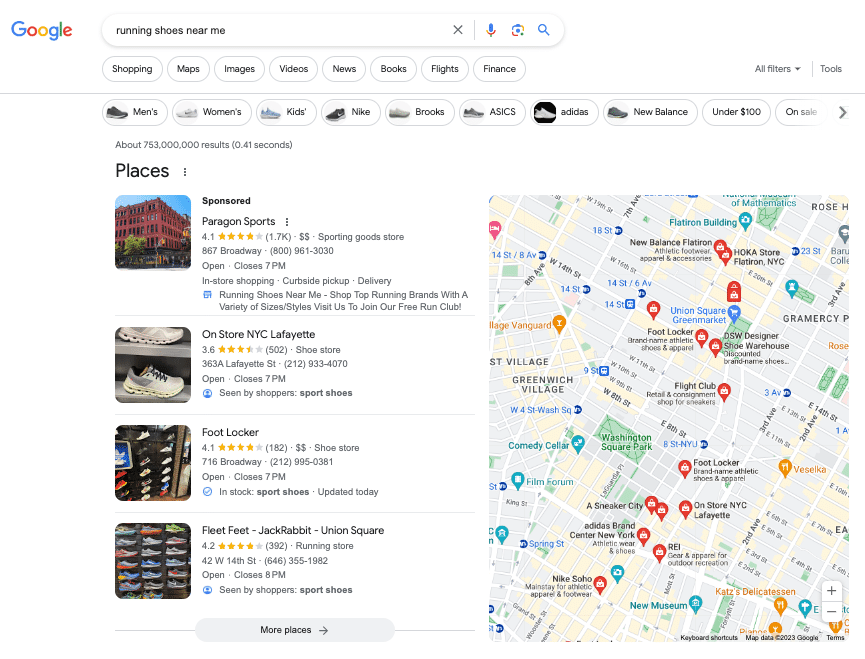
As seen in the example below for [running shoes near me], the map pack consists of top-ranking local listings for a user’s search location, displayed prominently above the first traditional organic result. 

running shoes near me

With organic click-through rates significantly higher among these first results, it’s critical to optimize your business profile to meet the search engine’s needs. 

It’s important to note that Google is not the only location-based listing platform you should be aware of. For restaurants, Yelp provides reviews, ratings and photos, which can significantly influence consumer decisions due to the platform’s popularity. 

Similar to GBP, Bing Places is another platform where businesses can list their details, ensuring visibility among users of Microsoft Bing. 

Depending on your investment level, a third-party local listing tool like Yext can help your business integrate across hundreds of directories to automatically sync key information as it evolves, like business hours, special events and more. 


Get the daily newsletter search marketers rely on.

Processing…Please wait.


Managing and optimizing local listings

You can think of local listings as digital storefronts of the web. 

Setting up a Google Business Profile with basic information only scratches the surface for businesses looking for optimal online visibility and local market reach. 

This ongoing process involves:

  • Ensuring listing accuracy.
  • Updating information
  • Engaging with reviews.

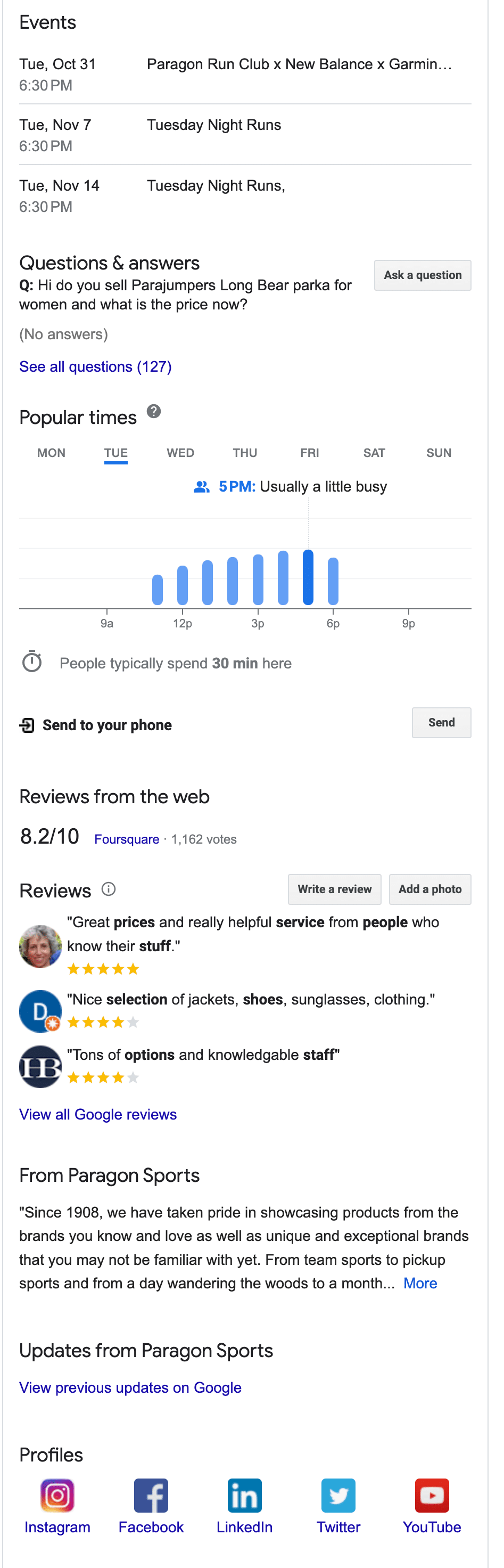
Let’s take a more detailed look at Paragon Sports’ business profile, one result from our [running shoes near me] example above:

Paragon Sports - GBP

Paragon Sports’ listing spans more than half of the entire first page of results, with many useful information for local searchers, including:

  • Service options.
  • Hours of operation.
  • Phone number.
  • Special events.
  • An in-store inventory.
Paragon Sports - GBP additional info

As users continue to scroll, they can engage with reviews, learn more about the business and access external social profiles.

The information shown here combines business-provided, user-generated and Google-powered content.

Let’s dive into the basic elements of the first part of that equation. 

NAP: Basic components of a strong local listing

NAP (business name, address, and phone number) consistency across listings is a foundational requirement for local SEO.

Inconsistent NAP information across different platforms can confuse search engines, ultimately affecting your rankings. 

More importantly, potential customers can lose trust if they encounter different details on the web. For successful local SEO:

  • Ensure that the NAP on your website matches the NAP on all local listings.
  • Audit listings regularly to correct any inconsistencies.
  • Use the exact same format everywhere, even down to the details like "St." versus "Street."

Regularly updating your listings

Outdated information can lead to lost opportunities and frustrated customers. 

Imagine a searcher trying to visit your store based on old address information or calling an out-of-service phone number. 

It's crucial to update listings whenever there are changes in key business information.

When determining how businesses appear in search results, Google’s local algorithm uses a combination of factors, primarily skewed toward: 

  • Relevance.
  • Distance.
  • Prominence. 

Incomplete or incorrect data will ultimately cause you to lose favor within local packs. 

Always audit updates for accuracy and consistency across all platforms. 

Google allows users to suggest changes to profile categories like operating status, hours and business details. 

While these can sometimes help identify alterations that need to be made, they could be inaccurate. 

As the verified owner of a Google Business Profile, you can accept, reject, or modify these updates. 

Adding photos and in-store products

Visual content is necessary for telling the story of your business. 

Photos offer potential customers a glimpse into your offerings, setting expectations and helping them make informed decisions. 

Visually appealing and relevant images can significantly enhance user engagement, making them more likely to interact with your listing and ultimately choose your business over competitors.

Be sure to add high-quality visuals to your business profile that meet Google’s requirements. Best practices include: 

  • Showcasing different angles of both the exterior and interior of your business.
  • Ensuring all images are high resolution, not pixelated.
  • Rotating photos with seasonal, up-to-date offerings. 

Additionally, many local listing platforms, including Google, allow businesses to highlight specific products available in-store. 

Be sure to take advantage by choosing relevant products that are popular, unique to your business, or currently on promotion and providing detailed information like prices and descriptions.

Monitoring and responding to reviews

When it comes to local listings and your Google Business Profile, customer input is just as important as any information provided on the business’s side. Reviews play a dual role: 

  • They influence potential customers' perceptions.
  • They impact search rankings.

A stream of positive reviews can boost a business's credibility and trustworthiness, while negative reviews, if not handled properly, can have the opposite effect.

Search engines view businesses with positive reviews as more valuable to users, often rewarding them with better local rankings.

Overall, you should always encourage your customers to share reviews online and respond to them authentically, regardless of the feedback. 

Always thank the reviewer for taking the time to leave a comment while addressing their specific concerns and maintaining a professional tone. 

This fosters customer loyalty and mitigates negative third-party results for branded queries that can be harder to control. 

Google also collects and aggregates reviews from third-party sources like Facebook, Yelp and consumer directories, so don’t forget to engage on other relevant platforms as needed. 

Dig deeper: Unleashing the potential of Google reviews for local SEO

Outside local listings: Additional local SEO strategies

Local listings are a pivotal part of local SEO, but to truly dominate local searches, you must extend your efforts beyond listings and toward your website and overall online presence.

Here are a few key additional strategies to bolster your local SEO game.

Leverage local keywords and content

Implement schema and structured data

  • Use local business schema on your website to provide search engines with location-specific information. 
  • Be specific and thorough when implementing schema. 
  • Regularly audit your site for additional schema opportunities.

Location pages and on-page optimizations

  • For businesses with multiple locations, create separate pages for each location to enhance local search visibility. 
  • Use a clear URL structure and integrate local keywords in your content and meta tags. 
  • Embed Google Maps for better user experience and search engine recognition.

Dig deeper: How to do a competitive analysis for local SEO

Embracing the power of local listings

Optimizing local listings for SEO is essential for businesses to boost online visibility and attract local customers. 

Effectively managing your listings improves your chances of appearing prominently in local search results to provide potential customers with accurate, up-to-date information that drives online and in-person traffic. 

As the digital marketing landscape continues to evolve, prioritizing local listings and integrating them with broader SEO strategies will be key to staying competitive and capturing the attention of the increasingly location-conscious consumer.

Dig deeper: 5 top tips to boost your local SEO efforts

The post How to manage and optimize local listings for SEO appeared first on Search Engine Land.


via Search Engine Land https://ift.tt/PD0Oxz3

Tuesday, 31 October 2023

Google Ads pop-up survey disrupting advertisers trying to pause campaigns

Google Ads has started serving a pop-up survey that disrupts advertisers when they try to pause campaigns.

The survey asks users whey they want to pause their ad campaign before allowing them to continue.

Why we care. The pop-up survey may annoy and inconvenience busy marketers who lack the time to explain their ad campaign pause to Google. Nonetheless, this feedback will aid Google in enhancing its product, ultimately benefiting advertisers in the long run.

First look. The pop-up was first noticed by digital marketing expert Greg Kohler, who posted about the survey on X. He shared some screenshots of the notification and then asked Google:

  • “Any chance this added friction could break the scripts or rules people have within accounts to auto-pause once certain budgets are spent?”
  • “Similar to how the account confirmation popup broke large automated budget increase rules.”

Reaction. After Greg shared his findings on X, fellow PPC expert Greg Finn asked Google Ads to stop disrupting advertisers by displaying the survery. He wrote:

  • “Kind request to @adsliaison to have this survey show AFTER the pausing occurs. Right now it adds extra steps for advertisers. We don’t need more bloat in Google Ads.”

Get the daily newsletter search marketers rely on.

Processing…Please wait.


What Google is saying. Google Ads Liaison Ginny Marvin took to X to explain the purpose of the survey:

  • "This is a survey for internal understanding."

Deep dive. Visit the Google Ads Help Center for more information.

The post Google Ads pop-up survey disrupting advertisers trying to pause campaigns appeared first on Search Engine Land.


via Search Engine Land https://ift.tt/Ic7698n