Thursday, 4 January 2024

10 internal linking best practices for accessibility

Internal linking has often been a powerful tool for SEO, helping serve as a bridge to connect various webpages. One main goal has typically been to boost visibility in search engines.

However, the importance of internal linking extends beyond SEO; it’s pivotal in creating a navigable, user-friendly website, especially for people with disabilities.

Internal linking is one area that SEO has influence in terms of where and how it appears on a website.

Unfortunately, many SEO linking recommendations have contributed to the inaccessibility of websites.

Fortunately, SEOs are in a great position to support change and provide better online experiences for site visitors – and sure, Google.

That being said, SEO support alone is not enough. To truly elevate accessibility, it’s imperative to integrate individuals with disabilities across the entire workforce spectrum, from executive roles to entry-level positions and everything in between. Such inclusivity enriches the workplace environment and significantly enhances overall accessibility standards. 

If you’re ready to begin the process leading with accessibility regarding internal linking, here are a few recommendations to help get you started.

Table of contents

1. Use clear and descriptive anchor text

2. Match anchor text to user intent

3. Avoid overloading with links

4. Indicate links that open in a new window

5. Use easily identifiable link styles

6. Use breadcrumb navigation

7. Use a global static navigation

8. Avoid hyperlinking headings

9. Resolve 404 errors

10. Limit the use of redirects

Final thoughts

1. Use clear and descriptive anchor text

Using clear and descriptive anchor text (a.k.a., link text) is fundamental for website accessibility. Anchor text serves as a guide, directing users to what they can expect when they activate a link. Without clear descriptors, users may experience potential navigation errors, especially those relying on screen readers.

“Vague anchor text such as ‘click here’ or ‘read more’ doesn’t provide any context. This is especially problematic for screen reader users who may not have immediate access to the surrounding content that might provide additional hints about the link’s destination. Non-descriptive anchor text can turn browsing into a series of unexpected outcomes and a poor user experience.” according to Stephanae McCoy, founder of Bold Blind Beauty.

Here is an exercise I like to use to illustrate the importance of clear and descriptive anchor text. You essentially blur all surrounding text so only the anchor text is readable. From here, ask yourself: Does the anchor text make it abundantly obvious as to what the next page is about?
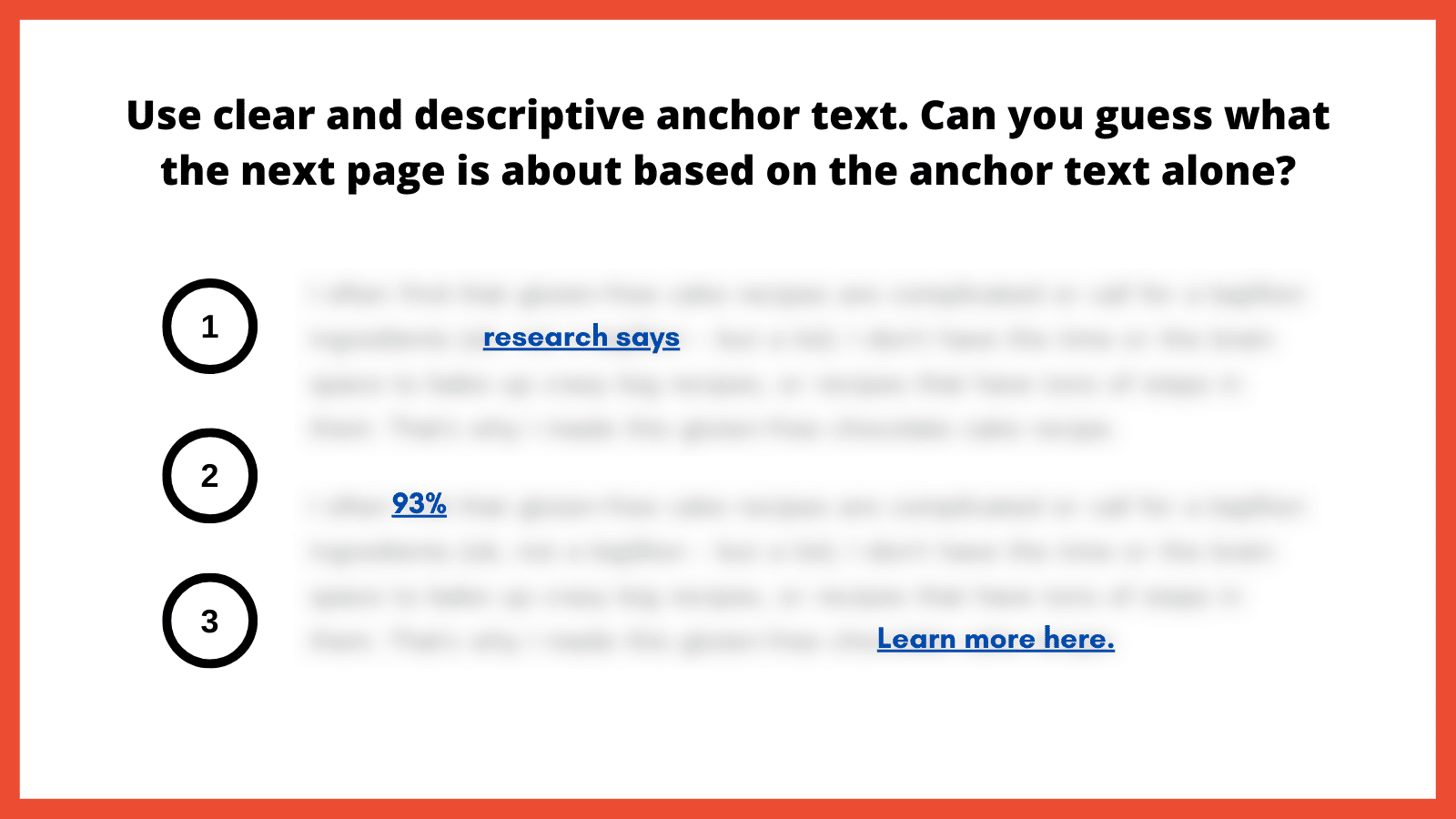
Graphic. Title reads, “Use clear and descriptive anchor text. Can you guess what the next page is about based on the anchor text alone?” Below, three underlined, legible links stand out amid blurred text, numbered one through three. The first link reads “research says.” The next reads “93%” and the third, “Learn more here.”

How to implement

Choose descriptive phrases that provide a clear snapshot of the linked content. This enhances usability and boosts user trust, as they know what to expect from each link.

Alternatively, leveraging ARIA-label attributes can also provide more context by replacing the anchor text with a more meaningful value to provide the necessary context for screen reader users. Replacing anchor text with something valuable helps ensure that each occurrence is distinct and meaningful.

2. Match anchor text to user intent

Matching anchor text to user intent is important for a straightforward browsing experience. Users who click on a link have an expectation based on the anchor text’s description. If the resulting content doesn’t align with that expectation, it can lead to a poor user experience. This inconsistency can be jarring for users with learning disabilities, leading to mistrust.

“Anchor text is possibly the most important part of internal linking, so you need to do it properly. What does ‘click here’ tell the reader? The search engines? People who use screen readers? Nothing. It tells them absolutely nothing. Everyone, and every bot, who is scanning your website needs to understand where they are going,” according to Alice Rowan, website copywriter and SEO consultant, and a community member of Neurodivergents in SEO.

This can also be irritating for screen reader users. Imagine selecting a link labeled “gluten free chocolate cake recipe” and instead being taken to a landing page to purchase chocolate. Your anchor text should serve as a promise and the linked page should deliver on that promise. 

How to implement

Regularly audit internal links to make sure they lead to relevant, expected content. Ensure links consistently deliver on their promises, fostering trust and enhancing the overall user experience. I’ve included a template example at the end of this article. 

We might inadvertently create clutter in our quest to provide as much information as possible. A page saturated with links can be visually chaotic and cognitively overwhelming. For users with attention-related disabilities, distinguishing between a multitude of links can be particularly challenging, leading to fatigue and frustration.

For neurodivergent users and those with cognitive disabilities, a cluttered page with too many links can be disorienting, making it difficult to process information efficiently and leading to a strenuous online experience. Simplifying the layout and reducing the number of links can significantly improve navigability and content absorption, enhancing the overall user experience. 

For screen reader users, an overload of links can be disruptive as assistive technology vocalizes each link. Screen readers use quick navigation keys to efficiently navigate web pages, allowing users to jump to specific elements like headings and links. Navigating through a lengthy list of links can become tedious and overwhelming, making it challenging to retain information or decide which link to select. 

SEO best practices typically suggest fewer than 100 links per page, but a more user-centric approach would be to aim for approximately 25-30 links or fewer. This helps to enhance page clarity and navigability, including for keyboard-only users.

To further optimize the layout, it’s best to avoid crowding links together. In addition to integrating and spacing them in the body text, also consider using bullet lists or tables to improve layout organization.

How to implement

Be judicious with linking. Instead of linking every possible keyword, focus on linking relevant, valuable content that enhances the user’s understanding or provides avenues for deeper exploration.

Ask yourself: Am I only adding this link solely for SEO, or am I adding it because it genuinely adds value? Also adopt this mindset if/when link building. 

Links that open in a new browser window or tab can introduce unexpected behavior, which can be disorienting. This sudden change is almost the equivalent of having a conversation, then being moved to a different room without warning. For users who rely on screen readers or those who are neurodivergent, these surprises can disrupt the entire browsing experience.

“Screen reader users might not immediately realize that a new window or tab has opened. They might continue attempting to navigate as if they were on the original page, leading to confusion,” according to Raghavendra Satish Peri, founder at DigitalA11Y.

Users with motor disabilities might find switching back and forth between windows or tabs challenging, making the experience cumbersome.

In the SEO industry, it has been previously recommended that we open a new window if it directs visitors to a different website, that way we avoid losing them completely. However, it’s better to keep users in the same window unless there’s a compelling reason to do otherwise, such as a calendar-based date picker. Another route is allowing users to open links in the same window or a new one.
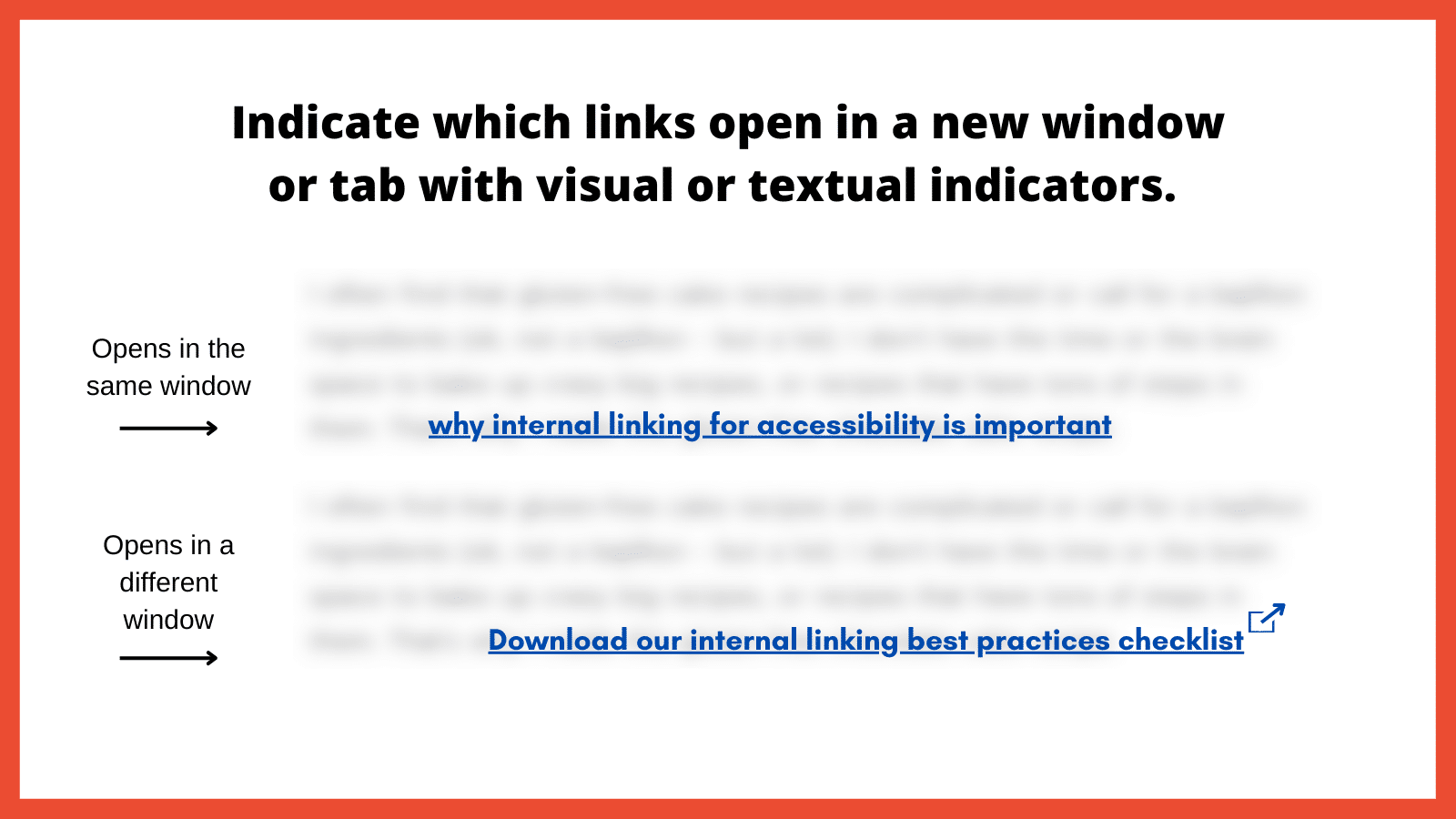
Graphic. Title reads, “Indicate which links open in a new window or tab with visual or textual indicators.” Below are two blurred blocks of text, each with a legible, underlined link. One is labeled “Opens in the same window.” The other, labeled “Opens in a different window”, has an icon of a square with an arrow pointing out of the upper right corner at the end of the link.

How to implement

Use visual and/or textual indicators to inform users that a link will open in a new window or tab. This can be done by appending phrases like “(opens in a new tab)” to the link text or using distinct icons next to the link. By indicating when links open in a new window or tab, you’re promoting transparency and predictability in the user experience. 

The visibility and distinctiveness of links are important in encouraging users to identify and interact with them. If links blend into the regular text and are not easily distinguishable, it can hinder navigation, causing users to overlook important pathways. Plus, how can we help increase page views and decrease the bounce rate if links are hard to find?

“For low-vision users or those with color vision deficiencies, indistinguishable links become nearly invisible. Links need to have at least a 3:1 color-contrast ratio to make them stand out,” according to Denis Boudreau, the founder of Inklusiv and Director of Instructor Led Training at Deque Systems.

Similarly, individuals with learning disabilities might struggle with non-standard or inconsistent link styling, as it adds an extra layer of complexity to their browsing experience.

How to implement

Links should have a uniform style throughout the website. The ability to perceive the link will depend on different modalities, such as a specific color, underline or other visual treatment. Maintaining consistency helps users quickly identify links no matter where they are on the site.

Be sure to also utilize a 3:1 color contrast so the chosen color can contrast against the surrounding text, while also meeting a contrast of 4.5:1 against the background. The hyperlinked text should also change in color and/or style when the focus is set to that link.

6. Use breadcrumb navigation

Breadcrumb navigation is a secondary navigation system that displays the user’s location on a website and the path taken to reach that location. Visually represented as a trail of links, usually at the top of a page, breadcrumbs offer users a quick way to understand their current position and how it relates to the broader site structure.

For screen reader users, breadcrumbs provide a quick overview of where the current page sits within the site structure. It offers an alternative navigational method, allowing these users to jump to higher-level sections without navigating back through multiple pages.

Breadcrumbs should be static, not dynamic. This is important for neurodivergent individuals due to its consistency and predictability, which helps maintain website orientation. This fixed format reduces cognitive load by providing a clear, unchanging path, allowing for easier information processing.

“Static breadcrumbs provide a consistent navigation structure, essential for neurodivergent users. This feature reduces cognitive load, allowing users to return to pages higher in the site structure, such as parent categories. This clear, unchanging path helps users dig themselves out of ‘rabbit holes’ and return to the previous page or category,” according to Jack Chambers-Ward, the co-founder of Neurodivergents in SEO and Marketing & Partnerships Manager at Candour,

How to implement

Breadcrumbs should be easy to find, typically at the top of a webpage, and should be visually distinct from other content. Ensure each segment of the breadcrumb trail is linked, except for the current page, allowing users to easily return to previous sections or pages.

Make sure the breadcrumb is marked up semantically, using appropriate HTML elements and ARIA roles so screen readers can interpret it correctly.

7. Use a global static navigation

Global static navigation refers to a consistent set of navigation options that remain unchanged across all pages of a website. Typically found at the top of a website or along the side, this navigation provides a stable and predictable menu, ensuring users always have a familiar set of options to help them move around the site.

Businesses sometimes adjust the top navigation based on user interactions for various reasons. That can include drawing attention to specific products, services or content based on what they believe a user might be interested in. While there can benefits to dynamic navigation, these changes can sometimes complicate the user experience, especially if it disrupts the consistency or predictability of the site. 

“Some neurodivergent users, such as people with dyslexia and those with memory-affecting disabilities, particularly benefit from static navigation. If a user is having to regularly relearn or re-adjust to new navigation layouts on every page, it can be disorienting.” according to Billie Geena Hyde, founder of Uptake Agency and community member of Neurodivergents in SEO.

The level of effort to understand and navigate a website should be minimal, and if your site is difficult to navigate, users with disabilities would likely look for alternatives. Many users with disabilities are incredibly loyal to brands that prioritize accessibility.

How to implement

Adopting a consistent global navigation menu across the website provides users with a stable, familiar anchor. This consistency reduces cognitive load and enhances navigational efficiency.

The order of links should be predictable, logical and intuitive. It should include links to the most important or frequently accessed sections of the website, ensuring users can always quickly reach key areas. 

8. Avoid hyperlinking headings

Headings play a pivotal role in organizing content and guiding users through a webpage’s structure. They act as signposts or a table of contents that help users understand the hierarchy and flow of information. When headings are hyperlinked, for some users it can disrupt this organizational structure, making the content harder to navigate and understand.

For screen reader users, headings are especially crucial. That’s because users often navigate by jumping from one heading to the next to quickly scan and understand the content’s layout. Hyperlinked headings can throw off this rhythm, as the user might unexpectedly find themselves on a new page or section without intending to navigate away.

It’s important to note, however, that feedback from screen reader users on this issue varies. In conversations with various users while putting this article together, some reported no disruption from hyperlinked headings, while others found them extremely bothersome. This mixed response is the reason for including this point.

How to implement

As a general rule, headings should be free of links. This ensures they serve their primary purpose of structuring content without adding potential perplexity.

If there’s a need to provide a link related to a heading’s topic, it’s better to include that link in the text immediately following the heading. This approach maintains the clarity of the heading while still offering the link.

9. Resolve 404 errors

Broken links are the digital equivalent of dead ends. They disrupt the user journey, leading to frustration.

Commonly known as a “Page Not Found” error, these occur when a user tries to access a webpage that doesn’t exist on the server. These errors can result from a page being deleted, a URL being changed without proper redirection or a mistyped URL.

“From an accessibility standpoint, 404 errors can be particularly disruptive as it breaks the rhythm of navigating through the website. In some cases, it can be challenging to navigate back to a familiar point where it can result in abandoning the website altogether. This can negatively impact the brand, trust and credibility of your website,” according to Nasreen Bhutta, the Chief Communications Officer of Bold Blind Beauty.

How to implement

Use tools and periodic audits to ensure all internal links lead to active, relevant pages. If a user does land on a 404 page, ensure the message is clear and provides guidance on the next steps, including a search bar, link back to the homepage or a list of popular destinations.

Also, provide a way for users to report broken links or issues they encounter. This feedback can help identify and resolve errors sooner rather than later. 

10. Limit the use of redirects

Redirects are tools that automatically take users from one URL to another. While they can be valuable in certain situations, such as guiding users from outdated content to its newer version, excessive or improperly implemented redirects can pose accessibility challenges. 

When a link unexpectedly takes a user to a different destination, it can cause disorientation. This can be particularly jarring for screen reader users who might find themselves on a page they didn’t anticipate without understanding why. For people with certain cognitive impairments, they might struggle to understand the context shift that occurs with redirects, leading to frustration.

How to implement

It is best to avoid redirects altogether as this will help the page to render faster. Only use them when absolutely necessary. If you have changed the URL structure or moved content, update internal links to point directly to the new location rather than relying on redirects. If redirects are unavoidable, ensure they’re quick and don’t chain multiple redirects together.

Final thoughts

There are other internal linking best practices that could have been included (such as how to approach an HTML sitemap and Table of Contents). Use the instructions above as a starting point if you’re not already employing them.

When we lead with accessibility, SEO usually tends to follow. That is not always the case when in reverse. An example would be adding links for the sake of “link distribution” and other nonsense SEO metrics. 

If you need a starting point for tackling some of the points made in this article, here is a simple template example to provide anchor text adjustments. The goal is to make it more abundantly obvious as to what the next page is about and improve the user experience, and then, sure, also help SEO efforts.
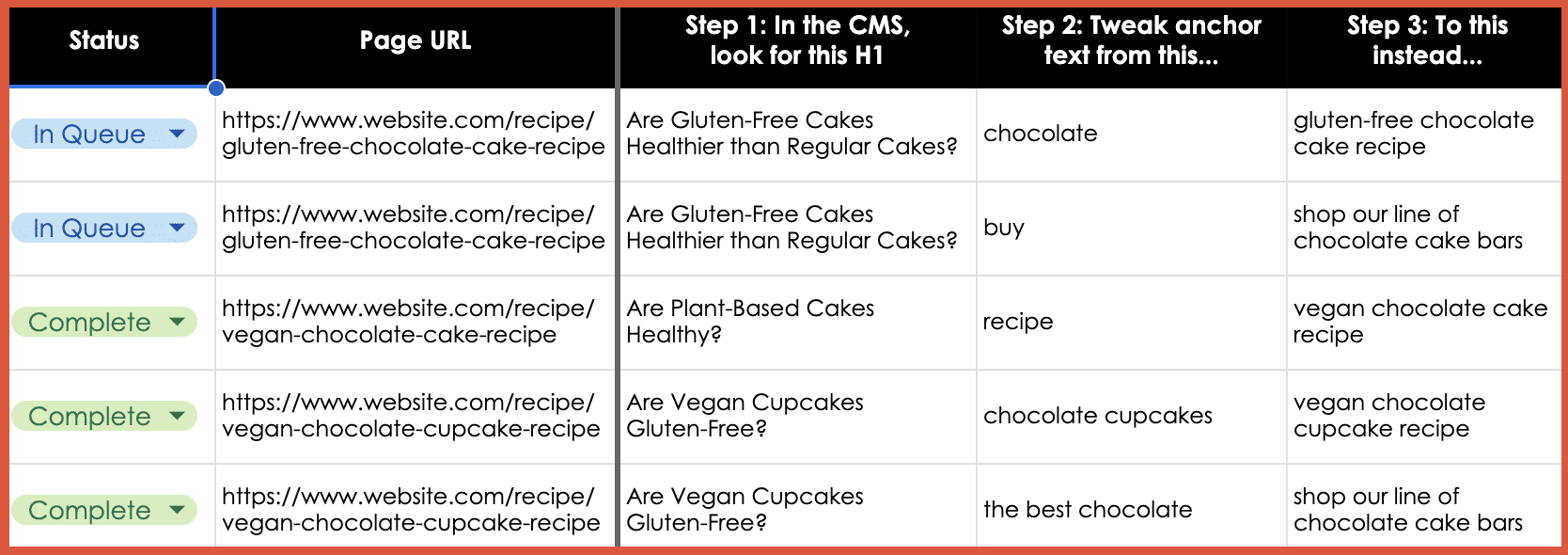
Table. Five columns are headed, “Status,” “Page URL,” “Step 1: In the CMS, look for this H1,” “Step 2: Tweak anchor text from this…”, and “Step 3: To this instead…” In the Status column, the first two are marked “In Queue” and the final three “Complete.” The second column has web addresses for gluten-free or vegan chocolate cake and cupcake recipes. The first row of entries reads as follows under Steps 1, 2, and 3. The question under Step 1 is “Are Gluten-Free Cakes Healthier than Regular Cakes?” Next entries suggest tweaking anchor text from “chocolate” to “gluten-free chocolate cake recipe.”

Be sure to use the most important best practice of them all: Engage real users with a range of disabilities in testing your links.

Individuals with diverse disabilities – visual, auditory, cognitive and motor – interact with websites in distinct ways, often revealing issues that may otherwise go unnoticed. By incorporating these diverse perspectives, you ensure a more universally accessible online experience, demonstrating a deep commitment to fostering an equitable digital space for every user.


via Search Engine Land https://ift.tt/OhNjJly

Wednesday, 3 January 2024

Could happy advertisers be the key to connected TV success? by MNTN

For years, CTV and linear television have been battling it out for viewership numbers. And it looks like CTV is coming out on top. Seeking more flexibility and lower costs, consumers have cut cords en masse, resulting in CTV viewership surpassing linear.

With ~230 million users in the U.S. alone, CTV offers a clear opportunity for advertisers to reach new audiences. But viewership numbers aren’t the only draw. With an array of results-focused capabilities, CTV has turned television screens into powerful performance advertising engines that brands of today don’t have to go without.

CTV continues to grow in popularity with viewers, and streaming services wisely cater to those customers. But there’s another consumer group they need to keep happy: advertisers. As ad-supported content offerings grow, streaming services and other CTV advertising platforms are developing more sophisticated technologies to meet advertisers’ needs. And though it may not be immediately evident, these technological advances are leading to a better experience for viewers, too.

TV has become a powerful performance channel

Advertisers once used television primarily as an awareness play. This is because viewers used to consistently tune in to their favorite newscast, weekly sitcom or sports broadcast, offering the possibility of reaching millions of eyeballs with one advertisement. But at the same time, this channel was inaccessible for many brands — advertising costs were high and determining when (and even if) an ad would run was difficult, if not outright impossible.

CTV changed this, opening doors to businesses for whom advertising on television had previously been a pipe dream. By providing brands with precision audience targeting, comprehensive reporting and the flexibility to change out ad creative when needed (among other benefits), CTV has transformed television into a performance advertising channel akin to social media and search. And many advertisers are already using it this way.

Studies revealed that while 81% of marketers said they use CTV to raise brand awareness, two-thirds classify it as a performance marketing channel. Additionally, many brands use CTV to drive specific outcomes: over half of respondents said they use the channel specifically to generate measurable web visits, conversions and revenue.

Brands may be using CTV as a performance channel, but some streaming heavyweights have fallen short when it comes to the advertiser-user experience. Netflix suffered when they failed to deliver on advertisement guarantees made when launching their ad-supported tier in late 2022. A year later, Netflix is still working to improve advertisers’ experiences. And they aren’t alone on this front.

CTV adtech is evolving to meet advertisers’ needs

On November 1, 2023, Netflix announced a slew of new features to meet advertisers’ needs better. Beginning in Q1 of 2024, brands who advertise on Netflix can utilize the following:

  • Binge ads: An ad format that lets viewers watch a fourth episode ad-free after watching three consecutive ad-supported episodes.
  • QR codes: Advertisers can include QR codes in their creative to encourage viewer engagement.
  • Sponsorships: Already available to advertisers in the U.S., Netflix’s sponsorships are broken into three categories: title, moment and live. With sponsorships, advertisers can be a part of major content releases (i.e. “titles”), seasonal moments and specific live events.  
  • Refined measurement: Netflix will partner with third-party providers to expand advertiser measurement capabilities and enable campaign verification.

Netflix isn’t the only one working on this. Paramount also recently refreshed its advertising platform. Their new product Conduit, which aggregates Paramount+ and Pluto TV inventory, was built to address issues associated with CTV fragmentation, like the separation of rival brands in ad blocks and accurately tracking ad running frequency.

“The undercurrent here is that there’s a lot of programmatic technology, and these platforms don’t always play super nice together, and we feel as a publisher the buck stops with us to serve a high-quality ad experience,” said Leo O’Connor, Paramount’s senior vice president of advertising, of the update. “If a viewer gets a bad ad break watching one of our shows, they don’t get upset with the ad server. They don’t get upset with the TV manufacturer.”

https://ift.tt/xWjpDPv

MNTN has revamped its adtech, as well. MNTN Next Gen TV was developed to help advertisers and their teams transform television into an even more powerful growth engine. Some of the major updates include enhanced audience building, verified measurement and optimized creative. Performance optimization also got an overhaul; its dedicated product and engineering teams have upgraded MNTN’s performance engine to deliver an unrivaled return on investment. With MNTN Next Gen TV advertisers are already earning, on average, 27% lower cost per acquisition and 38% more site traffic.

Viewer experiences with streaming ads can be inconsistent

Paramount’s O’Connor isn’t wrong in the assumption that bad ad breaks can reflect poorly on the streaming services serving them. And in the early days of ad-supported streaming tiers, the user experience has been inconsistent at best.

Alyssa Boyle, associate editor at AdExchanger, spoke to this first hand when she reviewed Disney+’s new ad-supported tier in February 2023.

“Whether I was watching ‘Hannah Montana’ or the National Geographic show ‘Airport Security’ about cocaine smuggling, the ad experience was pretty much the same,” Boyle said.

She also noted that ad repeats and those of rival brands weren’t uncommon.

“I saw repeat ads from Capital One and a university in Southern New Hampshire, as well as ads for both Huggies and Pampers in back-to-back episodes of ‘The Simpsons.’”

But a better ad-viewing experience could be on its way. In supporting the needs of advertisers, those updates to ad technology could, in turn, address (if not solve) the needs of viewers. For instance, enhanced audience building will help advertisers be more precise about who they serve ads to, ensuring that they consistently target viewers interested in and/or who could benefit from their product. For viewers, this means more ads that are actually relevant to their interests and needs — and fewer that aren’t.

Evolving CTV adtech could signal good things for advertisers and viewers alike

The ongoing rise of ad-supported streaming content paired with the performance capabilities of CTV should be reason enough for advertisers to invest in the channel. If not, the recent CTV adtech updates are helping to solidify the argument. Increasingly sophisticated advertising technologies will allow advertisers to produce top performance results and tap into CTV’s full potential, but they can also make for a better viewing experience — a win for CTV advertisers and users alike.


via Search Engine Land https://ift.tt/oyQC1r6

Facebook rolls out ‘Link History’ for all users – and uses data for targeted ads

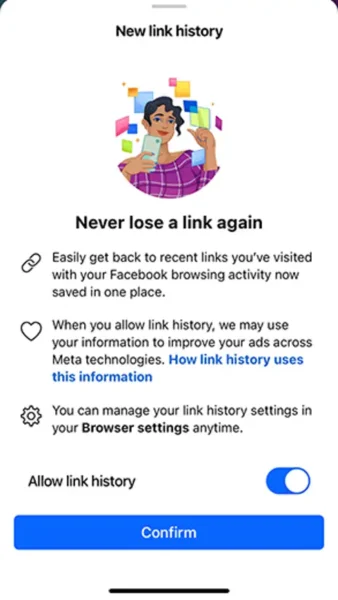
Facebook has started archiving all users’ link history globally on both Android and iOS devices.

While users have the option to opt out, the feature is turned on by default, allowing Meta to utilize the collected data for targeted advertising.

Why we care. As the digital marketing industry moves towards a cookieless future and stricter privacy laws, targeted advertising, while effective, faces uncertainties. Facebook’s new feature could very well prove to be a loophole for marketers wishing to reach high-value consumers, but the solution could be temporary.

Accessibility. This feature is gradually being introduced and so may not be currently available in your location. Meta hasn’t provided a specific timeline for the rollout of the Link History archive option just yet, but it has confirmed it will be expanding to all mobile users globally.

As of now, this feature is exclusive to mobile and is not available on desktop.

How it works. Link History is a feature that keeps track of the websites you’ve visited on the Facebook mobile browser over the last 30 days. If enabled, it stores links you’ve tapped within Facebook’s Mobile Browser for this duration. It’s important to note that links visited in Messenger chats are not included in Link History.

How to turn Link History off. To turn off this feature, follow these steps:

  1. Select any link within the Facebook app to launch Facebook’s Mobile Browser.
  2. Click on the three dots located in the bottom right corner, then select Browser settings.
  3. To enable link history, toggle the switch next to “Allow Link History”, and confirm by tapping “Allow”.
  4. To disable link history, toggle the switch next to “Allow Link History”, and confirm by tapping “Don’t Allow”.

What Facebook is saying. A Facebook spokesperson said:

  • “You can choose to turn link history on or off at any time. When you turn link history off, we will immediately clear your link history and you will no longer be able to see any links that you’ve visited. Additionally, we won’t save your link history or use it to improve your ads across Meta technologies.”
  • “When you turn link history off, it may take Meta up to 90 days to complete the deletion process.”
  • “When link history is on, we may use link history information from Facebook’s Mobile Browser to improve your ads across Meta technologies.”

Get the daily newsletter search marketers rely on.


Deep dive. Read Facebook’s announcement in full for more information.


via Search Engine Land https://searchengineland.com/facebook-link-history-targeted-ads-436197

How to combine GA4 and Google Ads for powerful paid search results

Google Analytics 4 (GA4) offers enhanced Google Ads integrations and features that surpass those available in its predecessor, Universal Analytics.

To make the most of these new and updated capabilities, Google Ads expert Charles Farina discussed the latest improvements in conversion tracking, audience analysis, and reporting at SMX Advanced.

Read on to discover how integrating GA4 and Google Ads could boost your paid search results.

Conversion tracking updates

To measure your campaign’s success accurately in GA4, you need to configure your conversions. However, there are some key changes you need to be aware of before diving into this process.

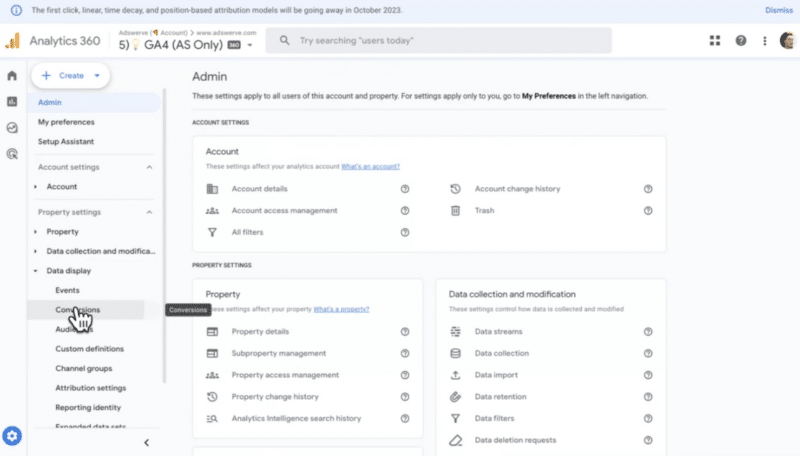
New administration section

For starters, there is a brand new administration section in GA4, which was rolled out toward the end of 2023. Farina said:

  • “If you haven’t spent time in this section, you definitely need to because this is where we set up conversion tracking for GA4.”
  • “Conversion tracking is now on one page, so it’s more simple than the old version. It’s also way more powerful than what we had before.”
  • “So you can come in here and track events and simply turn on or off conversions whenever you want.”

More goals

Historically, only 20 goals were available in the free version of Google Analytics – and you weren’t allowed to reuse them. This could be problematic because if marketers were using GA for a long period of time, they would often run out of goals, Farina explained.

However, this feature has been “completely rebuilt” for GA4. He commented:

  • “First of all, we now have up to 30 conversions (goals) in the free version of GA4. More importantly though, you can now archive or enable or disable conversions at any time.”
  • “I’ve actually made some horrible mistakes by archiving all of my conversions. However, now, when you archive a conversion, it doesn’t delete all the data – it actually keeps it which frees up a new conversion slot that we can use.”
  • “But why is this important? Well, a lot of paid media campaigns aren’t always necessarily permanent or always on. For example, we could have things that are seasonal in nature like a back to school or Black Friday campaign. Because we can now reuse goals, we actually have the ability to do kind of seasonal or micro conversions.”
  • “By simply setting up these seasonal conversions, they’re automatically available for measurement, both within GA4 and within Google Ads.”

Audience updates

Google has also improved audiences in GA4, which Farina sees as a crucial feature for both paid ads and other aspects. However, many advertisers haven’t been using or activating them in Google Ads. Farina hopes that the changes in GA4 will encourage more utilization of audiences.

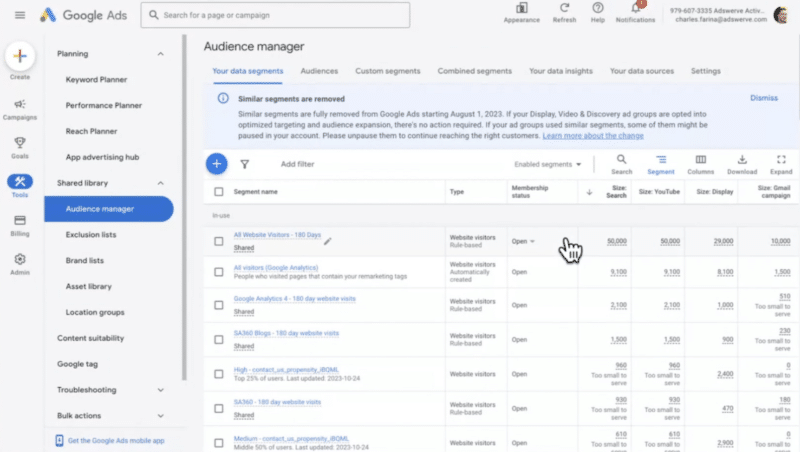
GA4 audiences automatically available in Google Ads

  • “One of the reasons people weren’t using audiences properly before was because it wasn’t exactly intuitive. When you created an audience in GA4, you’d have to also manually publish it to Google Ads. Now though, it’s automatically available in Google Ads without you having to really do anything.”
  • “All you have to do is go into the admin you link Google Ads to in the product section, and with three clicks, you have Google Ads linked – all of your conversions and audiences will automatically be shared.”
  • “If I then go back to Google Ads, and we go into our tools and then to the shared library, the audience manager is inside here, and this is where we can see all of our GA4 audiences. And all of these will be curated for us automatically without having to publish one individually, which is a big change.”

Types of audiences

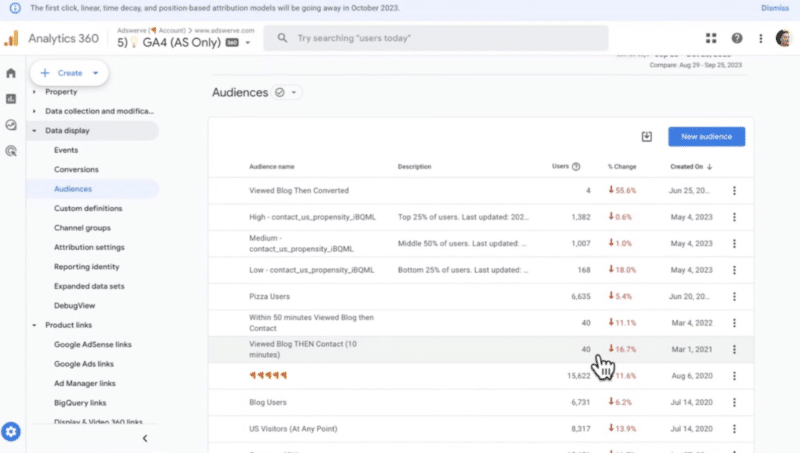
  • “There has also been significant changes to the types of audiences you can create and the types of remarketing campaigns you can drive.”
  • “The audience builder is one of the most powerful features in GA4 because we can create audiences of any condition we collect on the platform. We have access to every dimension, every metric, every event that our user does – and we call these ‘rich conditions.'”
  • “For example, we can look at users who visit a certain page like blog posts, and then we could say show me those users who looked at blog posts and then did something else to build sequences. And not only can we build sequences, but we can also restrict our audiences by time.”
  • “Remember, the audiences we create will also automatically be available in Google Ads for us to utilize if we so choose.”

Explorations paid-for features now free

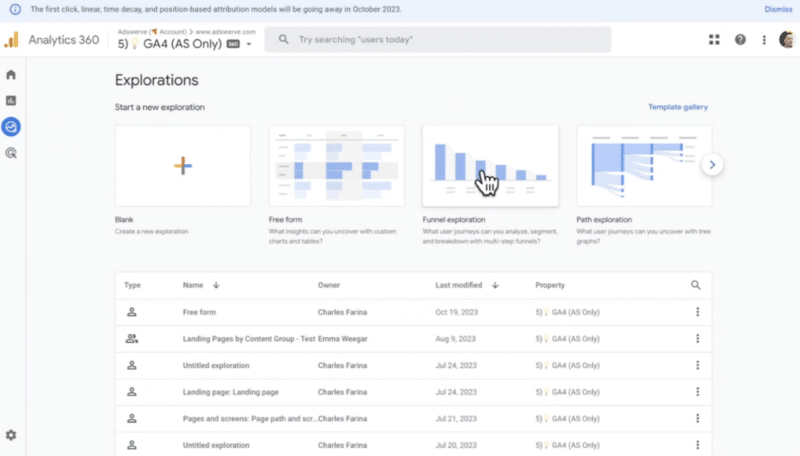
Another major change rolled out by Google is that a bunch of features that previously only existed in the paid-for version of Google Analytics are now available to everyone in the free version of GA4 – for example, “funnel explorations” (see image below).

  • “The funnel explorations feature is a really powerful feature because you can build funnels for anything. With one click, you can customize your funnels regardless of your business and your use cases.”
  • “The part for Google Ads that is super important is that these are also available for you to leverage as remarketing audiences. Everyone should have some sort of basic funnel created for their business.”
  • “The power of combining Google Analytics and Google Ads together, you don’t have to create a bunch of remarketing tags, publish and then wait a week to build audiences. Now, anyone can go in and immediately build these audiences on the fly. So this is a huge change.”
  • “This is the bread and butter of how to use our audiences and our conversions more effectively between Ads and Analytics.”

Attribution

Accurately measuring attribution is critical for marketing campaigns. This is one of the most misunderstood areas within GA4, Farina said.

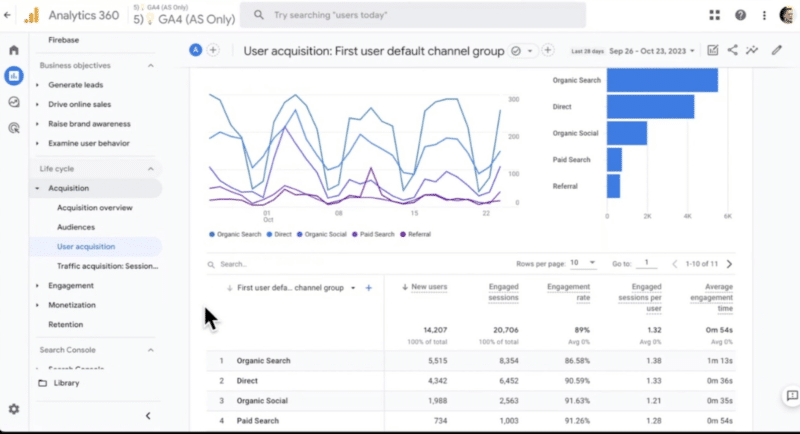
User acquisition report

  • “The dimension of this report tells us that this is the first user traffic source – so the first type of attribution we have is the first touch. The way this works is any new user who visits our site, whatever the original traffic source is, gets all the credit in this dimension as it’s the first touch.”
  • “But if we’re trying to measure the effectiveness of our paid search campaigns, this first user channel report or user acquisition report doesn’t give us the complete story. That’s because it only tells us how much paid search traffic we acquired where paid search was the first touch point.”

Real time report

  • “Real time is also one of the most misunderstood areas – I’ve seen a lot of people go to the real time report and they look at this traffic source section and, for example, think they have eight users from Google. But if the current session is from paid Facebook, but the first user source was Google, it’s not going to show that paid Facebook activity even though that’s the current traffic source.
  • “So real time in GA4 doesn’t report the real time traffic source of right now. It reports the first traffic source that user ever had.”
  • “So just be careful if you’re trying to do any sort of real time traffic analysis that you don’t misuse this kind of out of the box traffic widget that Google shows here.”

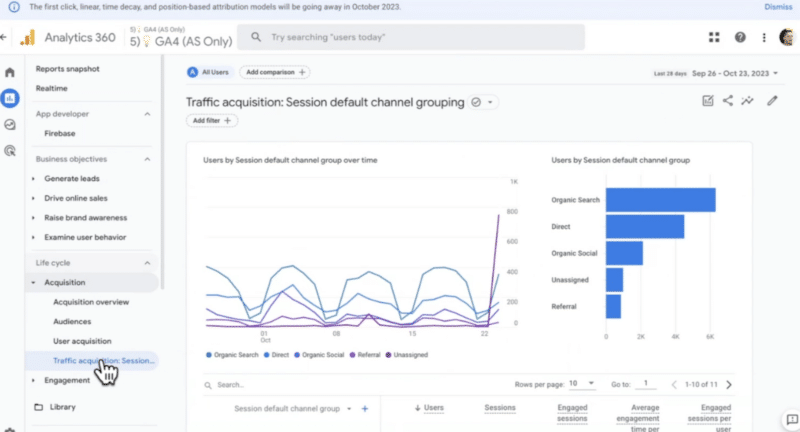
Traffic source report

  • “The traffic source report in GA4 helps us to understand how our paid search campaigns are performing. Within this report, you’ll find the session default channel group.”
  • “You’ve probably heard that GA4 has this new event driven data model; everything’s an event, it’s more flexible and they’ve updated the way attribution works, whereas in the old version, every new traffic source would actually create a new session. So each session in the old Google Analytics could only have a single traffic source.”
  • “I’ve heard some people say that GA4 now allows multiple traffic sources per session. That’s true. But with a very important asterisk because it’s only true in certain places within GA4 and it’s not necessarily true in this report, which is why this is really so misunderstood.”
  • “So if you compare your data in the new versus the old version of Google Analytics, this is one of the reasons that like the session or the traffic source reports don’t match because sessions with multiple interactions are not represented with each other.”

Data driven attribution model

There are two places where data driven models live in GA:

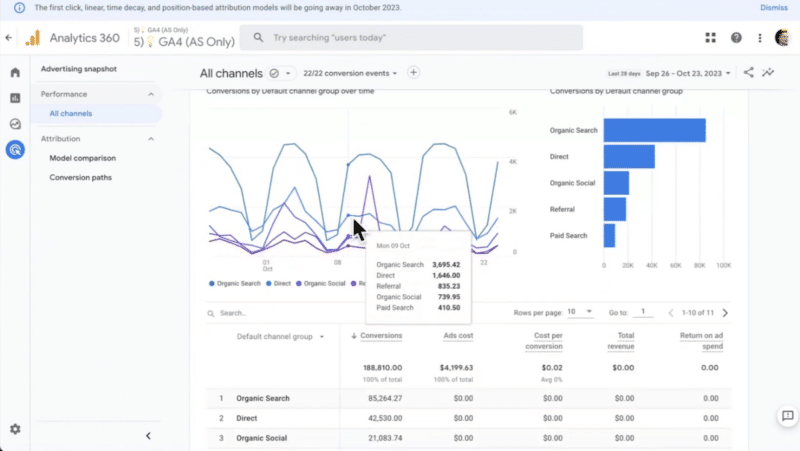
  • In the advertising section: If you go into the performance or the model comparison reports, this will be the new data driven attribution reports.
  • In the reporting section inside the engagement and in the conversions reports.
  • “If you wanted to know how paid search was leading to outcomes, [data driven attribution reports] are the best place to do that. However, this doesn’t account for sessions or paid search interactions that don’t result in a conversion.”
  • “For example, if someone clicks on a paid ad, visits your site and just has an interaction, going back to this report, just note you will be missing some of those paid search interactions in here. So some of that is being under reported.”

Quick tips

Farina concluded the session by sharing three quick tips on how you can get even more out of Google Analytics.

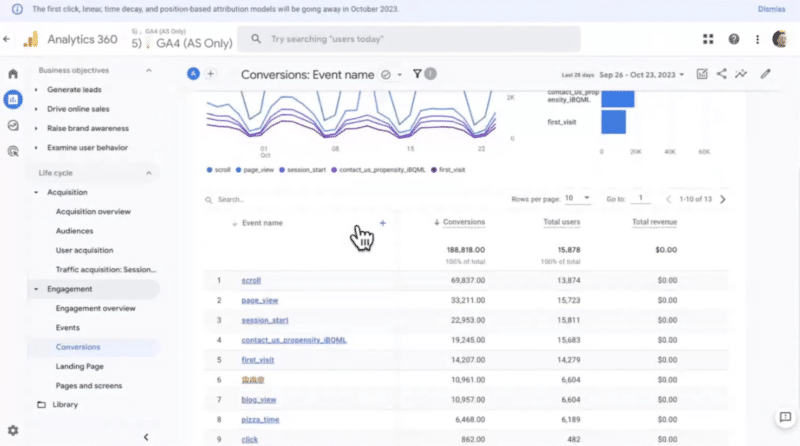
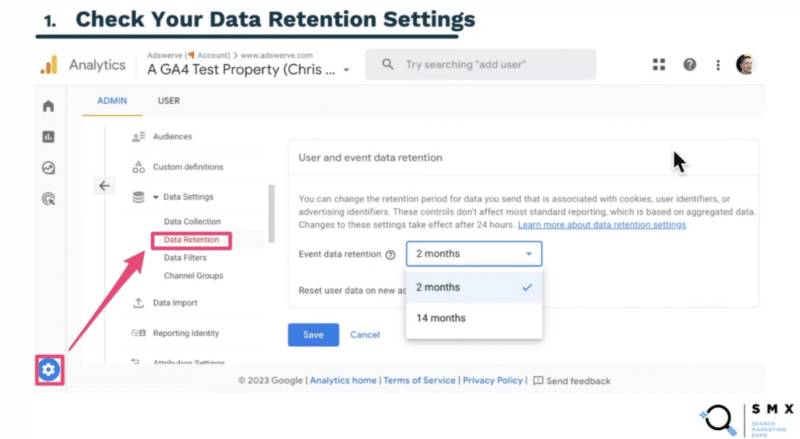
1. Check your data retention settings

Data retention settings inside GA4 is one of the most problematic areas new users run into. Farina explained:

  • “When you set up a new GA4 property by default, it only gives you the last two months of data because that’s the default setting.”
  • “Go look at that setting and change it to the 14 months because you’ll probably be very disappointed if you’re trying to do year-on-year comparison or do a more granular ad hoc analysis.”
  • “So check your data retention settings and make sure you don’t run into that issue.”

2. Be aware of your reporting identity

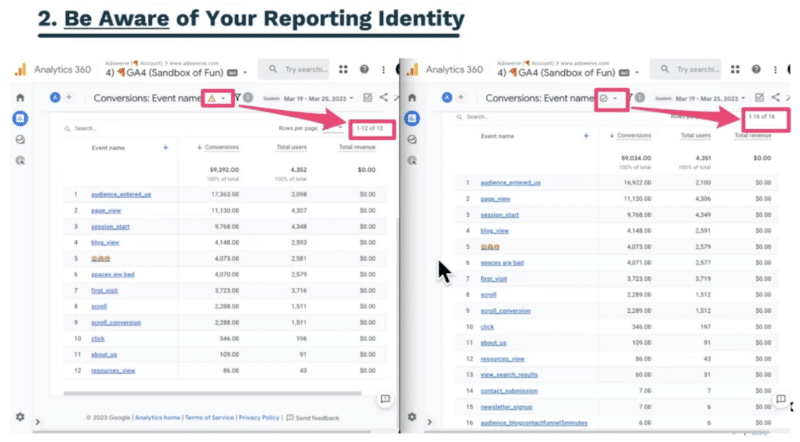
One of the biggest challenges that’s still occurring right now is with thresholding, according to Farina. This is because, by default, when you link and create a new GA4 property, it enables Google signals and uses it as a reporting identity in GA4, which can cause issues. He explained:

  • “If you’re doing your analysis and you ever see this orange triangle (see image below), you’ll want to immediately change your reporting identity.”
  • “There’s two ways to do this; you can either change the reporting identity to device ID only or there’s a brand new feature GA4 just rolled out where you can actually disable ‘using Google signals’ at all – which is actually my recommendation.”
  • “I don’t think ‘using Google signals’ helps better connect your data together, and it is definitely not worth the trade-off of this orange triangle because that means we lose data.”

3. Learn the different attribution scopes

One of the most misunderstood areas of GA4 is how attribution works, according to Farina, but mastering this topic can set you up for success. He concluded:

  • “The best way to do attribution right now is probably with the ‘attribution dimension’ (see image below) – this is super important.”
  • “The ‘source/medium’ dimension actually gives credit in a session to multiple traffic sources and across sessions.
  • “The other two traffic source dimensions – ‘first user source/medium’ and ‘session source/medium’ – I think are problematic, especially the session source, because it doesn’t account for multiple traffic sources within a session.”
  • “And with that, I think you have everything you need to use Google Ads and Google Analytics far more effectively.”


via Search Engine Land https://ift.tt/e0lCg7P

Better PPC account health in 2024: How to avoid modern pitfalls and wasted spend

Regular audits of Google Ads and Microsoft Advertising campaigns are crucial for PPC marketers.

Failing to do so can result in significant costs for clients, and what’s more, it’s often an entirely avoidable expense.

To avoid common pitfalls and optimize spending in PPC campaigns, Melissa Mackey, paid search director at Compound Growth Marketing, provided a comprehensive walkthrough of the most costly mistakes she comes across during auditing and her top tips for avoiding these errors at SMX Next.

Below is a summary of the insights and advice she shared.

Always check your campaign goal settings

Mackey shared a cautionary tale about inheriting accounts with ample clicks but minimal conversions:

  • “This happened to me – I was thinking we would have to rebuild the whole campaign. Something must be wrong with it, right? But as I dug deeper, I realized something important was missing.”
  • “What’s cool about Google Ads is they have goal settings at account level and campaign specific goals. This is a fantastic setting, but you need to make sure you’re careful about how you use it.”
  • “In this case, the client wanted track custom goals of demo requests and lead forms. However, they had campaign specific goals selected instead – these were goals that couldn’t even be completed on the landing pages for the campaigns that were running on, which is why it showed zero.”
  • “Once we switched the campaign specific goal to the correct goal, we started seeing conversions. This could have been disastrous if we decided to blow up these campaigns without digging into it. So always check your campaign goal settings and make sure that you’re actually measuring what you want to measure.”

Default settings you should never use

Mackey suggested steering clear of certain default settings that come pre-configured in your Google Ads campaigns, despite the convenience of having them in place. For example:

1. Broad Match without smart bidding or audiences

  • “Google will tell you that broad match can:
    • Get you a 35% improvement in your target Cost Per Action (CPA).
    • Find keywords that you never would have thought of to bid on.
    • Deliver an overall better performance that’s more efficient.”
  • “This is true – but only if you do it correctly. Broad match needs smart bidding and audience signals to be sure to get you the right customers. Using broad match with those two things works well, but using it without does not.”
  • “Make sure you’re always layering on audiences and smart bidding with your broad match campaigns.”

2. Broad Match campaign setting

  • “There is a broad match campaign setting that you need to really be careful about:”
  • “If you turn this setting on (see picture above), it’ll say use broad match keywords for your entire campaign. That means you can only use broad match. Now, you may think that’s fine because that’s what I wanted to do anyway.”
  • “The problem is you will not be able to add other match types further down the road because you’ve locked yourself into just broad match.”
  • “I can think of few to no such situations where you would want to do this. You would always want to choose the ‘Use keyword, match types’ setting to give you flexibility.”

3. All the networks

  • “When you create a new campaign, Search Partners and Display Network are both on by default. For our B2B clients, we usually turn off Search Partners because we don’t tend to get good results and there’s not enough control. Your mileage may vary, so test it, look at it, but be careful with it.
  • “Display network – you should never run this alongside Search. Even though Google tells you, we have smart campaigns that can run in both Search and Display, what we have seen is that display will eat up all your budget. It’s also very challenging to optimize it properly and it is a best practice still to run separate Search and Display campaigns.”
  • “So make sure that you opt out of display.”

4. Location targeting method

  • “The default location targeting method is people who show interest in your targeted locations. This setting almost always leads to traffic from unwanted locations.”
  • “I saw recently on LinkedIn, one of my paid search peers said that she saved a client $1,000 a month immediately just by turning off the setting.”
  • “You may think you’re just reaching people in the United States, but your ads can actually serve to people anywhere if they’ve shown interest in the United States.”
  • “Go to your location report in Google Ads and see where your ads actually served, you’ll see that they might have run in Turkey, Pakistan, India and a lot of other places you didn’t want them to run.”
  • “The setting that you should use instead is ‘people in or regularly in your target locations’. This will help cut down on those unwanted locations and make sure that your ads just serve in the places that you want them to serve.”

5. Exclude locations that charge tax

  • “You should always exclude the locations that charge tax or fees. There are seven locations that currently that have regulatory operating costs (or DST fees) and they charge tax for any ads that serve there.”
  • “If you have location targeting set to ‘people in or who show interest in’, you will probably get traffic from these locations. And in addition to paying for that traffic, you also pay taxes on it. So this is something you don’t want to do.”
  • “If you are not intending to target any of these seven countries, be sure to just exclude them as a matter of course, that way you won’t get charged.”

6. Conversion counting conundrum

  • “Another area that trips people up is in the actual conversions that they’re counting.”
  • “One of the first things that I audit when I look at a new account is what are we tracking as conversions? What’s primary, what’s secondary and what are the sources of those conversions? Because I think a lot of times we set up a conversion action and then maybe we decide we want to track something different. So we add the new conversion and forget to get rid of the old one – and that can really get you into trouble.”
  • “Over-reporting results to your client can create a lot of problems. So make sure that you’re actually counting the correct actions and you’re only counting them once. That’s a really important point.”

Hidden settings

Mackey went on to address the many hidden settings in both Google Ads and Microsoft Ads – and how to deal with them.

Automated extensions

  • “Automated extensions are turned on by default and they’re often completely irrelevant to what it is that you’re advertising.
  • “Automated extensions can work well for ecommerce if you’ve got lots of products, but it would really be challenging to set up bespoke extensions for all of your campaigns.”
  • “For B2B campaigns, we almost always turn these off. So, how do you do that? It’s not easy:
    • “You have to click these three dots above the “more” button on the righthand side of the screen.”
    • “Then you click account level automated assets.”
    • “Click a more button again, then you click advanced settings and finally you get to the screen where you can actually turn these off.”
  • “This is completely buried. If you didn’t know where it was, you would never find it. So it’s really important to understand where this is and then go in and turn off any of these extensions that you don’t want.”
  • “We turn off all of the dynamic extensions for our B2B advertisers, such as: Call out, structured snippets, images, and site links. Some are okay to leave on such as ‘automated apps’ and ‘automated locations’ if that makes sense for your business. But definitely at least give this some thought.”

Expanded audiences

  • “With expanded audiences, Google can expand and show your ads to other audiences that are similar to that audience.”
  • “If you want to cast a wide net, this is fine. But if you have a very specific remarketing program set up, you definitely don’t want the ads showing in expanded audiences because it really undoes your whole strategy.”
  • “Make sure that you opt out of expanded audiences if you don’t want to use them when you set up your campaign initially. It’s not easy to find as it’s buried. To do this, go to:
    • Group settings.
    • Select the option to edit ad group targeting.
    • Go into every single ad group where you’re doing targeted audience segments and turn this setting off.
    • Make sure you go through in the online UI and turn off optimized targeting for every single campaign that you don’t want it to run.”
  • “Make sure that you do this if you don’t want to serve in expanded audiences.”

Microsoft Ad group settings

Microsoft Ads has a lot of ad group settings that are different from Google and this can be used to your advantage, according to Mackey. For example:

  • You can schedule ad groups.
  • You can use campaign settings.
  • You can apply independent website exclusions.
  • You can make independent bid adjustments and ad distribution (this is also where you opt out of the Microsoft Advertising network).
  • You can make independent location bid adjustments and age settings.

Avoiding pitfalls

Next, Mackey talked about common mistakes she finds in audits and shared advice on avoiding them.

CPCs still matter

  • “We’ve all gotten used to smart bidding where we don’t have to worry about setting bids every day and checking them and changing them. And that’s a good thing because the machines are much better and more efficient at this than humans are.”
  • “However, cost per click is still how we’re charged, ultimately. And it can get very wildly out of control with smart bidding. So, it’s very important, especially if you’re using maximized clicks or a portfolio bid strategy in Google Ads, to go in and set a maximum CPC bid limit even if it’s a very high limit.”

Keeping tabs on CPCs

  • “To keep tabs on your CPCS use a script. Nils Rooijmans has a wonderful website where he has a lot of free scripts and one that we install on all of our accounts is his high CPC bid script.”
  • “This script allows you to say my CPC threshold is X amount and any time a bid goes above that I want to be notified. This doesn’t change anything in your account. It just emails you when your bids goes over your limit and then you can decide if you need to make any changes or adjustments.”
  • “You can change the CPC threshold at any time. And this script is run hourly.”
  • “You can also use this script to keep tabs on account changes. So if you’ve ever had a client who likes to go into your account and make changes without telling you or if someone from Google Ads has gone in and maybe auto applied recommendations on your behalf, you’re going to want to know about that.”
  • “This is another script that just sends you an email if anyone who’s not on your list of recognized users has made changes in your account.”

Keep rules in check

  • “We think we can schedule rules in advance and then we don’t have to worry about it again. However, be careful when you’re setting a rule.”
  • “If you are using a Manager Account (MCC), the default is for rules to run at the MCC level. Now, this is OK, if you are just specifying campaigns that you want the rule to apply to, then it will only run on those campaigns, whether you’ve set the rule at the MCC or client account level.”
  • “However, if you have a rule that just says ‘increase bids by 50%’ or ‘decrease budgets by 25%’ and you’ve set that at the MCC level, you’re going to have a lot of very unhappy clients.”
  • “So make sure if you are setting up rules at the client account level and not at the MCC level – you really will save yourself a lot of headache there.’

Auditing your account

Mackey wrapped up her SMX Next session by emphasizing the importance of auditing your account. She concluded:

  • “Whether it’s a new account or one you have been running for years, it’s a good idea to go through and audit it, check your settings and make sure that everything is the way that you want it to be.”
  • “I recommend auditing all your accounts on a quarterly basis just to make sure that things haven’t gone out of whack. It’s very easy to copy campaigns, copy ad groups, forget to change the settings and have problems that you may not have noticed.”
  • “So check all of your campaigns and make sure that everything is the way that you want it to be. You’ll get better account health in 2024 if you do this.”


via Search Engine Land https://ift.tt/AX7dtG0

Tuesday, 2 January 2024

The state of SEO in 2024: Are you AI-ready? by Cynthia Ramsaran

Emotional ingredients for SEO success

As search marketers brace themselves for SEO’s next chapter, it’s easy to get caught off guard by disruptions from generative AI advancements like Google’s SGE.

Get ready to step into the future of SEO by joining experts from Conductor as they dive into the ever-evolving landscape of SEO in the age of AI.

Learn more by registering and attending “The State of SEO for 2024: Are you AI-Ready?” presented by Conductor.


Click here to view more Search Engine Land webinars.


via Search Engine Land https://ift.tt/7ca3E9Y

LinkedIn ad prices surge as advertisers’ X boycott continues

LinkedIn ad prices have soared due to a surge in demand reportedly driven by the advertiser boycott of X.

Why we care. If you’re thinking about moving your ad spend away from platforms like X in 2024, LinkedIn could be a solid alternative to consider. Marketers are seeing good returns, but keep in mind it comes with a higher cost, so be sure to check your budget before making the switch.

Ad prices soar. In the past year, the cost of ads on the Microsoft-owned platform has surged by as much as 30% in some cases, reports the Financial Times. Leesha Anderson, the vice-president of digital marketing and social media at Outcast ad agency, told the paper:

  • “This is LinkedIn season. Most have switched over to LinkedIn over the past year . . . A few weeks ago most of our clients were off X. Now they are all off X.”

One media buyer revealed that the cost per 1,000 impressions of an ad was now as much as $300 for premium LinkedIn campaigns. In contrast, running a comparable campaign on Meta’s platforms costs between $10 and $15.

How ad prices are calculated. LinkedIn ad prices are determined by an auction system based on market demand. The greater the demand, the higher the ad price.

ROI. Despite the steep rise in LinkedIn ad prices, marketers are claiming to see substantial returns on their investments. Advertisers are reporting as much as 20% ROI, indicating that for every $100 spent, they are generating profits of $120.

LinkedIn ad revenue. The platform’s annual ad revenue soared by 10.1% year-on-year in 2023 to almost $4 billion, according to Insider Intelligence. The research group now forecasts that growth will soar by an additional 14.1% in 2024.

What Microsoft is saying. Penry Price, LinkedIn’s vice-president of marketing solutions, said that “more brands” are investing their ad spend in LinkedIn because of the platform’s unique targeting capabilities. The platform claims to have twice the buying power of the average web audience, with four out of five members driving business decisions.

Search Engine Land has reached out to Microsoft for additional comment.


Get the daily newsletter search marketers rely on.


Deep dive. Read LinkedIn Ads in 2023 for more information on how the platform has strengthened its position with B2B advertisers. 


via Search Engine Land https://ift.tt/ohKI67C