Monday, 29 August 2022

10 tips to help you become an in-house SEO

Looking to land a new SEO role to grow your career? You may want to consider becoming an in-house SEO specialist.

Thanks to the Great Resignation, more jobs are available and plenty of companies are currently open to remote work gigs. There’s a significant demand for in-house SEO roles, with hundreds of openings advertised around the U.S. alone.

Now’s the ideal time to give it a shot as the demand is high, yet the bar is not too steep. You have the opportunity to improve your own “hireability,” and as a former long-term in-house SEO strategist, I have tips for you.

But first, why look in-house?

Why should you consider an in-house SEO role?

In-house SEO can be advantageous compared to working for small SEO agencies or as an independent consultant. Benefits include things like:

  • Great pay (if you do in-house for larger companies or companies in lucrative verticals).
  • A more regular work schedule.
  • More robust group benefits such as insurance, sick leave, and 401K.
  • Stability.
  • Supportive teammates and infrastructure.

For instance, a larger company can call an IT person to fix your computer or internet access. In contrast, if you are independent, you may be doing everything ranging from accounting, IT, sales, and advertising to performing your HR functions, hardware upgrades, system admin work, and more.

My experience at doing SEO in-house for one of the world’s largest corporations and subsequently providing strategic guidance for other in-house teams has given me insights into how people may position themselves best for obtaining in-house SEO roles.

Below are 10 tips you can use to land that ideal position.

1. Determine your specialization

There are many aspects to SEO, and it can take considerable time to become a jack-of-all-trades in this arena. You should first look to leverage your existing skills and background.

If you come from computer science and programming, focus on learning:

  • In-depth details about HTML code elements related to optimization.
  • How structured data is designed within HTML.
  • How content management system (CMS) templates may be optimized.
  • How programmatic SEO is conducted.

You might also learn how to configure spidering software to perform audits on a website and how this can help review SEO elements across many of a website’s pages.

If your background is in writing, read up on:

  • How to perform keyword research.
  • How to find sources showing comparative data on keywords and phrase choices for particular topics.
  • How content marketing can help attract more links and visitors and improve a website’s performance in search.
  • If your background is in graphic design, learn how even attractively designed webpages may have code designed to be optimal without harming the graphic layout and styling of the site.

Those with a business analytics background should learn:

  • How to use web analytics packages to assess websites’ performance in search results.
  • How this performance data can indicate areas for potential improvement or reveal a site’s top-performing content.

You will use your specialization as a starting point and then work to expand your knowledge and skills to be more of a generalist in SEO later.

A specialization frequently helps you get your foot in the door with a company since those skills may match up with more available positions, albeit there have been increasing roles available as SEO specialists.

2. Learn the basics

This advice likely goes without saying, but all those interested in working in SEO should read up on the most influential and simplest ranking factors, and how to assess whether a website has them established. 

Before writing this piece, I posted a poll on Twitter asking what one thing someone should do to prep to become an in-house SEO. The number one item that voted for was “Read Google’s Webmaster Guidelines and SEO Documentation.” 

Google’s Webmaster Guidelines are general advice on what Google likes and dislikes. There’s also SEO documentation, including an SEO Starter Guide, that provides dependable, authoritative introductory instruction on SEO. 

While it is easy to hyper-focus on the industry juggernaut, there’s value in reading Bing’s Webmaster Guidelines. Many SEO elements are parallel in Microsoft Bing, but there are differences. 

According to my informal Twitter poll, SEO books were not a popular suggestion for learning the craft, but there are good ones out there that can help you learn SEO very well. Some of these SEO books can also be very helpful when researching issues that may come up outside the basics.

If you are a beginner, read a beginner’s guide – just not one marketed to “dummies” because you are not a dummy! Also, The Art of SEO is a great reference book, although I would not recommend it as a guide for beginning to learn the craft. The great thing about having books on your desk for reference can be a great resource to point to when someone does not believe you, and you need an authority to point to.

3. Learn HTML

Hypertext Markup Language, or HTML, is the formatting instruction protocol that tells browsers how to display webpage content. 

A page’s HTML can be very complex and resembles programming code, so this may seem daunting. However, it is pretty easy. 

You can view any webpages’ HTML code – often by right-clicking on the page in your browser window and selecting “View page source.” You can also view the code that composes the page by adding “View-source:” in front of the page’s URL in the browser address bar and clicking “Return” to view it. 

You can learn HTML just by viewing code this way, but many webpages are so complex that this will prove frustrating. 

You can also refer to online video tutorials on how to write HTML and guides and articles for learning the language. 

Some of the best tutorials provide a “sandbox” area on the webpage for one to write HTML directly, which will immediately display the result. For instance, the Learn-HTML.org website provides instructions and sandbox areas to try out the code. 

Once you have learned HTML, you might also learn further about CSS and JavaScript basics as they are closely intertwined in contemporary websites.

4. Create your own website and optimize it

Nothing beats hands-on experience, and this is ideal for learning both HTML and SEO. No matter your skill level, this should be an option open for you. 

Make a website around your personal interest because it should be a topic that will inspire you to work on the site. 

A personal website can also provide you with a safe space to experiment with different aspects of SEO, such as structured data, redirects, and image SEO. 

When I hired code developers at Verizon, it was sometimes difficult to select between many qualified candidates. 

But I found that those who had developed their own websites were typically an order of magnitude better for SEO and brought more real-world experience and skills to the table. 

You do not have to hand-code HTML and CMS to launch your own website. 

If you’re not as familiar with web coding, you could choose to go with a web host company that provides turnkey WordPress installations. You could also try Wix or other CMS. 

If you have time and inclination, it is great to set up a few websites on a few different CMS platforms to gain skills and advanced understanding.

When you achieve rankings for key terms related to your topic, you could use your website as an example of your work.

5. Intern

Many agencies and top consultants may accept interns or apprentices in return for work. Take on such a gig to gain further experience and enhance your resume for landing a desired in-house SEO position. 

Beware, however. There is a difference between cold-calling people or agencies you admire and applying for listed intern positions. Those of us operating agencies receive many cold-call offers from off-shore developers, lead-gen partners, and people offering to do work for us. 

So, you will have to either focus only on applying for posted internship positions or go to extra effort to court an agency or independent consultant compellingly enough to break through all the noise. 

Once you have an intern position, you may use it to step up into another role that helps build your job history into your dream in-house SEO role.


Get the daily newsletter search marketers rely on.

Processing...Please wait.


6. Campaign for a lateral move within an organization

It may be easier to initially get a position within a company for a non-SEO role, but you can then work to transition yourself into providing SEO analysis, guidance or development. 

Discover who within the company are the decision makers who can approve SEO efforts or who may already be providing SEO guidance to an extent. 

If there is already a primary in-house SEO person, you may be able to campaign to work with them as a team member, or you may be able to assist them from your existing position. 

Often, the SEO role is shared in some way between the Marketing and IT departments. (In other places, it could even be in the Sales or Business Development departments.) 

Individuals who carefully and sensitively position themselves to help facilitate SEO and can communicate its value proposition while exploring ways to make optimizations happen have an edge. They can have a role created specifically

7. Develop your soft skills

This tip likely needs to be my number one recommendation for in-house SEOs! 

You would think that SEO cleverness might be the most beneficial skill for these roles – and, I think it should be considered second to soft skills. 

But being diplomatic and communicating effectively and professionally will get you further along in your career than nearly anything else. 

You may dream of ranting in an offended, dramatic tone when your system admin bans the pesky Googlebot and Bingbot, but you also may need that person to do you a favor later. Thus, embarrassing them in front of leadership will not win you a friend and ally. 

As an in-house SEO, you not only need to be able to convey ROI advantages to your leadership, you will need to persuade others to collaborate with you and inspire everyone to work toward increasing qualified referral traffic. 

When I was younger in my career, my mentors suggested improving my soft skills – picking up the phone more rather than attempting to direct and persuade through email. 

They were right. I have also seen younger SEO professionals hamstring their career growth through too-blunt and unprofessional speech. 

Even worse, others have tripped up in dealing with others because they did not understand the value of maintaining culturally sensitive communications in professional settings. 

Consider bolstering your ability to do public speaking and writing well. 

And, seriously, take sensitivity and diversity training courses online.

8. Stay up to date on SEO developments

One mark of professionals in the SEO industry is that we must all keep up with a rapidly evolving landscape. Read the top news emerging here on Search Engine Land and Search Engine Roundtable, as well as top articles in other publications. 

You might also want to read the commentaries about new and emerging things written by top consultants in the industry.

Some articles posted on the major SEO tools’ websites are also very good quality – particularly the research studies that they conduct from time to time. 

Search engines publish thousands of changes per year, so reading the articles posted each week on major websites can distill down the information to the most important for you to consume. 

Make a consistent habit, and you will not fall behind or go stale.

9. Attend an SEO conference, meet-up and/or workshop

There are plenty of conferences, meet-ups, and workshops provided around the world. One upside of the pandemic era is that you can attend many of these from the comfort of your own home. 

Frequently, these may be more beneficial to people who are a little more advanced than beginner-level. Regardless, they feature presentations by experienced people from whom you may learn a lot. 

According to my informal poll, this was not one of the popular options for preparing for in-house roles, but that could be because conferences can be pricey. 

If you have the budget to invest, do this for the sake of professional development. If you do not, look for free opportunities. Also, consider lower-cost options, such as attending regional search marketing association meetings. 

Other in-person conferences may also allow you to attend sessions in return for working at the conference. 

Larger conferences are often attended by many in-house SEOs looking to expand their knowledge. As such, those already working for a large company should campaign to get the company to pay their way to one or two conferences per year. 

Having the company’s in-house SEO staff become more educated on the intricacies of optimization can pay off in dividends as the company’s website may rank higher and gain more qualified visitors.

10. Become Google Analytics certified

Understanding web analytics is a crucial skill for people in SEO. 

Going through Google Analytics’s training program formalizes that understanding. It can help you evaluate your optimization work’s effectiveness and research what is bringing people to your site. 

You should also become fully familiar with Google Search Console to see critical analytic information related to your organic search presence. 

Certification also helps you appear serious as a professional in SEO, which is unquestionably beneficial for an in-house career. 

Web analytics are undergoing a serious sea-change at the moment, unfortunately, with the transition from the traditional GA Universal Analytics to GA4. Some of the analytics may become a little dumbed-down from what it has been in the past. Consider familiarizing yourself with alternative analytics services out there.

One final, bonus tip

Do not let “imposter syndrome” hold you back, make you feel insecure about applying for SEO positions or make you too hesitant to campaign to attain the SEO role you desire. 

While SEO has evolved over the past 20 years, it is also completely approachable, regardless of your degree of technical knowledge. 

It is still the case that a simple webpage with a beautifully written article may outperform another webpage on the same topic that is technically optimized to the Nth degree. 

You absolutely should endeavor to expand your own knowledge and skills, but you can do this without feeling reticent to assert yourself as a professional in the field. 

There are short-sighted gatekeepers in SEO because it is a field that can attract people who want to create a territory for themselves without having to jump through a lot of formal hoops to do so.

That said, there is a lot of room for new participants to join in, and people don’t have to try to make it seem harder than necessary. 

You do not have to be a hardcore programmer or have umpteen advanced degrees to do SEO. 

You just need a desire to push for quality, informed by understanding what works well with the search engines.

The post 10 tips to help you become an in-house SEO appeared first on Search Engine Land.


via Search Engine Land https://ift.tt/pOuNJZS

Friday, 26 August 2022

Twitter now has podcasts

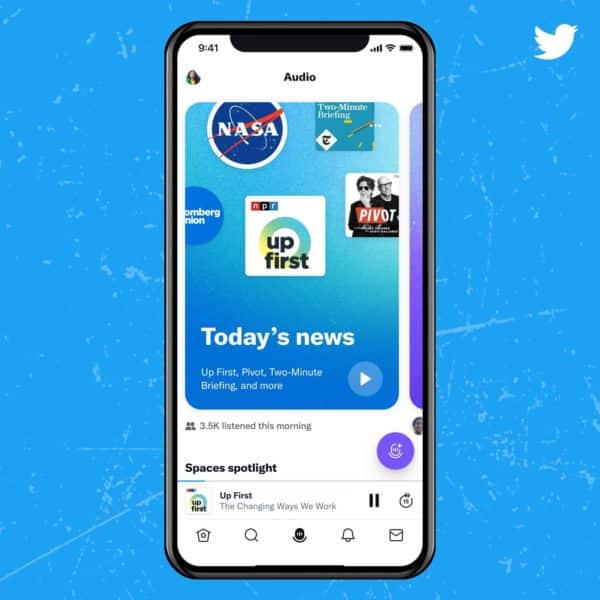
Twitter has now integrated podcasts into it’s recently redesigned Spaces Tab.

How does it work. The redesign of Spaces includes hubs where users can personalize audio content together by specific themes like News, Music, Sports, and more. The new design allows listeners to easily access more personalized sections of Spaces on topics they find relevant.

What else is included. The new Spaces will also feature the most popular podcasts from around the world. Twitter will automatically suggest podcasts based on the content they interact with the most. Listeners can give the podcasts a thumbs up or down if the content is interesting or not.

What Twitter says. “Integrating podcasts into Spaces, where audio conversations happen on Twitter, is another way we’re continuing to invest in audio creators. To do this in a simple and intuitive way that allows listeners to simply hit play and go, we started with a redesigned audio experience in the Spaces Tab.”

Why we care. Brands that are considering advertising on podcasts may want to examine opportunities a little closer now that Twitter has entered the game. It’s too soon to tell if the new redesign will increase listeners, but having podcasts available on additional platforms seems like it could give creators an incentive to develop and host more.

The post Twitter now has podcasts appeared first on Search Engine Land.


via Search Engine Land https://ift.tt/FVHbtwq

Google AdSense FLEDGE API testing delayed until September

Earlier this month we reported that Google AdSense was planning to start testing their FLEDGE API on August 28. Now it looks like they’re pushing it back to on or after September 24.

What is the FLEDGE API. The API uses interest groups to enable sites to display ads they believe are relevant to their users. According to Google, when a user visits a website that wants to advertise its products, an interest group owner (such as a DSP working for the site) can ask the user’s browser to add membership for the interest group.

What does the delay mean. Not much. There will be no publisher revenue impact expected. Google also says the blocking control for animated display ads will not apply, meaning animated ads may serve via FLEDGE even if you’ve enabled the blocking control.

Turning off access. If you’re not interested in FLEDGE accessing your sites, you can turn it off via Chrome’s permission policy header.

Read the announcement. You can read Google’s full announcement here.

Why we care. AdSense users who were expecting to test the FLEDGE API now have another month to prepare. As we mentioned previously, as Google moves toward a cookieless existence, remarketing may become more of a challenge. Advertisers and AdSense publishers need to consider how this will affect their revenue.

The post Google AdSense FLEDGE API testing delayed until September appeared first on Search Engine Land.


via Search Engine Land https://ift.tt/W9Nk6Re

Performance Max optimization: How to improve your performance

You’ve set up your Performance Max campaigns and maximized the data and insights. Now what?

Your primary goal with Performance Max is to enable the algorithm to do its job well.

Like most things in life, you get what you give.

The AI can perform better if you provide stronger data inputs (data feed + audience signals + creative assets) and outputs (tracking).

Machine learning can only make smart choices when we teach it what is valuable to us. This is why it’s super important to ensure your campaigns are tracking conversions properly.

PMax requires patience: give it 2-4 weeks to gain momentum while making limited incremental changes.

Bid strategy

Depending on your product/goal. We typically recommend starting with Maximize Conversions so the system can gather data.

Once you have solid historical data, you can layer on a target CPA or switch to Maximize Conversion Value with target ROAS.

If you find that you’re not spending your full budget, that means your bid is too aggressive. Try increasing your tCPA or decreasing your tROAS targets.

If you are spending your full budget daily, you can likely decrease bids incrementally or spend more!

Audience signals

If overall performance is poor and you are not seeing many conversions, try tightening your audience signals. Provide strong data so Google knows who your customer is.

Interests are great, but the best data is your actual customer data.

I highly recommend adding these:

  • Customer Match: Import customer lists, email + SMS subscribers
  • Custom Intent: Create audiences with top-performing keywords
  • Website Visitors: Page Viewers, Converters, etc.

Creative assets

Here’s a great thread from @duanebrown on the importance of strong creative in Performance Max. Similar to paid social, PMax is reliant on creative assets to sell your products.

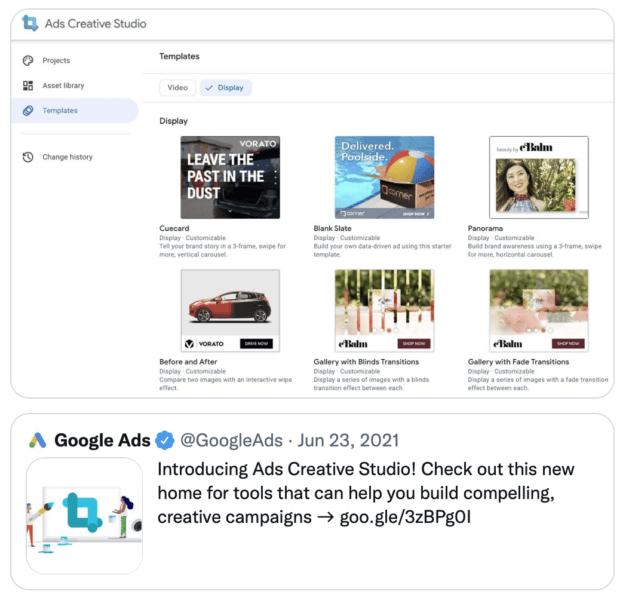
Ads Creative Studio

Google recently released some tools to make it easier to create and manage your assets. Ads Creative Studio is an amazing tool to create templates graphics and videos.

Video Builder

Video Builder is located in Google Ads and lets you easily create videos from a template.

Google Ads > Tools & Settings > Shared Library > Asset Library > Create Video

Data feed (ecommerce)

When submitting products to Google Merchant Center, make sure you are submitting as much info as possible. Specific attention should be made to product identifiers.

Google looks at the following three columns to understand what specific product you’re selling:

  • Brand Name
  • Manufacturer Part Number (MPN/SKU)
  • UPC Code (GTIN)

Additionally, but just as important to have:

  • Descriptive Titles (include keywords in your title, this is how Google knows which search terms should trigger your ad!)
  • Google Taxonomy/Categorization
  • Product Type

Exclusions

Something not working? Exclude it and force the system to focus elsewhere.

  • Listing Groups: You can exclude by Product ID, Category, Brand, Custom Labels, etc.
  • Negative Keywords: A Google rep can block irrelevant or non-performing KWs. I don’t love this approach as the whole idea of PMax is to allow the algorithm to see real-time revenue and stop non-converting traffic automatically.
  • Customer Exclusions: Not getting enough new customer acquisition? Block your existing customers from being targeted.
  • URLs.

Location

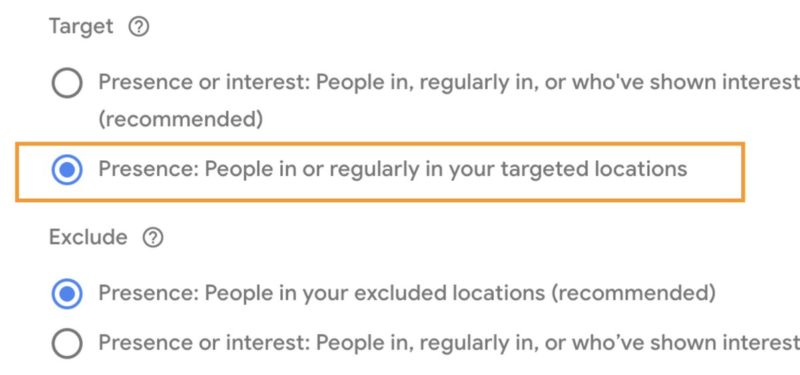
If you’re seeing irrelevant traffic from countries/locations you’re not targeting. Make sure to switch the location settings to Presence.

This can be found in the campaign Settings > Locations > Advanced Options

Landing pages

If you find that PMax is cannibalizing search and sending traffic to pages that are not converting well, you can:

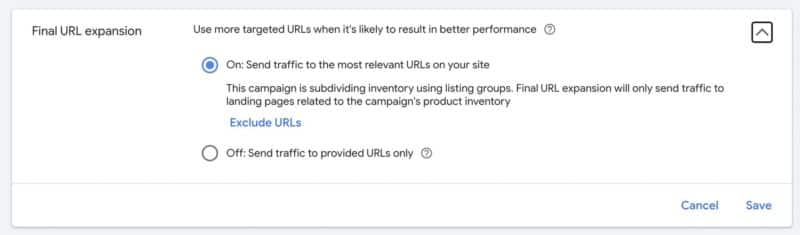
  • Exclude Specific URLs
  • Turn Off URL Expansion Settings > Additional Settings > Final URL Expansion

Budget

Is your campaign performing well? Increase the budget in 10-20% increments on a weekly basis.

Don’t increase too much in one shot, it’ll shock the system and force it to find new traffic sources.

Takeaways

  • Take the time to configure the right data inputs.
  • Let the algorithm do the work.
  • Be patient.

The post Performance Max optimization: How to improve your performance appeared first on Search Engine Land.


via Search Engine Land https://ift.tt/WDZURQN

Webinar: How Google paid search automation has changed the game for marketers

paid search

With increased automation from Google – Smart bidding, Responsive Search Ads, etc., how marketers approach Paid Search management has evolved. Automation can incorporate more information to better understand the user’s intent, personalize the right message, and make the right bid for each search.

Join Vishal Maru, VP of solutions at iQuanti, as he discusses the three value-added tasks marketers should focus on and also learn best practices to enable automation effectively.

Register today for “How Google Paid Search Automation Has Changed the Game for Marketers!” presented by iQuanti.

The post Webinar: How Google paid search automation has changed the game for marketers appeared first on Search Engine Land.


via Search Engine Land https://ift.tt/KXe3Pli

The pros and cons of using AI content writing tools

The rise of artificial intelligence (AI) programs has allowed writers to streamline content development.

Simple AI writing tools are available for spelling and grammar checks, while more advanced programs provide copywriting and content generation with the click of a few buttons. 

But is it worth using such tools when Google is clearly against AI-generated content

Learn three pros and four cons of using AI content generators before purchasing your own subscription.

The pros of AI writing tools

1. Writing efficiency and scalability

The greatest benefit to using these tools is the speed at which content is generated – significantly quicker than human writers

Between researching and writing, a two-page article may take a human writer 30 minutes to an hour to complete while this can be done in a few minutes by AI. 

Multiplying this writing efficiency by the number of articles to produce at any time, AI writing tools improve the scalability of work. 

Other benefits of this efficiency include:

  • Meeting the speed-to-market requirement for trending topics.
  • The localization of language for each product or service in geographic regions.
  • Developing unique social media content with personalization for each platform.

2. Cost-effectiveness

Quality human writers can cost a few hundred dollars per content project, depending on factors such as:

  • The number of articles.
  • Length per article.
  • The technical knowledge required.
  • And more.

This cost is often worth it, given the high-ranking results of detailed, well-researched content. 

Comparatively, most AI writing tools use a monthly subscription pricing model that limits the number of words, keywords and articles developed in the billed period – with prices often around $100 per month for tens of thousands of words and multiple articles.

Using AI writing tools might be more cost-effective when developing brief, simplistic content.

3. Spark ideas and overcome writer’s block

A common hurdle to human writers is creating authoritative content on subjects they are not qualified experts on. This hurdle requires extensive research and ideas to develop the content. 

To overcome this, many AI tools can develop detailed outlines on what to include in the content and key points on the subject.

This circles back to writing efficiency, as AI tools can help overcome writer’s block and spark ideas for content development.


Get the daily newsletter search marketers rely on.

Processing...Please wait.


The cons of AI writing tools

1. Quality concerns and plagiarism

Although AI is considered one of the fastest-growing industries in the world, it still heavily relies on data analysis and algorithms to write content.

The intended tone of an article and the misuse of statistics within the flow of the content are just two of the quality concerns that can be experienced with AI writing tools.

Similar to the quality concern is the potential to be flagged by search engines as plagiarizing other content. 

Many AI tools scrape pieces of content from other websites and then re-word them, which is against Google’s guidelines of “stitching or combining content from different web pages without adding sufficient value.”

2. Risk of Google algorithms devaluing your content

Google’s helpful content update aims to “help people see more original, helpful content written by people, for people, in search results.” 

This clearly states that the search engine prefers human-written content that provides a satisfying experience while also utilizing SEO best practices, and intends to better reward these website pages.

The update also says to “avoid creating content for search engines first”.

As many AI-writing tools analyze search engine results without truly understanding what the searcher is looking for, beyond siloing each search as informational, transactional or navigational, this is not a people-first approach.

3. Lack of E-A-T

Closely related to the risk of Google algorithms devaluing your content, Google’s quality rater guidelines assess how content appears for expertise, authoritativeness and trustworthiness (E-A-T). 

This is separated as another con to AI-writing tools given the significance that Google uses E-A-T criteria to help it evaluate good content, and the lack of E-A-T that AI content gives.

Readers are inherently skeptical of online content, due to numerous factors including the rise of misinformation. Showcasing the expertise of the writer of the content, their professional certifications or years of experience are invaluable in terms of overcoming this. 

Since AI-written content lacks these credentials, quality raters (and users) will have issues trusting you. 

4. Missing creativity, originality and other nuances

Adding creativity to content is what makes articles engaging and shareable, which are two key metrics for success. Because AI does not have emotional intelligence and the ability to understand nuances in the local language, quality human content should continue to outperform AI content.

Again, AI relies on existing content and data for the development of “new” content. Combining this with the lack of creativity, AI is unable to understand search query intent nor plant the seeds for an evergreen content strategy.

AI should be a writing assistant, not an outsourcing solution

After evaluating all of the pros and cons of AI-generated SEO content, there is scope to use these tools for writing assistance. The ability to quickly develop cost-efficient draft articles is enticing, especially when AI tools can help you overcome writer’s block and spark creative ideas.

However, be careful not to become overly reliant on such tools for content generation. Use it to source content suggestions, help paraphrasing short passages, check grammar and spelling and support your research. 

Even before drafting content, research:

  • What content users are actually looking for.
  • How you can demonstrate E-A-T.
  • If the content you’re creating is satisfying to the reader. 

Lastly, always proofread, edit and humanize your content.

The post The pros and cons of using AI content writing tools appeared first on Search Engine Land.


via Search Engine Land https://ift.tt/iBCHKVu

Page speed and experience in SEO: 9 ways to eliminate issues

Google’s Core Web Vitals show that website speed and user experience are intertwined. 

Users will leave your site if a webpage takes too long to load. That’s nothing new. 

Google stated years ago that going from a 1 to 5-second load time will result in 90% of users leaving your site without interacting with it.

So, even if your website ranks high on Google, a slow site will impact your performance.

Why? Because as user experience declines, people will exit your site without buying your products, reading your content or interacting with the site.

That said, speed goes far beyond just user experience impact. Core Web Vitals make it clear that speed is an essential factor.

What are Core Web Vitals?

Core Web Vitals (CWVs) are a set of metrics used to evaluate user experience. They measure the following for both desktop and mobile users:

  • Loading speed
  • Page responsiveness 
  • Visual stability

CWVs were introduced in 2020 to provide user-centric, real-world metrics that SEOs and site owners can use to measure usability. The three main elements of CWVs include:

  • Largest Contentful Paint (LCP): Measures the loading performance of a page. LCP accounts for the first 2.5 seconds of a page’s loading.
  • First Input Delay (FID): Measures interactivity between an action on the page and a response.
  • Cumulative Layout Shift (CLS): Measures a page’s visual stability.

CWVs work to offer a technical SEO aspect with a focus on page experience and usability. 

Understanding page experience

Page experience – which includes Core Web Vitals – is a ranking signal that Google uses to understand “how users perceive the experience of interacting with a web page.” 

The search engine aims to offer the best results for search queries. If a site is slow, isn’t responsive or accessible, and doesn’t perform well on mobile, then it may not be the best result to deliver.

Multiple signals make up page experience, including:

  • Core Web Vitals
  • Mobile-friendliness
  • HTTPS
  • Non-intrusive interstitials

Google states

“While page experience is important, Google still seeks to rank pages with the best information overall, even if the page experience is subpar. Great page experience doesn’t override having great page content. However, in cases where there are many pages that may be similar in relevance, page experience can be much more important for visibility in Search.”


Get the daily newsletter search marketers rely on.

Processing...Please wait.


Where page speed fits into page experience and SEO

Google’s statement on page experience shows that if everything else is created equal, page experience may improve visibility in the search results. 

So, while page experience is certainly not the only thing you want to focus on, it’s one more element in your control to improve your site’s visibility on the SERPs.

Page speed is a significant element because it hits heavily on Core Web Vitals and will improve all three components. To find areas of improvement, make sure to run a PageSpeed Insights report

Here are a few ways to eliminate page speed issues.

1. Minify coding

You can optimize CSS, JavaScript and HTML. Various tools can help with minifying your coding, such as HTMLMinifier, CSSNano and UglifyJS.

2. Remove unused coding

If you have unused JavaScript or CSS code, remove them. Every little bit helps to reduce file sizes and speed up your site.

3. Caching

Installing caching on the application level can help. 

WordPress and most other CMS options have caching plugins that will reduce the load on your site’s database and can improve CWVs dramatically. 

If your site hits a database often, this may be a bottleneck for your site, so something like Memcached may be needed.

4. Optimize videos and images

A major part of LCP is images and videos. 

It’s best to compress all image and video files. In most cases, GIFs should be replaced by videos.

If your images or videos are large, consider a content delivery network or third-party hosting. 

5. Use lazy loading

One way to improve the loading of an image-heavy site is to have asynchronous loading, also called lazy loading, to help speed up your site’s first render.

6. Use a content delivery network

It’s recommended to place images, videos, CSS, JavaScript or any static files on a content delivery network (CDN). 

A CDN is an ultra-optimized network with servers worldwide that hosts your files, improves delivery speed and reduces the load on your site’s server.

7. Reduce redirects 

Your site may have redirects, and they’re 100% natural in a site’s evolution. 

However, you ought to remove any redirect chains, where one page redirects to another that redirects, because they will impact your site’s speed.

8. Audit your plugins

If you’re running a popular CMS, it’s not uncommon to have dozens of plugins installed. 

You should review all of these plugins and replace those that are not used or can be replaced under one plugin.

9. Upgrade your hosting

Finally, if you’ve done everything else and page speed won’t improve, you may want to upgrade hosting

Some hosts have slow older systems, but most will allow you to add more RAM and CPUs to help improve site speed if traffic is causing the server to hang.

If you’re running an Apache or Nginx server, you can install the PageSpeed Module on your server. The benefit of this module is that it works on the server level to improve speed, meaning your site’s application will not be altered.

Note: You may need to work with IT or server administrators to implement some of the changes above to improve site speed.

Tips to improve page speed further

On top of just focusing on speed, you want to improve page experience using the tips below.

Mobile-friendliness  

In 2022, your site needs to be mobile-friendly. There’s no excuse for not using a responsive design on your site that will improve user experience. 

Next, if you follow the speed tips above, you’ll improve mobile site speeds, too.

Finally, consider:

  • Eliminating or reducing pop-ups.
  • Create mobile-friendly content with short paragraphs.

Safe browsing 

Safe and secure browsing are two elements of a site that you should already be offering. You’ll want to:

  • Run a secure site using HTTPS
  • Run security checks on your site
  • Scan all uploads to the site for malicious coding, malware, viruses and more

Routine monitoring is also essential. If your site is compromised, it will be quickly flagged by Google and cause many would-be visitors to the site to abandon it altogether.

Non-intrusive interstitials

Interruptions are never good for user experience, but they may be necessary to generate revenue or add subscribers to your newsletter. However, you’ll want to do your best to:

  • Reduce pop-ups
  • Reduce interstitials

Mobile devices have limited screen space, and if your site has a lot of pop-ups and interstitials, it can make it difficult or impossible to interact with the site, creating a poor page experience.

Review ad networks

If a site is displaying ads, there’s another element of page experience impact that needs to be considered. 

Ad networks will require you to put coding on your site to serve the ads, but if the network is slow to load, it will cause a significant drop in page speed.

You should review:

  • Ad networks to see the impact they have on your site’s speed.
  • All plugins or third-party elements on your site that are out of your control.

If an ad network, script or service impacts site speed, it will hurt your page experience.

Wrapping up

While page speed’s impact on SEO shouldn’t be the only thing to focus on, it’s an integral part of optimization that is mostly in your control. 

Using Core Web Vitals as a guide, your site speed and page experience should improve along with a potential boost in rankings.

The post Page speed and experience in SEO: 9 ways to eliminate issues appeared first on Search Engine Land.


via Search Engine Land https://ift.tt/JSQWrwL