Friday, 23 December 2022

How Google Autocomplete works

When you go to the Google homepage, you’ll most likely know what you’re about to type into the search box – whether you’re checking in on the weather forecast, looking for a business or service, or want to find out where you recognize that actor from. (Unless you’re “feeling lucky,” that is.)

You enter a word or a single letter, and Google will populate the search box with a list of “predictions” before you’ve even finished typing. This Google feature is called Autocomplete.

But what exactly is it? How does Google come up with those predictions? Read on to find out how Google Autocomplete works.

What is Google Autocomplete?

Autocomplete is a feature within Google Search that, in Google’s own words, is “designed to make it faster to complete searches that you’re beginning to type.”

Starting as an experimental feature in 2004, it was fully introduced four years later as Google Suggest and was renamed Autocomplete in 2010.

It is available anywhere you can expect to find a Google search box, including:

  • The Google home page.
  • The Google app for iOS and Android.
  • The quick search box from within Android.
  • The “Omnibox” address bar within Chrome. 

Begin typing, and you’ll see predictions appear.
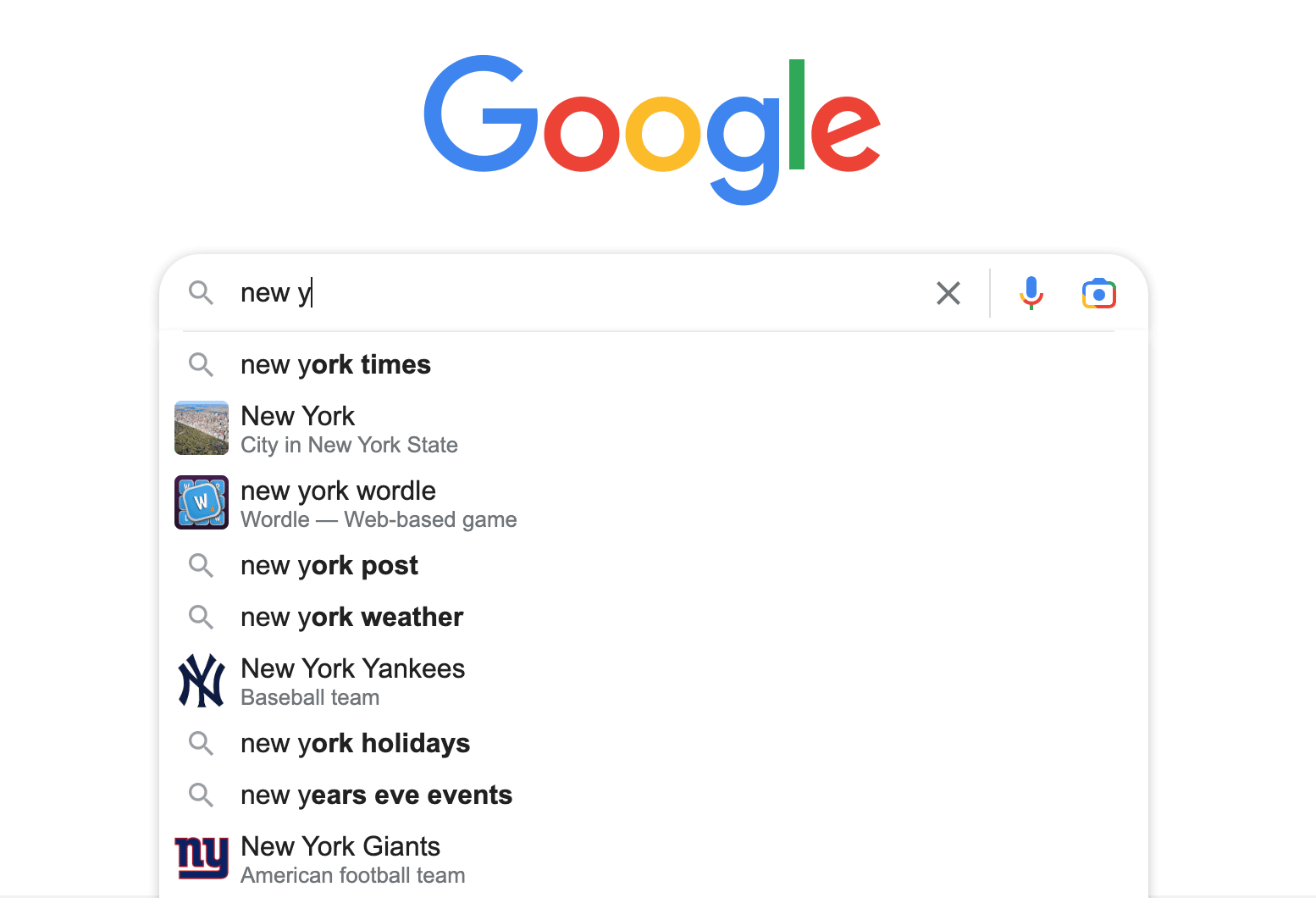
Google Search - Autocomplete for 'new y'

In the screengrab above, you can see that by typing “new y” Google brings up predictions such as “new york times” or “new york Yankees.”

This makes it easy to finish entering your search on these topics without typing all the letters. The predictions change in real-time in response to each character being typed into the search box. 

The user then has the option to continue typing their desired query or choose from the dropdown selection.

But if you know what you’re searching for, why do you need Google to tell you? 

It saves time. While Autocomplete began as a desktop search feature all those years ago, it has become a popular time-saving feature on mobile devices.

Google estimates that, cumulatively, it saves the equivalent of over 200 years of typing every single day and, on average, reduces typing overall by about 25%.

How Google Autocomplete works

Google Search doesn’t quite know how to read minds. Instead, it makes calculated predictions by looking at searches made by real people.

Autocomplete displays common and trending queries relevant to the characters entered into the search bar. 

Here are some key factors used by Autocomplete to predict search queries:

  • Overall popularity.
  • Trending topics.
  • Search history.
  • Location.

Put simply, the results shown are influenced by things you’ve previously searched for, the location you’re searching from, and the search term data that Google has gathered – using all of this data to automatically predict what you’re looking for. 

Let’s take a closer look at each factor.

The popularity of search queries

When it comes to predicting search queries, popularity often walks hand in hand with what’s trending. But trends can fade over time, whereas one or more subjects might always be commonly linked together. 

While some searches are far more common than others, some less popular searches might be shown above more common ones if Google deems them more relevant, the company says. In short, personalized > popular.

We’ve all heard of Google Trends, the website that analyzes the popularity of top search queries across various regions and languages. Well, this isn’t that.

A current trending search is a term or phrase that suddenly spikes in popularity. As people flock to Google to ask the same question, the query can appear as a suggestion, even if it hasn’t gained long-term popularity. 

Google uses the following example to explain:

When actress Anna Paquin was getting married, “Anna Paquin wedding” began appearing as a suggestion just before her big day. The term was useful to suggest, as many people were starting to search for it.

If Google had relied solely on long-term data, then the “suggestion” wouldn’t have appeared as an option in the search box, as it hadn’t widely been searched for previously.

And today, Autocomplete no longer offers the term as it didn’t harness enough long-term popularity (though “Anna Paquin married” has stuck).

Previous search queries

The predictions dropdown list will include a variation of topics and questions depending on who is doing the searching. To speed up the search process and identify what you might be looking for, Google sifts through your past searches.

In the example below, you can recognize that a previous search result appears because the text is highlighted in purple.

Desktop view of Google search bar with autocomplete

On desktop, you’ll also see the word “Remove” appear next to the prediction, which you can click if you want to delete the past search.

However, on mobile, things look a little different. You’ll see a clock icon on the left for previous searches and an X button on the right to remove it. 
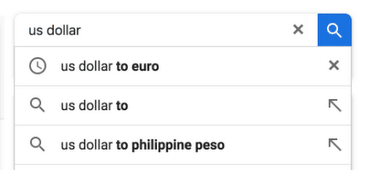
Mobile view of Google search bar with autocomplete

You can also delete all your previous searches in bulk or by particular dates or those matching particular terms using My Activity in your Google Account, regardless of the device you use to search.

Language and location

With a service that seems so personalized, it’s perhaps no surprise that not everyone receives the same suggestions. Among the factors that can tailor your experience is the language you’re searching in and the location you’re searching from.

The country, the state or province, and even the city can all produce different suggestions – whether it’s where you currently live or are originally from. 

Different suggestions will also appear if you’ve told Google that you prefer to search in a particular language or based on the language Google assumes you use, as determined by your browser’s settings.


Get the daily newsletter search marketers rely on.

Processing…Please wait.


Why are some predictions removed?

Google outlines that Autocomplete makes "predictions" rather than "suggestions."

This could be due to several controversial and legal claims previously made which suggested that Google was promoting harmful, offensive and/or inaccurate information by suggesting certain search queries.

When rebranding in October 2010, Google moved away from "Suggest" since it's not always offering the most thoughtful, caring, or appropriate term.

The company prefers to use "predictions" and is committed to bettering the service by taking on feedback and monitoring searches.

In addition, Autocomplete is designed to help people complete a search they intended to do. The feature offers predictions based on the query you were likely to continue entering. 

While the results show depend on several factors outlined above, Google removes predictions that are against its autocomplete policies, which block:

  • Sexually explicit predictions that do not cover or relate to medical, scientific, or sex education topics.
  • Hateful predictions against groups and individuals based on race, religion, sexuality or other demographics.
  • Violent or harmful predictions.
  • Dangerous and harmful activity in predictions.

Google may also remove predictions considered spam, closely associated with piracy, or in response to valid legal requests.

How do inappropriate Autocomplete predictions happen?

While Google has systems designed to automatically catch inappropriate predictions, the search engine processes billions of daily searches.

Billions of searches mean billions of predictions, which means that sometimes, inappropriate predictions can slip through the net.

While some predictions may seem odd, shocking or make you question why someone might want to search for it, looking at the actual search results generated sometimes provides needed context. 

In some cases, the search results themselves may make it clearer that predictions don't necessarily reflect awful opinions which some people may hold but instead may come from those seeking specific content that's not problematic. 

This is why popular searches measured in our Google Trends tool might not appear as predictions within Autocomplete.

Google Trends is a tool designed as a way for anyone to research the popularity of search topics over time, regardless of the search intent.

How to report inappropriate Autocomplete predictions

If you spot something which doesn't feel right, makes you uncomfortable or might offend someone, you can report using the "Report inappropriate predictions" link, which appears below the search box on desktop.
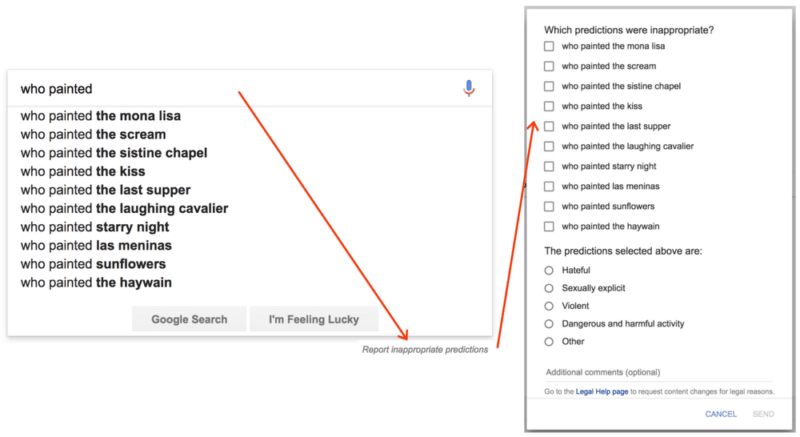
Report inappropriate predictions

For those searching on mobile or using the Google app for Android, long press on a prediction to get a reporting option. Those using the Google app on iOS can swipe to the left to get the reporting option.

Google reassures users that they don't just remove a reported prediction that violates their policies but also investigate closely related predictions to provide a broader solution and prevent inappropriate predictions from being made in the future.

More than just Autocomplete

Google Autocomplete benefits all types of users, helping them to make searches and load pages more quickly.

Whether you're looking to inform your marketing strategy, generate content ideas, research keywords or explore search intent, Autocomplete can be a valuable tool.

Search and digital marketers use it to find out what people are actively searching for so they can better meet their customers' needs.

The post How Google Autocomplete works appeared first on Search Engine Land.


via Search Engine Land https://ift.tt/rZimGPS

Thursday, 22 December 2022

Google updates ad policies to allow more CBD promotions

On January 20, 2023, Google will update its Dangerous Products and Services and Healthcare and Medicines ads policies to allow for the promotion of FDA-approved pharmaceuticals containing cannabidiol (CBD) and topical, hemp-derived CBD products with THC content of 0.3% or less in California, Colorado, and Puerto Rico. 

Why we care. If you’re a brand or advertiser for CBD products in the three approved locations, the new policies will allow you to advertise if you are certified by Google. Advertisers can request certification with Google starting on January 20, 2023, when the form is published.

Certification from LegitScript. Google will only allow CBD products that have been certified by LegitScript to be promoted. The certification process will require that any product that is going to be advertised adhere to the following:

  • Provide samples of their product to test for compliance with legal THC limits
  • Provide LegitScript a third-party Certificate of Analysis

Still not allowed. Certain formats, including YouTube Masthead, will not be eligible for serving. CBD will be removed from the Unapproved Pharmaceuticals and Supplements list. All ads promoting other CBD-based products, including supplements, food additives, and inhalants, remain disallowed.

Dig deeper. Review the announcement from Google here.

The post Google updates ad policies to allow more CBD promotions appeared first on Search Engine Land.


via Search Engine Land https://ift.tt/LNrfITS

Merchant Center Feeds issue

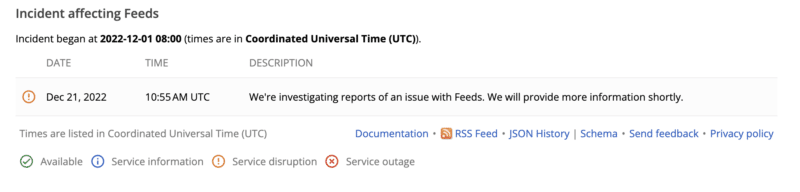
Just in time for the holidays, Google has reported a Feeds issue in Merchant Center. The following is a screenshot from the status dashboard.

Why we care. This issue could affect your product feed. Keep an eye on the dashboard for a resolution.

The post Merchant Center Feeds issue appeared first on Search Engine Land.


via Search Engine Land https://ift.tt/H2fBzjE

GA4 now lets you recreate Universal Analytics audiences, and personalize the Home page

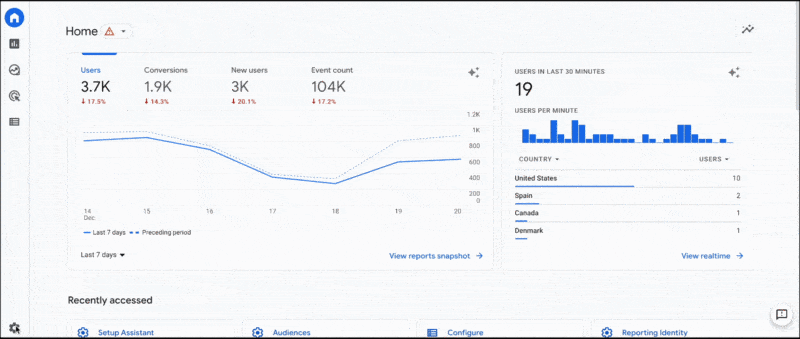
GA4, everyone’s favorite new Google Google Analytics product, will now let you use the Migrator for Google Analytics Google Sheets add-on tool to recreate many of your Universal Analytics properties into a GA4 property. You can also personalize the content on your home page to make what’s shown more relevant. Let’s take a look.

Why we care. First, these new tools attempt to make GA4 tolerable by allowing you to customize your dashboard and properties as close to UA as possible. Though not perfect, this should at least bring a little more familiarity into the mix. Advertisers who have been slow to implement or learn GA4 might find solace in these familiar features.

If you haven’t implemented GA4 yet, this is your sign.

Recreate Universal Analytics audiences in Google Analytics 4

Audiences based on dimensions and metrics that are the same in UA and GA4 can be recreated just as they are. When the audiences use dimensions or metrics that differ between UA and GA4, you can edit the audience definitions in the spreadsheet to use the relevant GA4 dimensions and metrics.

For each audience, the spreadsheet includes information about whether the audience is available for recreation; if it isn’t, the spreadsheet has information about why. Editable audience conditions are included so you can modify them before recreating them.

More information on the Migration tool can be found here.

Personalize the Home page

Keep in mind that when you personalize your homepage, the customization is only visible to you. Other users will not see your dashboard.

The following information is from the Google Analytics Help documentation.

Personalize the metrics and dimensions

You can now change the metrics on the overview and realtime cards. On the overview card, hover over a metric to see a drop-down menu so you can change the metric.

On the realtime card, you can also choose from a number of dimensions (e.g., Audience, City) or let us choose a dimension for you (i.e., Choose for me).

Restore your choices

Whether you change the metric, dimension, or date on a card, we’ll restore your choices in future sessions. For example, we’ll populate a card with City the next time you visit Google Analytics when you choose the dimension in your current session.

Additionally, when you return to a report using the Recently accessed section, you’ll see all the changes you made to the report. For example, if you changed the primary dimension, you’ll see the dimension applied when you select the report from the Recently accessed section.

Try Suggested cards

When you’re new to a property and haven’t viewed a card frequently, a new Suggested for you section will appear. The section surfaces cards that are popular across all Google Analytics 4 properties to help you find useful information in your property.

Provide feedback

You can now give a thumbs up or thumbs down when hovering over the top right of a card in the Suggested for you, Because you view frequently, and Insights sections. The feedback options allow Google Analytics to provide you with more helpful information in the future.

The post GA4 now lets you recreate Universal Analytics audiences, and personalize the Home page appeared first on Search Engine Land.


via Search Engine Land https://ift.tt/kTVr8Eo

Why SEO experts rarely share actual success stories

Most SEO experts are still afraid to publish their success stories, with a few notable exceptions. 

Many are simply unable to share their work even when it’s successful. How can SEOs stop practicing “ghost optimization”? 

Before we dive into this question, let’s look at the reasons for the ongoing secrecy and still prevailing negativity among SEO practitioners.

SEO horror stories, anyone?

One of the most popular SEO hashtags within the industry over recent years has been #seohorrorstories. 

Why are SEO experts much more likely to share the horrible failures of the industry and their colleagues than their own success stories? 

Is this the overall prevailing negativity of society as a whole? Or do we have an internal problem aggravating the situation? 

I think it’s probably both.

First off, the recent years have led to a never-ending, downward spiral of public debate. Diplomacy has made way for trolling. 

When even presidents provoke people online to get attention, how is everybody else meant to stay civil in day-to-day conversations? 

Also, social media like Facebook and Twitter have been capitalizing on fear and anger.

Such “bad news” goes straight to our lizard brain and elicits fearful and angry reactions without consulting the parts of the brain responsible for logical thinking.

No wonder that even within the relatively professional SEO industry, the discourse has degenerated into the realm of “OMG! Look at that nonsense! How stupid!”

I’m exaggerating a bit, but that’s the essence of most shares where #seohorrorstories are involved. 

These are more than cautionary tales. It’s also a way of ridiculing those reckless enough to get caught red-handed while employing outdated SEO tactics.

Perhaps the thought process is that when one can’t shed light on their actual successes, then highlight others’ failures. This way, they indirectly stand in a better light by sheer comparison.

Of course, this is merely guesswork. The motivation behind the many horror stories may vary. It won’t simply gloat or malice, in most cases. 


Get the daily newsletter search marketers rely on.

Processing…Please wait.


‘Look at this random graph, please – the growth is stellar!’

There is also a compromise, anonymized "success" stories – where the alleged success can't be fully reviewed by peers.

Such stories seem to be the middle ground between failure and success stories. So what is the logic behind them, then?

You will find lots of social media posts shared of random graphs without any URL connected to them.

It's usually an analytics screenshot clumsily anonymized before publication. Ultimately, the stellar growth they exhibit lacks any credibility. 

I’m usually acquainted with those who share such success stories, so I know they won't lie.

In most cases, they also add as much context as possible without giving away any meaningful detail so that you cannot track down the website they’re talking about.

What about industry outsiders and potential clients?

They have no idea who the people sharing the graphs are and how trustworthy the information is.

What is the purpose of sharing graphs without any context?

Again, I can only guess. 

  • Some SEO experts try to convey their expertise that way. 
  • Others share their success out of sheer joy at having made it. 
  • Some may want additional opinions on what happened when things went wrong. 

Take note that #seohorrorstories are quite often anonymous. That way, some limited peer review does happen within a very small perimeter. It's better than nothing, right?

Are there any SEO hero stories? 

Some of you may have noticed. I have been looking for SEO hero (as in superhero) stories for two months and have been quite aggressive about it. 

There were far fewer success stories than bad news from the SEO industry. Yet, I was astounded that even the prospect of getting additional free publicity did not motivate many SEO companies, in-house SEOs or SEO consultants to divulge their success stories or share their case studies with me.

I started a similar hashtag inspired by #seohorrorstories called #seoherostories to encourage sharing such positive examples, but it seemed like I was the only one using it.

Are SEO experts ashamed of their work or afraid to show it?

Given the poor reputation of the SEO industry in the last 25 years, it's no wonder some people are not keen on outing themselves as SEO practitioners. 

Numerous SEOs still engage in unethical practices, which might be why they are ashamed to show what they do.

Still, others may simply be afraid. I probed about the reasons behind this fear, and here are the obvious ones.

Manual Google penalties

This is an age-old fear of SEO practitioners stemming back from the early days. Sometimes, outing yourself as a practitioner of the dark arts of SEO – and mentioning the actual website you’re working on – was akin to suicide for your project. 

Even before the somewhat weird term "manual action" was introduced by Google, penalties have been known to hit out of the blue and after too much publicity for SEO practitioners’ work. 

This fear is no longer reasonable. And like most fears, it's rather irrational.

SEOs are not criminals, and hiding is not necessary in most cases.

‘Secret sauce’ copycats

Another albeit more likely scenario is that the competition may steal your "secret sauce" and copy your SEO techniques. 

While this is possible, it's important to realize who your competition on the web is. Most SEOs would still say something like "businesses who sell the same thing in the same area." 

The reality of Google SERPs or the "SERP real estate" is that you mainly compete against the web giants:

  • Google itself pushes its own services and ads above actual organic results.
  • Huge websites like Amazon or Wikipedia are always on top by sheer popularity. 

Would a competitor or colleague who happens to have a similar business as you really hurt you that much by looking at your site's SEO? 

Also, anybody can look up your secret sauce by using a tool like Semrush and find out about on- and off-page SEO with ease. So, why hide your success from the general public?

Client-stealing competitors

The other fear relating to the competition is that other SEOs may see who you work with and, thus, contact them and "steal your clients."

People do this. I have had several clients notifying me of such attempts over the years. 

I don't think I lost any clients that way, though. Why? Is it just because I'm such an expert?

Probably not. I was a beginner at the time as well. 

It’s such a sneaky practice that business people are not fond of offers made that way. If they are, you may be lucky to get rid of them. 

Toxic clients often hurt you more than they help financially. I had to learn that lesson the hard way over the years, trying to satisfy everybody.

I believe the above common "reasons" for not sharing SEO work are often irrational fears and traditions – merely excuses.

One reasonable explanation for why someone would not want to share the actual website address or their "stellar growth" chart is that the work is still in progress. 

Many other parts of the project were far from ready for prime time, and it was not a good idea to share them prematurely. I've only heard that justification once, though, even when I asked many times.

NDA: The dreaded acronym

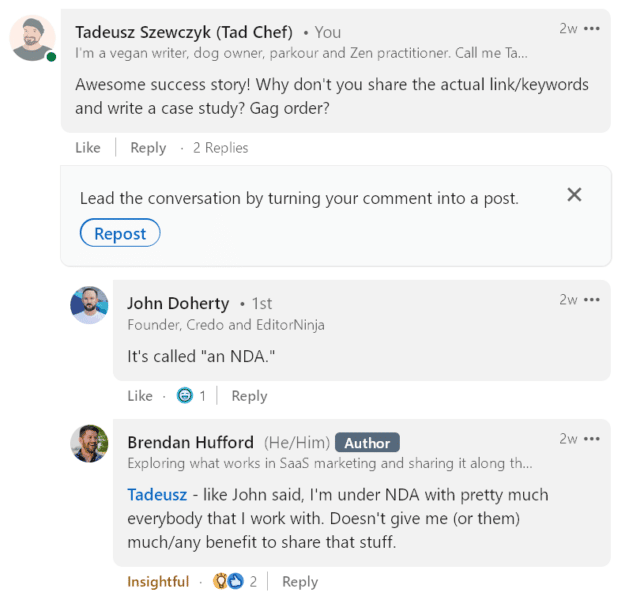
A common explanation for not publishing actual results or disclosing website addresses and client names is the typical non-disclosure agreement (NDA). It may as well be called a "gag order," as most SEO experts have to shut up completely about their work. 

Some popular search marketers, including John Doherty and Brendan Hufford, emphasized this point on LinkedIn.

For those in creative industries, being unable to share their work or having to do so anonymously would be virtually impossible. 

Imagine the following scenario if designers, architects and programmers were involved.

  • "Look at this house based somewhere in the northern hemisphere. Brown brick has been used for the structure, and the large window frames facing south are made of a local wood I can't disclose here. To protect the owner’s privacy and hide the location, I had to blur some of the images."

So why do we have to sign so many NDAs forbidding us to show our actual work or even sometimes tell our friends and families about it?

What’s with the high level of confidentiality? Are we secret agents? 

Clients who demand that SEOs do not talk about their projects may be due to any of the following reasons:

  • They are unethical and will ask you to perform SEO outside Google guidelines or even beyond what the law allows.
  • They want to claim success for themselves and their sales department.
  • They are simply ashamed to buy SEO services as these are still considered to be some kind of voodoo by some.

The common logic is, of course, about "trade secrets." But as noted above, many tools allow you to analyze those supposed secrets.

The bright side: 3 inspiring case studies that welcome peer review

After talking so much about the issues surrounding (the lack of) success stories in the SEO industry, let's focus on a few actual case studies that inspired me this year. 

Hopefully, these SEO hero stories encourage you enough to follow in their footsteps.

Example 1: Missguided 

Dogs and owners often become very similar to each other, even by their looks. I am one and can tell you that it often happens "accidentally."

But there’s an artistic photo series taking it to the extreme, where dog owners and their pets dress up and get their hair done in the same style. 

UK-based SEO agency Rise at Seven made this the idea behind a very successful campaign:

As CEO Carrie Rose reports in her case study, the results have been more than impressive:

"865% increase YoY traffic to this area of the site, 134,757 page views to be exact."

She goes into great detail to explain how it worked and what exactly happened to make it such a success, so make sure to read the entire case study.

Example 2: LiberEat

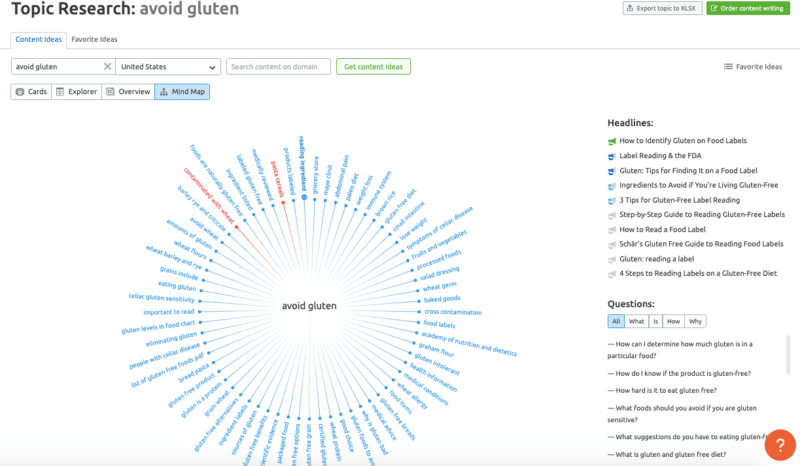
Semrush topic research - avoid gluten

Olga Andrienko, well-known for her leadership role at Semrush, showcased the success story of LiberEat, made possible by Mich McClure and the team behind Hoojy. 

"1000% organic traffic growth in 3 months".

While this might sound too good to be true, especially given the approximate numbers, she goes to great lengths to highlight what happened, why and how in her extensive Twitter thread.

If that's still not enough, check out the full-fledged case study with lots of screenshots, keyword examples and figures over at Semrush.

Example 3: Unbeatable Blinds

The folks over at Boom Online have many case studies, but their campaign for Unbeatable Blinds made me feel good. It might be the artistic quality of the images they have shared as part of the campaign. 

While they did not divulge the numbers, the links they attracted speak for themselves:

"The content was covered by a number of high-profile publications such as Design Taxi, Bored Panda, Line Today & The York Press among others."

Given such attention from popular blogs and local press alike, I'm confident that the traffic and other metrics will follow suit.

How to get clients who are proud to work with you

As a writer, I do not offer ghostwriting services.

Ghostwriters tend to become invisible. Someone else gets the credit for their work.

Nobody knows what they have done, so they can't prove their expertise. 

It's pretty straightforward when it comes to writing.

Potential clients usually tell you upfront that they are looking for a ghostwriter. You can just ignore such offers unless your financial situation forbids you to.

With SEO services, it's much trickier. Nobody will tell you they are looking for a "ghost optimizer." 

Often, after plenty of discussions and only when you are short of signing a contract will you get a cryptic NDA full of legalese meant to hide its true scope.

In other cases, you get the NDA, or they don't talk to you at all. Either way, you risk losing a lot of time and money and not getting the client.

Some NDAs are meant to protect trade secrets. Yet, most of them usually grant sweeping powers to the client to ban you from disclosing much of anything. 

No wonder people working in SEO and adjacent industries (think marketing or advertising) are simply shutting up in general in order not to breach their agreements.

You never really know what goes too far, so you play it safe by keeping quiet.

So what can you do to identify clients who undermine your status as an industry expert? 

You can prepare upfront, be clear during the preliminary talks and stand firm once you start working. Below are four specific tips.

Work on your own projects first

Always work on your projects first or at least keep them going in the background. 

Once you have independent revenue sources and ways of gaining status outside client work, you can rest assured when choosing to engage with others.

Having to work for third parties out of necessity is never a good place to be at. 

Whenever possible, work for others because you love the challenge and variety, not because you need the money. Ideally, clients seek you out because they are fond of your personal projects.

Build your authority in the industry and beyond

Visibility is not limited to client work. Many practitioners attend conferences, trade fairs or meetups to show up and teach others what they know.

Some hoard knowledge and keep it to themselves so that nobody can "steal their ideas." This is a short-sighted approach. 

Ideas can be discovered by more than one person at any given time. But the one who publishes it first or does so more widely is usually credited with the "invention." 

It's crucial to become an authority within your industry, and beyond the narrow field you specialize in. 

When I started out in SEO, I made sure to keep branching out into broader yet more popular areas like web development, marketing and blogging. 

SEO is often viewed as merely "technical SEO" and a small subset of actual search engine optimization, in my opinion. The number of people interested in what you are talking about is very small.

By sharing your knowledge, you are enabling those unfamiliar with your work to understand what you do. 

Introverts can share and teach on the web. You don't have to show up in person, shake hands and pat backs.

You can also network online with like-minded individuals. LinkedIn is your best bet here.

Charge more for ‘ghost optimization’

A simple yet powerful way to make a point is to charge more money for something harder or more valuable. 

Usually, ghostwriters are underpaid young writers who have no name yet so that they are forced to write in the shadows of the bigger names. But once you've built a name for yourself, you have to be proud enough to charge accordingly. 

Almost nobody will think you are valuable as long as you undercharge or are too timid.

The few who know will be glad to exploit your expertise for low fees and shut up about your true worth in most cases.

Similarly, you have to make it clear that you charge more for ghost services from the start.

With "ghost optimization" being much more complex and riskier than mere writing, it's even more important to charge your true value.

There are far fewer high-quality SEO practitioners out there, so don't be afraid to get what you deserve.

Flatly refuse to do the dirty work 

Once you have worked with a client for a while, some drop their masks or become more daring.

Others might get frustrated with the slow pace of SEO progress and demand you do what the competition does. 

Riskier tactics may get their domain banned or penalized, but in the short term, the results may look impressive. 

Now you have to keep your integrity. How?

Flatly refuse to make your hands dirty and to use questionable means of SEO. 

The client feels safe due to the NDA, so they think they can get away with it. But SEO does not happen in a vacuum. 

Just because you don't tell anybody that you have to spam doesn't mean it's invisible. 

As noted above, publicly available tools give you an X-ray vision of any website's SEO.

Google also has human quality raters and increasingly sophisticated algorithms to find the bad apples.

The post Why SEO experts rarely share actual success stories appeared first on Search Engine Land.


via Search Engine Land https://ift.tt/cOuyEsX

Wednesday, 21 December 2022

Microsoft to go fully live with new Bingbot user-agent change in January 2023

Microsoft’s Fabrice Canel has said that in early January 2023, the new BingBot will be responsible for 100% of Bing’s crawling activity. The new user agent is now responsible for about 50% of all crawls.

Some history. In 2019, Microsoft Bing announced new Bingbot user-agent names that fit better with its evergreen Bingbot crawling and rendering service. Then in April 2022, Microsoft announced a name change, a user agent name change, for BingBot.

January 2023. Next month, in the coming weeks, the new BingBot user agent will be responsible for 100% of all crawling from Bing. Fabrice Canel wrote, “will go to 100% early January” for BingBot’s new name. He added they are still at 50% now because they wanted to be extra safe.

Old user-agent. Microsoft said it would stop using its historical user agent by the Fall of 2022. That user-agent looks like this:
Mozilla/5.0 (compatible; bingbot/2.0; +https://ift.tt/Voi1Dat)

New user-agent. Bing will use a user-agent that identifies the specific version of Microsoft Edge is crawling your site. Here is the format for both desktop and mobile:

Desktop – Mozilla/5.0 AppleWebKit/537.36 (KHTML, like Gecko; compatible; bingbot/2.0; +https://ift.tt/Voi1Dat) Chrome/W.X.Y.Z Safari/537.36

Mobile – Mozilla/5.0 (Linux; Android 6.0.1; Nexus 5X Build/MMB29P) AppleWebKit/537.36 (KHTML, like Gecko) Chrome/W.X.Y.Z Mobile Safari/537.36 (compatible; bingbot/2.0; +https://ift.tt/Voi1Dat)

“W.X.Y.Z” will be substituted with the latest Microsoft Edge version Bing is using, for eg. “100.0.4896.127″.

Why we care. You probably should have been prepared for this change since it was announced back in 2019. But in any event, this change can impact your site if you have any user agent detection methods for BingBot. Make sure to test your site to see if it supports the new user agent. Most sites probably do not need to worry about this, but if you have done any advanced bot detection, you may need to take steps to update those scripts.

The post Microsoft to go fully live with new Bingbot user-agent change in January 2023 appeared first on Search Engine Land.


via Search Engine Land https://ift.tt/HrxJT86

How the TikTok algorithm works: Everything you need to know

Since its initial release in 2016, TikTok has become the fastest-growing social media platform.

If you’re looking to learn more about the popular short-form video app and how your brand can use it, you’ve come to the right place.

We read TikTok’s creator guidelines and newsroom documentation, so you don’t have to. 

In this article, we’re sharing everything we learned – along with insights from the TikTokers well-versed in increasing views, engaging users and growing a following.

Find out how the TikTok algorithm works, what you need to do to create a winning video, and decide whether TikTok can benefit your brand.

In this article:

What is the TikTok algorithm?

The TikTok algorithm is a recommendation system that determines the videos you see on your app. Like any good algorithm, it works to bring relevant content that you enjoy based on your interests.

Recommendation systems are used all around us in the digital world and not new. Many platforms, including Netflix, use them to deliver you the content you like the most.

The purpose of a recommendation system is to share content that users like based on their preferences and those of people in similar demographics.

The TikTok recommendation system and algorithm centers around the “For You” page.

What is the For You feed?

The For You feed (a.k.a., For You page or FYP) is a curated stream of videos, a unique and tailored feed to the user’s interests.

Although TikTok users will see the same videos, your FYP is totally unique and curated only for you. 

When you open the app, you land on this feed first. The great news is that you can curate your own FYP by interacting with the app. 

When you first join TikTok, your FYP will likely be curated by the interests within your demographic based on the information you gave (i.e., age, gender and interests).

It’ll be a broad approach until you show TikTok what you want to see more of.

Let’s take a look at the actions that influence the algorithm.

How does the TikTok algorithm work?

TikTok documentation states three core factors that influence the algorithm:

  • User interactions.
  • Video information.
  • Device and account settings.

1. Factor: User interactions

User interaction includes actions that users take on a particular video. These interactions can be negative or positive.

A positive interaction will cause the app to show you more of the same, and a negative interaction will do the opposite. More on negative actions and their impact on “What the algorithm won’t show.”

Positive interactions include engagements like:

  • Posting a comment.
  • Following an account.
  • Liking a video.
  • Video watch time.

As a creator, knowing how the TikTok algorithm works means that you know what to ask from your viewers to increase the right sort of engagement. 

User interactions in practice

User engagements are certainly a factor in the algorithm, and TikTokers know it.

The TikTok algorithm got it right when it put the below viral video on my FYP a few weeks ago. I don’t engage with TikTok videos very often, but I did like the below video and left a comment about how wholesome the content was. I didn’t want to follow the creator, but I enjoyed the brief interaction.

@brialem

🍅🥪

♬ original sound – bria lemirande

The video amassed 785,200 links, 9060 comments, 76,900 saves and 5,579 shares. Most impressively, the video has 6,000,000 views.

Thanks to my like and comment, when the creator made a second, similar/follow-up video, it landed on my FYP.

The second video didn’t quite have the same magic, but the virality of video one certainly helped the creator’s second video land in the right places based on previous user interaction.

To TikTok’s credit, there seems to be a level of trust in the TikTok algorithm. 

On some of the most engaging videos – or videos made in a series – you’ll often see comments like, “Trusting the algorithm to bring me back.”

TikTokers might comment something like this when they want to show the algorithm that they’re interested in the content but (perhaps) don’t want to follow the creator.

In the video below, a creator reminds viewers they can hit the follow instead of trusting the algorithm. A follow is a desirable action for creators as it almost guarantees the user will see more of their content. 

@molzysketch its there for a reason guys 🤨 #tiktokartist #tiktokart #handsofthedsmp ♬ Luna, amore e no – Piero Piccioni

How to encourage user interactions

As a creator, you want to encourage user interactions. You can achieve this by creating great content, but you can inspire meaningful action from passive viewers with a call to action.

TikToker Tyla Brimblecombe from Styla Socials explains the importance of a call to action in her TikTok.

@stylasocials 3 more quick points in the comments 🤌🏼 Send this to someone who would benefit from this 🤍 #tiktokcontentcreator #viraltips #growontiktok ♬ In a French Cafe – Relaxing Piano Waltz – Classical Piano Music Masters

She says:

  • “We all know the most important metric on TikTok is watch time… someone is scrolling on the For You feed, they see your video, they like it, they make it all the way to the end. When they see your call to action, ‘take a look at my other videos,’ they click on your profile, they check out your other videos, which lets TikTok know your content is valuable and is going to push your content out to a wider audience.”

2. Factor: Video information

According to TikTok documentation, video information includes:

  • Sounds
  • Captions
  • Hashtags
  • Video descriptions
  • Text overlays

Video information in practice

TikTok is well known for its association with trending sounds. With a trending sound, the TikTok algorithm can identify a group of people who are likely to engage with a video based on previous user interactions. If a user watches a video to the end each time a certain sound is used, they are likely enjoying the content and want to see more of it.

It’s important to note that trending sounds are not just viral dances. Brands can use sounds to get fast visibility to a wider audience.

Kristyn Higginson, Skinician’s TikTok creator, says:

  • “Creating ‘viral’ content seemed challenging in the early days as a lot of the trending music wasn’t available for business accounts. The way around this was to opt for trending sounds when we wanted to create relatable, relevant content for the platform. This meant, as a brand, we leaned into trends without any copyright infringement. This might be a useful tactic for other small brands in the early stages of content creation on the platform.”

With early adoption of a trending sound, Skincian’s most viral video received 50,900 views, 2,142 likes, and 40 engaged comments. The video introduced the brand to their TikTok audience.

@skinician Get to know us! ☘👏🏼 #skinician #skincare #localbrand #beautytok #skincaretok ♬ เสียงต้นฉบับ – [FS]ICHIGO_TH 🎗🇰🇷 – 「 saijoutakato7 」°• ⚘

TikTok creators are finding that video information contributes significantly to video success. 

Kate Smoothy from Web Hive Digital is a TikTok creator.

Smoothy shares that captions, hashtags, and video descriptions are a core part of her strategy. She says:

  • “I can’t express enough how much you have to caption your videos. This is essential for those without hearing but for those who prefer to scroll through TikTok without the sound on. You’ll significantly reduce your audience size and reach without captions. There has never been a better time to include keywords in your TikTok descriptions. We’re seeing a huge shift with the platform where videos optimized for their search feature seem to perform better.”

Smoothy credits the inclusion of video information tactics with the success of her “super low effort marketing hack video.”

@webhivedigital Not enough people know about this super low effort marketing hack to get interactive video on your website. I’ve got it on mine 👀👀👀 #websitetips #websitetipsandtricks #digitalmarketing #marketingtips #websitesyouneedtoknow ♬ original sound – Kate Smoothy | Websites & SEO

The video has 92,400 views, and amassed 5,913 likes, 91 comments, and 740 shares. 

The keywords used in the video description, within the text overlay and within the video description have communicated to TikTok what the video is about. This resulted in the video ‘ranking’ for the search term ‘marketing hack’ and ‘marketing tips’ within TikTok’s search feature. 

How to use video information 

The top tip from TikTok experts is to conduct keyword research using the TikTok app, then use keywords in your video, captions and hashtags.

@socialby.lu Take advantage of the search bar results to see what others are looking for and create content to attract the right audience, make your account relevant, get more views and more followers! This is the easiest way to create a TikTok strategy aligned with your niche and according to the platform’s enhanced SEO! #tiktokseo #tiktokcontentideas #contentcreatortips2022 #growyourtiktok #socialmediastrategist #ugccreator #socialmediatipsandtricks #greenscreen ♬ Hold Me Closer – Elton John & Britney Spears

3. Factor: Device and account settings

TikTok is clear that device and account settings receive lower weight in the algorithm. 

Some of the more obvious factors include language preference and country setting. It makes sense that users want to see videos in the language they speak.

TikTok also includes device type in its algorithm. They may prefer to show you videos that your device can play seamlessly since this would lead to a positive user experience for people using older phones or smaller screens.

Keywords and the TikTok algorithm

In recent months there has been a lot of talk from TikTokers about a change in the TikTok algorithm and how TikTok now prioritizes keywords.

If you search “TikTok Algorithm Change,” you’ll find people saying a lot of the same thing – TikTok SEO is becoming more prevalent. 

@coach.alexrob NEW algorithm changes for TikTok! If you are a business owner or content creator, in this video I break down all the new changes happening to TikTok, you definitely want to make sure you are using some of the key features such as SEO, improved analytics and making your content longer form. #tiktokforbusiness #tiktokforcreators #socialmediaforbusiness #tiktokseo ♬ Trap Sax – Nish

Interestingly, TikTok doesn’t seem to mention “keywords” in relation to their algorithm anywhere in their documentation.

But that doesn’t mean that keywords aren’t important.

It’s no coincidence that TikTok increased video descriptions to 2,200 characters. In their announcement via the app, TikTok did say:

“Increased characters gives creators a chance to ‘generate engagement while becoming more searchable and better recommended by TikTok to viewers.”

TikTok also mentions captions and hashtags, which both contribute to FYP.

Captions and hashtags are words that help contextualize videos. If captions are a contributing factor, it suggests that words – or keywords – contribute to the TikTok algorithm. 

We also know that TikTok users can limit content based on keywords (more on that later).

TikTok SEO and Google

To further explore TikTok SEO and how this transpires on the world’s most loved search platform, Google. We ran some tests to explore Google’s indexation of TikTok videos.

When you search for “TikTok recipes” on Google, you’d expect to return TikTok videos. But what we found was the contrary. 

Google prioritized websites sharing TikTok’s viral recipe trends. TikTok ranked with a tag page in the eighth search position. Considering the relevancy to the search term, this isn’t an overly strong rank.

In the Video results, TikTok ranked sixth below five YouTube videos. It makes sense that Google would prioritize its owned channel, YouTube, above TikTok.

It is worth noting that videos featured in the TikTok recipes tag all featured the hashtag #recipes in the caption. Captions help the TikTok algorithm sort videos by topic and could even boost visibility via Google search.

Paneer recipe screenshot from TikTok video that ranked within the TikTok Recipe Tag.

As shown in the screenshot, the caption includes the hashtag #recipes, suggesting that keywords are relevant to the TikTok algorithm.

So, what does this mean?

  • Creators should use relevant keywords in their captions and hashtags.
  • According to TikTok documentation, captions and hashtags are contributing to the TikTok algorithm.
  • For increased visibility in Google, consider sharing your video on other platforms, like YouTube Shorts.

Get the daily newsletter search marketers rely on.

Processing…Please wait.


TikTok algorithm myths debunked

Let's clear up some commonly held misconceptions about TikTok.

Myth: You need to post daily

Posting 1-3 TikTok videos daily is a common recommendation for new TikTokers. However, TikTok's guidelines make it clear that it's not required for growth.

That said, it may be useful to test different videos. TikTok's documentation advises that experimenting with videos you share and posting quality content is more useful to keep an audience engaged.

Myth: Creators in the TikTok Creator Fund get more discoverability

The good news is: you do not need to be in the creator fund to increase your chances of discoverability. 

Those in the TikTok Creator Fund are more likely to earn increased engagement, but this is because these TikTokers know how to create great content that engages the community.

Myth: TikTok is only for short-form videos

Although TikTok started as an app with seven-second videos, the maximum video length has since increased. 

Within the app, you can create videos that are 15 seconds, 60 seconds, or three minutes long.

Alternatively, you can create extended videos and upload them to the TikTok app.

TikTok doesn’t mention longer videos earning favor in the algorithm, but they do seem to be sharing reasons why longer videos are engaging with creators.

@rachforaday make longer videos to get more views - it's not me saying it - it's the algorithm ! #tiktoktips #socialmediatips #makelongertiktoks #tiktokhacks #getmoreviews ♬ longer TikToks getting more views - Rach • Social SEO Expert

What the algorithm won’t show

To give TikTok credit, it's taking action to safeguard and diversify recommendations in the FYP. 

With a recommendation system, it would be easy for TikTok to become repetitive, showing only similar videos. Equally, it could be easy for TikTok to show unwanted content to its viewers. 

TikTok is taking measures to make TikTok a better place for everyone. Here's what TikTok won't show in the FYP.

Duplicate content

TikTok says that too much of anything can get tiresome.

For this reason, TikTok won’t show duplicate content in the FYP. Plus, diversifying the FYP keeps users exposed to a range of ideas and perspectives. 

Potentially problematic clusters

The TikTok algorithm works to deliver the platform’s mission to inspire creativity and bring joy. 

To achieve this, TikTok avoids recommending similar content around potentially problematic subjects such as extreme dieting or fitness, sadness, or breakups. 

TikTok wants to protect its users from viewing content that may cause distress if viewed together but might be okay as a single video. 

This type of restriction is positively compounded by the “not interested” and “keyword filtering” features.

Content marked ‘Not interested’

TikTok lets users control what they want or don't want to see on the platform. 

Viewers can press and hold the screen on any TikTok video and select any of the following options:

  • Save video: A positive video engagement indicator for the algorithm.
  • Clear mode: View videos without usernames and captions, etc.
  • Report: This action indicates that a video goes against TikTok's Community Guidelines and must be addressed.
  • Not interested: This tells the TikTok algorithm that you, as a viewer, don't like a particular piece of content. In return, you will see less of it.
Screenshot of the TikTok menu with four items: save video, clear mode, report and not interested. All, but clear mode, influence the algorithm.

If a viewer clicks "Not interested," you can expect this to influence the algorithm and their FYP.

Content including filtered keywords

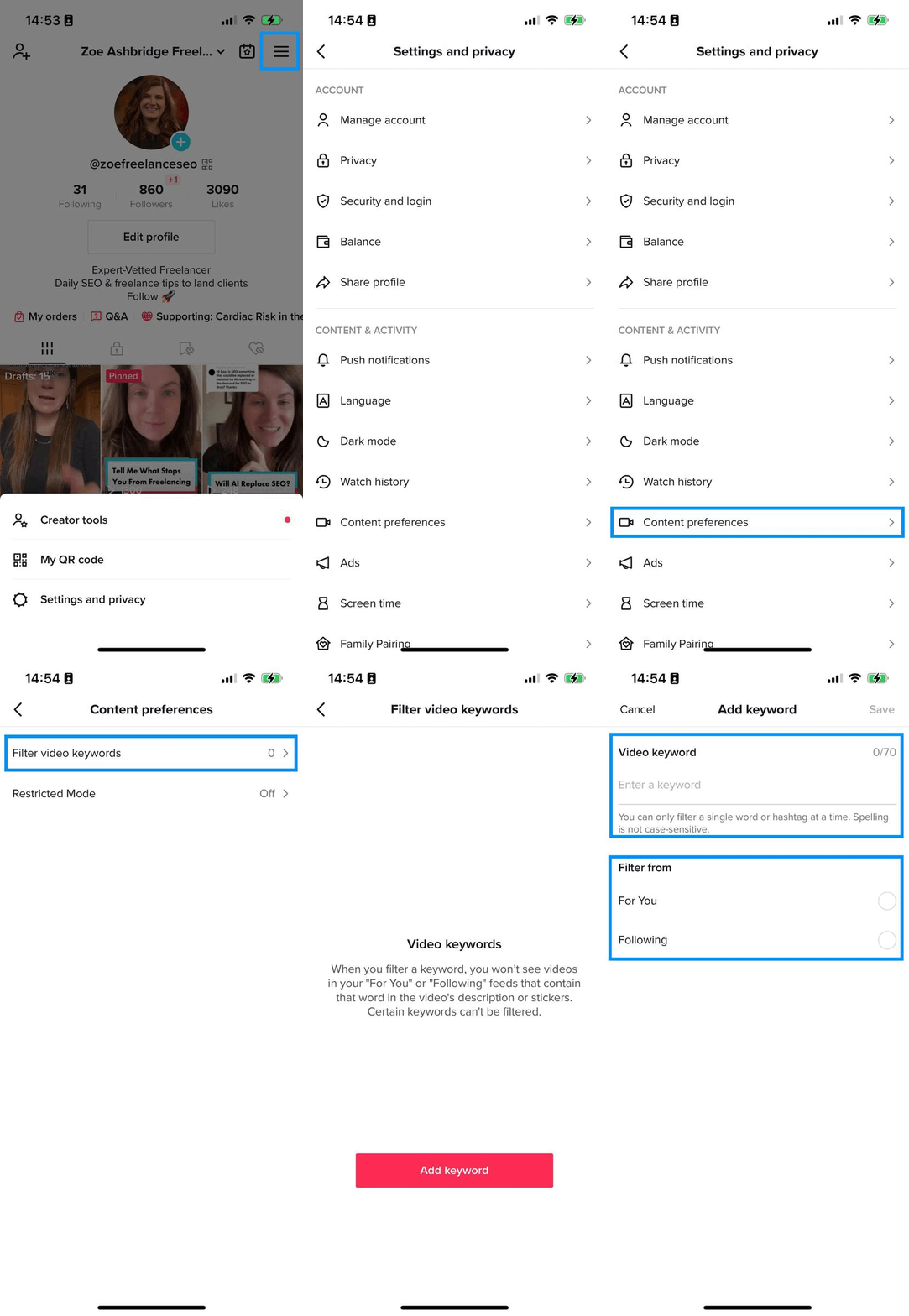
Users can tell TikTok what they don't want to see by heading to the menu in the top right and navigating to Settings and privacy > Content preferences > Filter video keywords

Here, you can add keywords and filter videos from users you're following and/or the FYP. 

Gif of the process of filtering videos by keyword.

Content created by those under 18

In its commitment to keeping the app a safe place for all, TikTok introduced measures to protect its younger users. 

Children or teenagers under 18 can't feature content on the Explore feed – meaning their content and profiles are not so easy for other TikTok users to come across.

7 tips for working with the TikTok algorithm and going viral

Some top TikTok creators provide some best practices for creating video content that might gain the algorithm's favor. 

Tip 1: Switch to a TikTok Pro account

TikTok Pro Accounts provide more detailed analytics to creators. 

By creating one, you'll be able to see insights on:

  • Weekly and monthly views.
  • Follower growth.
  • Trending videos.

If you're a lover of in-depth analytics, this might be for you. 

But it's important to note that TikTok's guidance advises against creating content primarily around analytics. Instead, think of the bigger picture when creating content.

Tip 2: Find your niche

Finding a niche on TikTok gives you a greater understanding of the bigger picture. 

If you know what niche you fall into, you can explore topics using the search bar and see exactly which videos perform well, so you can recreate something like them.

@secretsocialari You Just Need To Learn The Right Way! #tiktokgrowth #tiktokgrowthtips #socialmediatips #viraltiktok ♬ Lookmeinmyeyes - Iloveslowedmusic🧸

Tip 3: Use the right hashtags, add captions and write video descriptions

Keywords clearly have advantages, as shared above. 

Remember to opt for hashtags highly relevant to your video or niche for a chance to feature in the top lists for keywords.

@brooklynsocial.co How to find trending hashtags for your niche @Brooklyn Social | TikTok Coach @Brooklyn Social | TikTok Coach #trendinghashtags #socialmediacoaching #marketingtips ♬ original sound - Brooklyn Social | TikTok Coach

No matter how much the algorithm changes, music and trending sounds are likely to have a place on the TikTok platform. 

Remember, trending sounds and music aren't always about voiceovers and viral dance moves. 

You can use them to introduce your brand, make them relatable in your niche and stand out.

Tip 5: Create high-quality videos 

TikTok’s editing tools allow users to create and edit eye-catching, high-quality videos within the app. 

TikTok creators express the importance of creating engagement early on, so try to edit your videos in a way that captures the user's attention in the first three seconds.

@jimmy_talbert 9 video hook templates. #marketing #socialmediamarketing #videomarketingtips #tiktokmarketing ♬ Shout Out (No Vox) - Chris Alan Lee

Tip 6: Engage with other TikTok users

Your comment section is a trove of video ideas! And you can reply to comments with a video. 

This feature puts your reply in the comment section in video format. 

You can bet other commenters have the same questions, so they're likely to click through and join you in your next video.

Tip 7: Publish a series

Somewhat contrary to the long-form video format, shorter videos in series can still be effective. 

Henry Purchase from A Couple Things To Do has grown a TikTok following to 193,000 followers. Purchase shares destination and activities for couples. He says:

  • “We post several videos of the same activity, uncovering more information each time - this keeps people coming back for more. For example, at first, we didn’t post the location of our most popular video. Once it had gained popularity we used comments we got to create more content. Therefore reusing content and engaging with our audience.”
@acouplethingstodo Replying to @metaltirana_al our most popular question answered! Have you guys been? ✌🏻 #milan #fyp #italy #qctermemilano #stormroom #travelcouple #acouplethingstodo #traveltips ♬ original sound - Ian Asher

Why brands should care about TikTok

Love it or hate it, TikTok is standing the test of time as its generous algorithm lends itself well to fast growth. 

With a little commitment, brands can reach thousands of people in no time.

Although high-quality videos are preferred, simple to-the-camera videos can earn just as much visibility.

The post How the TikTok algorithm works: Everything you need to know appeared first on Search Engine Land.


via Search Engine Land https://ift.tt/emYo7hy