Google has released some really needed updates to its site names feature in Google Search. Site names are now supported on subdomains on all devices in English, French, German, and Japanese languages. Google also made other improvements and added workarounds when Google gets your site name wrong, Google announced.
Site names. Site names is the title and name of the site Google shows in the search results listings. “When Google lists a page in search results, it shows the name of the site the page comes from,” Google explained.
Subdomain support expanded. Google added support for site names with subdomains on mobile devices only, for English, French, German, and Japanese. Now it also works for all devices, not just subdomains.
Here is an example from Google’s own site.
Updated guidance. Google also updated its guidance on how to communicate your preferred site name to Google Search. Google wrote, “As a reminder, the best way to indicate a preferred site name to Google is to make use of WebSite structured data, as explained on our site name documentation.”
Also, Google now encourages more use of the alternateName property when sometimes a preferred site name isn’t available for your site.
Workarounds for site names. Google also listed a few workarounds for when the preferred or alternative names are not selected by Google Search. Google posted new workarounds in its help documentation that lists these workarounds:
First, try providing an alternative name using the alternateName property. If our site name system isn’t confident enough to use your preferred name, it strongly considers this option.
Provide your domain or subdomain name as a backup option. To provide your domain or subdomain as a backup option, add your domain or subdomain name as your alternative name. Your domain or subdomain needs to be in all lowercase (for example, example.com not Example.com) for our system to detect this as a site name preference. Our system will strongly consider using it if your preferred name isn’t selected. In this example, Burnt Toast is the most preferred option, followed by BT, and ending with the domain example.com as the final name preference.
If that’s still not working, then try providing your domain or subdomain name (in all lowercase) as your preferred name, as a last-resort workaround option. If you provide your domain or subdomain name as your preferred name, our system will generally select that (but we recommend only doing this as a last resort). In this example, the only preference is the domain example.com.
Need support. Having issues with your site name? Google posted a support thread in the Google support forums over here, including more FAQs.
We saw some issues with site names, some of which Google resolved. This should resolve more of those issues. In fact, I did capture some before and after examples and posted them this morning on the Search Engine Roundtable.
What it looks like. Here is where the site name shows in the search result snippet:
Site names timeline. Here is the timeline Google posted of the evolution of site names since it launched in October:
October 2022: Site names for the domain level were introduced for mobile search results for English, French, German and Japanese.
April 2023 (I have this as March): Site names were added for desktop for the same set of languages.
May 2023: Site names are now supported on the subdomain level for the same set of languages and on mobile search results only.
Controlling site names. Google back in October explained that Google Search uses a number of ways to identify the site name for the search result. But if you want, you can use structured data on your home page to communicate to Google what the site name should be for your site. Google has specific documentation on this new Site name structured data available over here.
Upgrading the favicon. Google also recommended revisiting the documentation for favicons for the latest best practices. Google is now also suggesting you provide an icon that’s at least 48 pixels and follows the existing favicon guidelines.
Ads. This is also rolled out to the Google search ads on desktop, so the size of the site name, favicons, and also the ad label will be more prominent in mobile search. In fact, Google rolled out the “Sponsored” label in mobile search last October and today on desktop, officially replacing the “Ads” label from January 2020.
Why we care. Google has made several improvements to how it selects and shows your site name in the Google Search results. If Google is still getting it wrong and you are following the documentation, then maybe try some of those new workarounds to get your site name showing exactly how you want it in Google Search.
If you are in marketing, especially content marketing, exploring the AI-based tools YouTube creators use is essential.
They offer insight into the most effective AI video generators that could secure your job in the near future.
ChatGPT and Midjourney
Check out “Star Wars by Wes Anderson Trailer | The Galactic Menagerie.” Uploaded on April 28, this whimsical and visually stunning fan-made fake trailer now has 2.8 million views.
Caleb Ward, the CEO of Curious Refuge, told Yahoo Entertainment that it only took a few days to produce thanks to ChatGPT, which wrote the script, and AI image generator Midjourney, which created all the visuals. Then, Ward edited the generated clips on his laptop to produce the final product.
And this wasn’t a fluke.
On May 9, artificial intelligence, Caleb Ward, Shelby Ward, and Tyler Smith created “Lord of the Rings by Wes Anderson Trailer | The Whimsical Fellowship.” This delightful fan-made trailer now has 3.8 million views.
So, even if you aren’t a fan of Anderson’s signature visual style, you’ll want to learn how to use AI to create videos.
The process includes learning to utilize advanced VFX techniques to push your projects further than typical AI productions, according to the AI storytellers at Curious Refuge.
But they also believe AI empowers non-traditional artists to unlock their inner creativity and create compelling stories.
Runway’s Stable Diffusion and Gen-2
Next, watch “ANIME ROCK, PAPER, SCISSORS.” Uploaded on Feb. 26, this cartoon by Corridor Digital now has 4.0 million views.
Corridor used the machine-learning text-to-image model Stable Diffusion to create their AI-generated anime – no animators required.
The model was trained using live-action footage of actors in front of a green screen. The anime art style was trained using Vampire Hunter D: Bloodlust as a reference.
Is that a big deal?
Well, the Corridor Crew created a companion video that asks the rhetorical question, “Did We Just Change Animation Forever?” Also uploaded on Feb. 26, this behind-the-scenes (BTS) video now has 3.0 million views.
Corridor Crew says, “ANYONE can make a cartoon with this groundbreaking technique.”
And Runway, which co-created Stable Diffusion, recently released Gen-2, a multi-modal AI model that allows users to generate new videos with text, images, or video clips.
That’s right: Gen-2 turns text into video.
Watch “How to Use Gen-2 | Runway” to get a quick tutorial.
Gen-2 costs $0.05 per second of generated video. Paid plans come with an allotment of monthly credits, which can be supplemented by purchasing additional credits.
Dob Studio’s artificial intelligence technology
Now, watch “러브홀릭스(Loveholics) – ‘Butterfly’ 커버 COVER [𝗥𝘂𝗶 𝗖𝗼𝘃𝗲𝗿𝘆].” Uploaded on Dec. 2, 2022, this cover song by Rui now has 1.4 million views.
Why is this remarkable?
Well, Rui is a virtual YouTuber, or VTuber. She is a real person with an AI-generated face.
Is this a thing? Well, a global survey by Google/Ipsos in May found 52% of people had watched a VTuber over the past 12 months.
Rui was made by Dob Studio, a virtual human project company based in Seoul, South Korea, which uses artificial intelligence technology to:
Create realistic virtual faces that are indistinguishable from real people.
Plan various personas.
Operate them as virtual influencers.
Since Dob Studio was established in June 2020, the IT start-up has developed Rui and several other virtual humans.
These virtual humans function as corporate brand ambassadors and appear in dramatic and surprising scenes on popular South Korean TV shows.
Rui has even been appointed as an ambassador for the Korea Welfare Foundation, an honorary ambassador for the Korea Tourism Organization, and a Nuri Honorary Ambassador of the Korean Ministry of Culture, Sports, and Tourism.
Get the daily newsletter search marketers rely on.
Many marketers can get the upskilling or reskilling they need to learn how to use the powerful AI-based tools that YouTube creators use now.
But there are situations when the best AI video generator for a content marketing campaign doesn’t need to be overpowering.
Fortunately, there are options.
Synthesia
Synthesia is an AI video generator that transforms text into speech in a few minutes.
It includes more than 85 AI avatars that can speak your text in more than 120 languages and accents.
This enables marketers to create training, how-to, and product marketing videos for global audiences.
Watch “Discover Synthesia in 4 minutes | Product Tour” for an overview.
Synthesia offers a free demo video to evaluate the AI generator (limited to 200 words).
If you love the results, you can upgrade to the Personal pricing plan ($30/month) or contact Synthesia for a custom Corporate plan.
Pictory
Pictory is an AI video generator that can create videos from scripts, articles, blog posts, visuals, or other videos.
It uses a library with over three million video clips and images along with a 15,000-track music library.
Check out “Introducing Pictory - The AI that crafts social videos from lengthy content in minutes.”
Pictory automatically adds accurate captions to your videos quickly. It creates highlights from webinars and other long videos and lets users schedule automatic posting on various social channels via Hootsuite integration.
Pictory offers a free trial that enables marketers to create three video projects.
InVideo
InVideo is another AI-powered video generator that allows marketers to create videos from text. You can use InVideo to create videos for social media ads, promos, or your YouTube channel.
InVideo offers a free online video maker with limited features. You can create and render videos with a watermark at no cost. You’ll need to upgrade to one of InVideo's paid plans to remove the watermark or use features like premium stock media.
Watch “Top 10 Faceless YouTube Niches To Make Money without Showing Your Face” to learn some strategic insights beyond the tactical advice that others provide.
DeepBrain AI
DeepBrain AI is an artificial intelligence company that provides real-time video synthesis solutions. DeepBrain AI's AI Humans can be conversational or non-conversational.
Check out “[Sketch movie] Howie Mandel gets a digital twin from DeepBrain AI” to meet AI Howie.
The company's AI technologies include video and speech synthesis, live chatbots, and more.
DeepBrain's solutions create generative AI videos with just a script and apply to various industries, including financial services, retail and commerce, education, as well as media.
DeepBrain AI has two pricing plans: Starter at $24 monthly and Pro at $180 monthly.
VEED.io
VEED.io is an AI-powered video script generator. It provides compelling video scripts that you can turn into movies or short videos.
Watch “How to Make 30 YouTube Shorts in 24 hours using AI” to learn how easy it is to create a month’s worth of content in a single day using ChatGPT and VEED.io.
VEED.io also offers video editing tools, a video downloader, and a GIF maker and editor. VEED's video editing tools are free to use.
VEED.io has two pricing plans: Basic at $12.00 per user per month and Pro at $24.00 per user per month.
Other AI-based tools
Marketers at brands and agencies should spend 80% of their mythical “spare time” evaluating AI video generators and the remaining 20% evaluating other AI-based tools.
Why? Two reasons.
First, Peter Weinberg and Jon Lombardo, the heads of research and development at LinkedIn’s B2B Institute, recently shared a contrarian take on AI in MarketingWeek.
“The biggest disruption won’t be creative. The biggest disruption will be diagnosis. AI has the potential to change market research forever. And for the better,” they said.
Second, even YouTube has a contrarian take on AI.
So, let’s look at two other AI-based tools.
DAIVID
DAIVID, an AI-powered creative effectiveness platform, uses a suite of advanced technologies – including facial coding, eye tracking, and computer vision – to help with campaign planning, video testing, and media planning.
But it leaves creation to brands and agencies.
DAIVID’s partners include ADK Marketing Solutions, Coca-Cola, DIRECTV, EssenceMediacom, and Singtel.
Watch “In Conversation with Ian Forrester, CEO & Founder of DAIVID” to hear what Forrester says to Tom Saunter, EssenceMediacom's Global Head of Creative & Media Technologies, about the role of emotion in advertising and how AI can help with measuring advertising effectiveness.
Area 120’s Aloud
During his keynote speech at VidCon on June 22, Amjad Hanif, YouTube’s VP of Creator Products, announced that Aloud, an AI-driven dubbing product from Area 120, Google’s in-house incubator for experimental projects, is coming to YouTube.
Aloud can transcribe an English-language video and then translate it.
Marketers can review and edit the transcript before the video is dubbed into Spanish and Portuguese, with Hindi, Bahasa-Indonesia, and other languages coming soon.
So, even though Aloud isn’t an AI video generator, you’ll want to watch “Aloud: Let's overcome the language barrier in videos together.”
Take advantage of AI or get left behind
Nvidia founder and CEO Jensen Huang gave a commencement address to 10,000 graduates in late May.
He urged them to run, not walk, to seize the potential opportunities that AI presents, and embrace the inevitable failures that will occur along the way.
“While some worry that AI may take their jobs, someone who’s expert with AI will,” Huang said.
“In 40 years, we created the PC, internet, mobile, cloud and now the AI era. What will you create? Whatever it is, run after it like we did. Run, don’t walk… Either you are running for food, or you are running from becoming food.”
So as a marketer, you should run, not walk, to evaluate the powerful AI-based tools that YouTube creators use now.
Google Analytics 4 audiences can now be used with third-party segments in Ad Manager.
By accepting a third-party segment (cookies matching the demographics of your visitors bought via a third-party data provider), marketers can target line items to it, perform reports and run forecasts.
Meanwhile, audiences can also be used as-is for targeting or, marketers can combine this data with other audiences to perform analyses.
Why we care. This additional data provides valuable insights to marketers about their customer-base and how effective their campaigns are at reaching them.
It’s vital that advertisers understand their customers the best they can so that they can make data-driven decisions to not just target the right people, but to ensure that the content they create will engage them – which is likely result in higher conversions and ROI.
Get the daily newsletter search marketers rely on.
Google will exclude gameplay imagery from its Shocking Content policy next month.
The Publisher Restrictions guidelines will be updated to include the exception on August 30, the Ads Manager team has confirmed to Search Engine Land.
Why we care. It’s important for marketers to ensure they are staying compliant with Google policy changes to avoid potential penalties and exclusions.
What’s new? Once the new updates are rolled out, gameplay content will only be excluded if it contains gruesome, graphic or disgusting accounts or imagery and depicts acts of:
Torture.
Sexual violence.
Violence against minors.
Violence against prominent real-name persons.
Violence against an individual or group on the basis of a characteristic that is associated with systemic discrimination or marginalization.
Get the daily newsletter search marketers rely on.
What has Google said? Google is advising brands to review the update to check how their site or app will be impacted.
If a brand would like to challenge previous content exclusions based on this update, they have the right to appeal. A spokesperson said:
"If your site or app received restricted ad serving previously due to Shocking content but you believe ad serving should no longer be restricted following the update, you may request a review or appeal of your site or app on or after 30 August 2023."
Deep dive. Read Google's 'Shocking content' rules for more information on what content exclusions apply to. For more information on appealing content exclusion decisions, read Google's Policy Center guidelines.
Google reviews are easy to influence and can impact your local search rankings. They also matter significantly more than you might think.
Building a strong review strategy is a crucial part of your SEO efforts that you might be overlooking.
Invest time and energy in acquiring new reviews and retaining existing ones to enhance your local SEO. Maintaining a competitive number of reviews is essential in your market.
The kind of Google reviews you want
Any review a business gets is beneficial, but some reviews can outweigh others for SEO purposes.
You always want to make sure customers leave reviews with a lot of text where they are talking about the services they received and their experiences.
They should mention specifics about their service like:
The problem they were having.
The experience they had with your team in terms of communication.
Results of the service. (Was their problem solved?)
Reviews with photos tend to stick at the top longer
Incorporating visuals like photos and videos with your Google reviews can amplify their impact significantly.
Visual content adds authenticity and credibility to the reviews. We have also noticed that these reviews tend to stay at the top much longer than reviews without photos.
So if you are trying to get some positive reviews to stick at the top, try getting more reviews with photos.
What do we mean by “stay at the top”?
When you navigate to a business’s Google Business Profile (GBP) and then click on their reviews, the default view a user will see is sorted by “Most relevant.”
We have found that Google sees reviews with images as relevant and stays at the top of this view longer than other reviews.
So, encourage your customers to snap a photo of the HVAC system you just fixed, the roof you just installed, or the spring on the garage door you just replaced and add that to their review.
Monitor GBP reviews for strategic insights
Did you know that only businesses with a 4.0-star rating and above are eligible to show up for searches with “best” or “top” in them?
Is your business above a 4.0 rating right now? If the answer is, “I don’t know!” this part is for you.
Monitoring reviews quarterly lets you gain insights into various aspects of your online presence.
Track fluctuations in review volume to identify trends or problems such as:
Losing reviews.
Falling behind competitors in review count.
Dropping below a 4.0-star rating.
You must also ensure you are receiving a steady stream of new reviews.
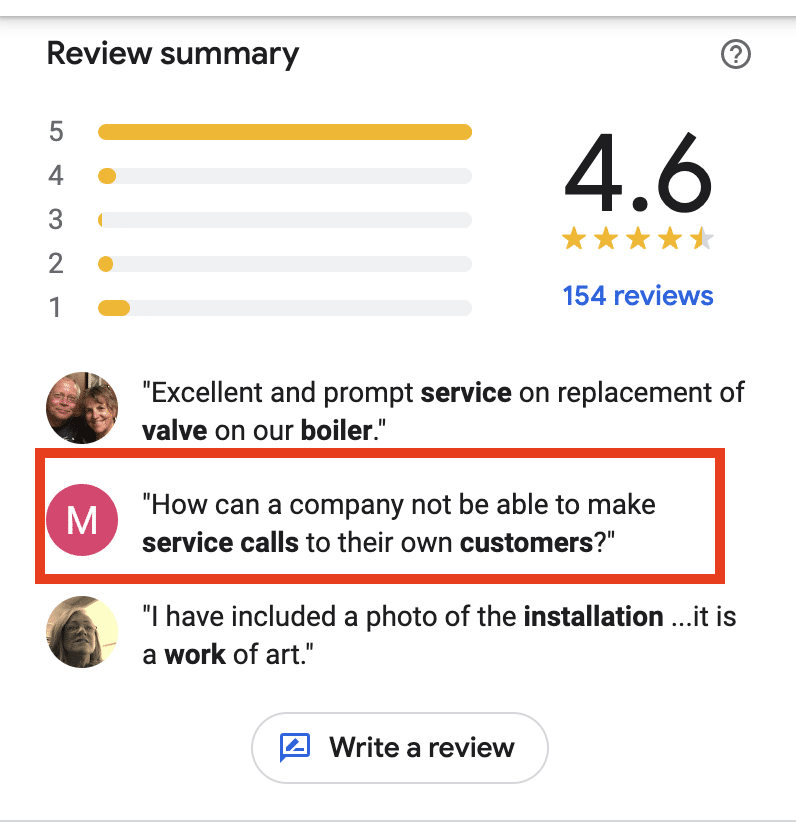
Watch out for negative reviews showing in the top 3 on GBP
Sometimes, Google will highlight a negative review in the top 3 that appear prominently on GBP listings on desktop and mobile.
These can harm your business's reputation and possibly deter people from calling.
Want to eliminate a negative review from being highlighted on your listing?
The only way I have seen this done is to bombard the listing with legitimate, lengthy, positive reviews from your customers that include photos. Hopefully, one of those will push the negative one out.
This is not ideal since we have no control over what shows in this area.
That said, it’s a great opportunity to respond thoughtfully to negative reviews, acknowledge customer concerns, and offer solutions publicly.
Simultaneously, encourage satisfied customers to leave positive reviews to balance the negative feedback and hopefully push it off the listing.
How to keep a steady stream of Google reviews with little effort
Getting new consistent reviews is key to maintaining visibility on Google Maps and growing that visibility if there is room for improvement.
As business owners, many rely on their employees to provide top-notch service that naturally generates positive reviews. In reality, people need a little nudge to leave those positive reviews.
Google absolutely does not allow businesses to incentivize customers for positive reviews.
It is directly against their Google review guidelines as this can be considered “deceptive content” if the customer was paid or incentivized in any way to leave the review.
However, Google does allow business owners other ways to incentivize reviews.
Incentivizing employees
Business owners can and should motivate employees to ask for reviews from satisfied customers during their interactions.
They should be asking for photos along with that review as well.
If an employee gets mentioned in a review by name or gets a customer to post a review with a photo, reward your employee by giving them a cash prize, a gift card to Amazon, or even a gift card to a local restaurant of their choice.
If your business typically gets lots of reviews, consider doing a monthly "drawing" instead and rewarding that winner. Keep it fun and rewarding, as everyone wins here.
Automated email templates
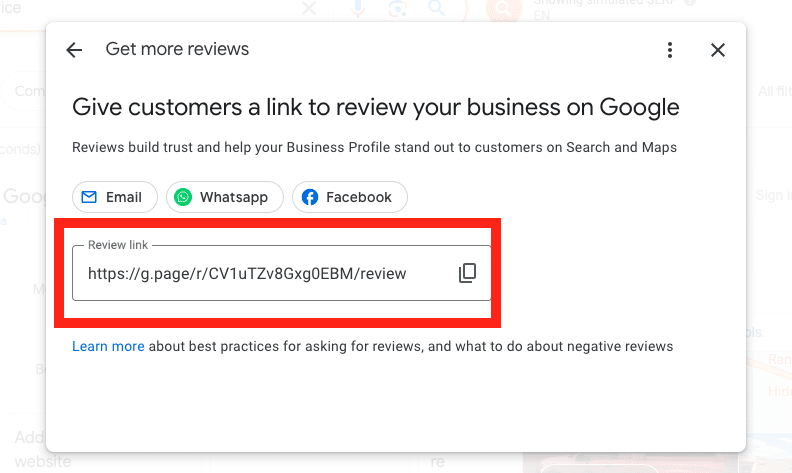
Giving customers a link to review your business on Google is super important to streamline the process for them.
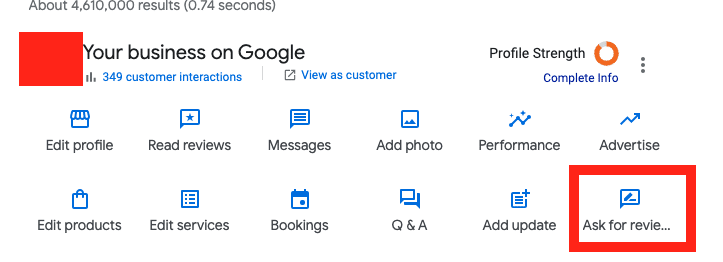
Getting the link is easy. It's right on the GBP dashboard under “Ask for reviews.”
The trick to getting the most reviews possible with the least effort is creating an automated email template using this link to request reviews from recent customers.
You can personalize these emails, but don't get carried away and lose the point of the email: getting the review.
Make sure it's crystal clear how they can easily review you on Google, why it's important, and the link is easily accessible.
New reviews were not being posted, and in some cases, reviews that had been live for years were suddenly missing from hundreds of profiles.
This problem was so widespread Google put out some support information explaining why reviews may suddenly go missing from a GBP listing.
Google has since fixed the bug causing reviews to go missing, but the algorithm they employed that supposedly filters suspicious or inauthentic reviews is still in play.
While the intention behind this system is to ensure review integrity, it can sometimes result in legitimate reviews being filtered out.
If you suspect this is happening to you because you are monitoring your reviews (called a callback), then you have some options.
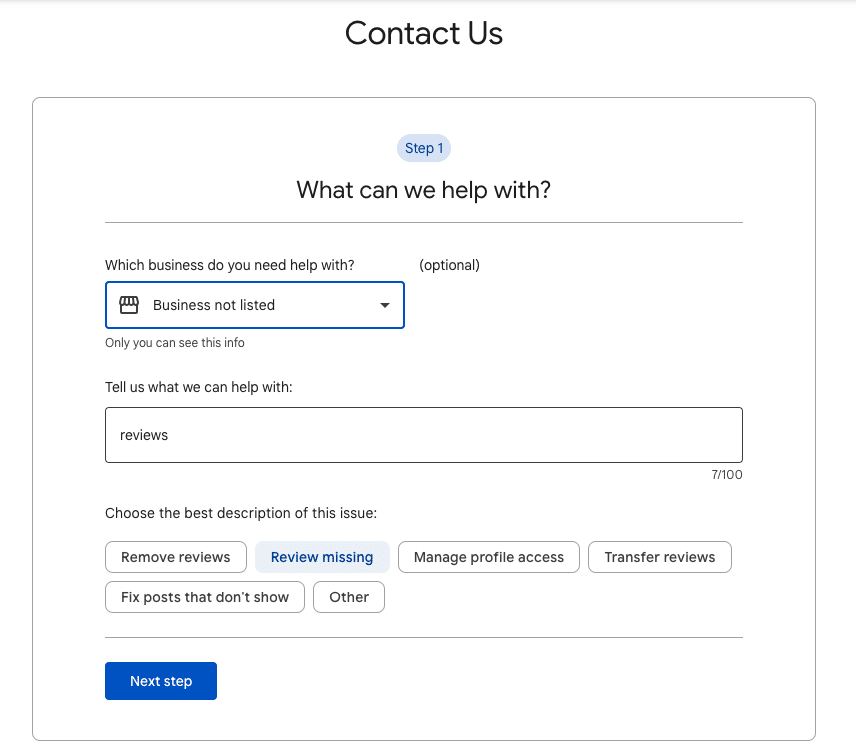
The best way to restore these is to contact support and follow these steps:
Type “Reviews”
Select “Review missing” and follow the prompts.
They may ask for screenshots of the missing reviews, so having those handy is recommended.
Fake reviews: The never-ending tale
Fake spam reviews can be frustrating. Is your listing being bombarded with fake, negative reviews?
Google is usually good about catching these and removing them with their filter.
However, sometimes fake reviews get published. In this case, Google support should be able to remove them from your listing if they are indeed fake.
Sometimes businesses get fake positive reviews to game Google’s ranking algorithm. The frustrating thing is that it works most of the time.
When a listing gets many fake positive reviews, they typically see improvement in rankings.
Though it may be tempting to report them to Google and try to get those removed and hurt their rankings, typically, all the effort it takes to report the reviews isn’t worth it in the long run.
The juice ain't worth the squeeze! That is, if you can even get the reviews removed which doesn't always happen.
Going from an SEO professional to a manager of an SEO team, you need to shift your mindset, lean into your new role, and build trust with your team.
Moving from focusing on your own output to your team’s needs can help you succeed in your new role.
Transitioning from an SEO professional to manager
Moving from an individual contributor to a manager is a difficult transition on your career journey.
In the book “The Leadership Pipeline,” co-author Ram Charan highlights the career transition points from individual contributor to manager of a team and on to leading managers.
The first change from “leading yourself” to “leading others” is a huge shift. It requires taking on a new mindset as you move from relying on yourself to relying on and coaching your team.
While intimidating, moving from an individual contributor role to leadership is extremely rewarding.
The role of a manager differs from your daily responsibilities as an SEO. The overall training is likely not there as you must figure things out for yourself.
You were promoted to management because of your past success and expertise, which are all based on your output as an individual.
The assumption is that because you succeeded as an individual, you’re set up (or will figure out how) to lead a team.
The bulk of the training available for new managers is the technical HR items:
How to fill out HR forms.
Approve vacation.
Filling out the annual performance reviews.
Navigating the internal HR platform.
When I earned a promotion to a management position, I first contacted several managers, directors and VPs for their advice and references to management training.
There was no in-house training on being a good manager, coaching and developing employees, or any behaviors that I equated to “good” management.
It took some time, but I found a peer group of managers to talk to, some podcasts to listen to, and a set of resources to help along the journey to manager and leader.
To be successful in this step in your career journey, you’ll need to master a new mindset, communicate clearly and enable your team to succeed.
Using the principals from the Leadership Pipeline, you are making a transition from leading yourself to leading others:
Leading Yourself (IC)
Leading Others
From
To
Results from your own efforts
Results from your team’s efforts
Understanding what you need to deliver
Setting clear objectives for your team members to deliver
Being more productive
Making your team more productive
Planning your work
Planning work for the team
Being self-motivated
Motivating your team
Developing yourself
Developing team members
Adapting your mindset from maker to manager
As an individual, you achieved success through your own expertise and exceptional performance in your role.
Your measure of success shifts from your accomplishments to your team’s accomplishments. Each key point of “Leading Yourself” has a team-focused pair.
Now you focus on getting your team members to work on leading themselves while you gain expertise in leading others.
Moving to a management role requires that you embrace the mindset shift.
You need to lead the work instead of being the best individual SEO.
Instead of your own efforts, you’re judged on the efforts and outcomes of your team.
These are scary for new managers.
You have to rely on your team to perform. That’s scary.
You also have to shift to learn new communication, management, and leadership skills. (That’s scary, too!)
Because of that, managers often will fall back to their old behaviors.
We like to do what we’re good at and generally avoid things that cause us stress.
When you’re in the transition phase from individual to manager, you’re learning entirely new behaviors and redoing how you work.
At this phase, you’ll likely be tempted to revert to your individual ways and fall into common early management traps.
Common traps new managers fall into and how to avoid them
Trap 1: Fixing mistakes rather than teaching how to do it right next time
When I first became a team manager, there was a transition period where I wanted all of the work done the way I would do it.
That meant I was redoing much of my team’s work or spending time on it to get the output where I wanted it.
I quickly realized that I needed to work more on helping my team get better than polishing up their work myself.
Instead of working on individual outputs, I shifted to communicating expectations and feedback on the work so they could level up.
How to avoid this trap
Your team was hired for a reason.
Your job is to coach them and help them improve. If they’re at 80% of what you could do. Your job is to coach them over time to get better.
Instead of fixing the work, have one on one review sessions where you walk through their work and discuss the opportunities to improve.
Ensure you are clear on expectations for your team’s output and document as much as possible into a knowledge base (wiki, checklists, procedure documents).
Trap 2: Trying to do everything yourself and not letting go of the jobs you used to enjoy
This is another instance of not letting go and seeking comfort in doing what you know you’re good at. It’s a trap I still find myself stumbling into.
There’s comfort in taking on a task or project and knocking it out just how you want. Getting it done – and knowing you’ve still got it – feels good.
The downside is that you’ve taken away two development opportunities:
For you to grow by working on your communication skills to detail the project goals and what is needed.
For your team to grow by delivering the project.
How to avoid this trap
There are often times when you are a “player-coach” and have to lead projects yourself.
However, you should look for opportunities to delegate as much as possible to your team.
When your boss asks you to get a project done, they’re asking for the project to be completed, not for you to be the one to do it. (Your team is an extension of you in this case.)
Unless you are asked to be the lead, look to delegate to your team members.
Get the daily newsletter search marketers rely on.
The opposite of not dealing with performance issues, managers, in general, don’t provide enough positive feedback.
This is the feeling of “no news is good news,” but that leaves your team unsure of where they stand.
When left with no feedback, team members may feel the worst.
What you mean to be tacit approval (i.e., “You’re doing a great job and don’t need an intervention”), your team member may feel is a criticism (i.e., “I’m doing such a bad job he doesn’t want to speak with me”).
Manager Tools, a management resource I use, provides specific guidance for when and how to provide feedback.
How to avoid this trap
Know that your job is to build up your team and help them perform better.
Feedback and coaching are essential tools to help your team members achieve more.
Take notes of positive behaviors and bring those up in your one-on-ones or feedback sessions.
Be on the lookout for the behaviors you want to encourage and let your team members know you saw the behavior and that it’s valued.
Example:
“Thank you for taking notes at the meeting and sending them to the team. When you do that, it shows me that you’re engaged and keeping us organized. Please keep doing that.”
What to do as a new manager
What should you do now that you know about the traps to avoid as a new manager?
It all starts with building relationships and earning trust.
When you earn your role as manager, you should take time to go on a listening tour.
Schedule one-on-ones with each team member and your key stakeholders.
This is important even if you’re being promoted and you already know all of the people.
The beginning of your time as a manager is the time to get out, have discussions and set up new relationships as the team manager.
You’ll find that conversations with stakeholders and partners from other departments shift. You’ll be discussing not what you can do but what your team needs to deliver to be successful.
Having one-on-ones with your team members is also important for establishing a new relationship.
In these meetings, it’s best to ask questions about them, their goals, and their work so that you clearly understand your team.
I hope you’ll embrace the journey to leadership. It’s filled with challenges but very rewarding as you can accomplish so much more through your team than you can do yourself.
This is how Google describes broad match in their Google Marketing Live 2023 recap.
Wait, what? Broad match gives the most relevant reach?
PPC marketers know it inherently can’t be the most relevant – or at least that was the conversation within our team at the time.
Our team and clients extensively discussed the idea of a “keywordless” future heading our way, especially in the context of Performance Max campaigns.
We’ve also observed that the exact match type has become more lenient with “close variants.”
This made me want to uncover how paid search accounts perform at the match-type level. Here are some key observations and what they mean for PPC marketers.
Looking at Google Ads account performance per match type
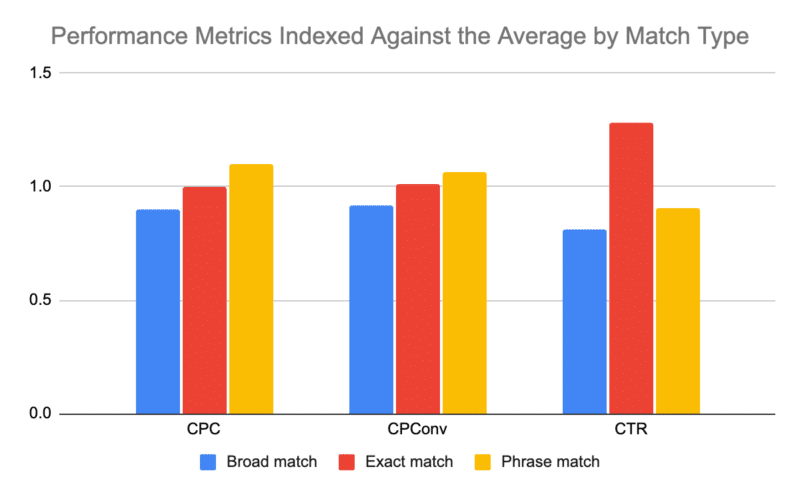
Since these cross a variety of brand/non-brand campaigns in various verticals, I indexed the results against the average. Therefore, a 1 = the average, anything greater than 1 is above the average, etc.
I pulled data across our client accounts for the past 12 months. Here are four key takeaways from my analysis.
Broad match has the lowest CPC
This is expected. The theory is that the less targeted you are, the less competition and the lower the cost.
The data confirmed this theory, showing that the least expensive match type was nearly a dollar cheaper than others.
Exact match drives the highest click-through rate
This data point matches the theory that the more specific you are, the more relevant the ad.
The more relevant the ad copy is for consumers, the higher the response rate.
Phrase match is the worst performing match type with a slight exception for CTR
Poor phrase match. This one seems just trapped like a middle child.
It can’t seem to do anything right. It had the highest CPC and cost per conversion.
It was only slightly better in CTR than broad match, which isn’t really much of an endorsement.
Broad match has the lowest cost per conversion
This one was the most surprising.
However, if broad match has the lowest cost per click, it can have a lower conversion rate and still have the lowest cost per conversion.
That is exactly what the data suggests. Broad match has the lowest conversion rate, but the cost to acquire the traffic offsets the lower conversion rates.
Get the daily newsletter search marketers rely on.
The data suggests that performance has remained fairly consistent with the introduction of more AI tools. There's no clear indication that users or advertisers use these match types differently over time.
Although I only share CPC data, the other graphs for different data points show similar patterns.
The data showed that only ~11% of the total impression volume accounted for just 8% of the clicks.
Interestingly, exact match had the highest volume of both impressions and clicks.
Considering that broad match had the lowest cost per conversion, I'm keen to analyze the entire data set to identify potential opportunities for performance improvement.
How to use broad match in Google Ads effectively
Broad match can be a great way to reach a wider audience with your ads, but it's important to use it carefully.
If you use broad match extensively, your ad could show for irrelevant searches, and you could end up wasting money.
Here are some tips for using broad match effectively:
Use negative keywords to exclude irrelevant searches. For example, if you sell running shoes, you could add "basketball shoes" as a negative keyword to prevent your ad from showing for searches related to basketball shoes.
Use ad extensions to make your ads more relevant to the searches they show for. For example, if you sell running shoes, you could add an ad extension that shows the different types of running shoes you sell.
Monitor your results and adjust your campaigns as needed. Keep an eye on your click-through rate (CTR) and cost-per-click (CPC) to see how your ads are performing. You may need to adjust your keyword match types if your CTR is low or your CPC is high.
Make data-driven decisions in your Google Ads account
Broad match can be a powerful tool, but it's important to use it wisely.
By following these tips, you can leverage broad match to reach a wider audience with your ads and achieve better results in your Google Ads campaigns.
As we move toward a “keywordless” future, the fate of various match types remains to be seen.
For now, data-driven decisions are crucial so we can make smarter optimizations.